


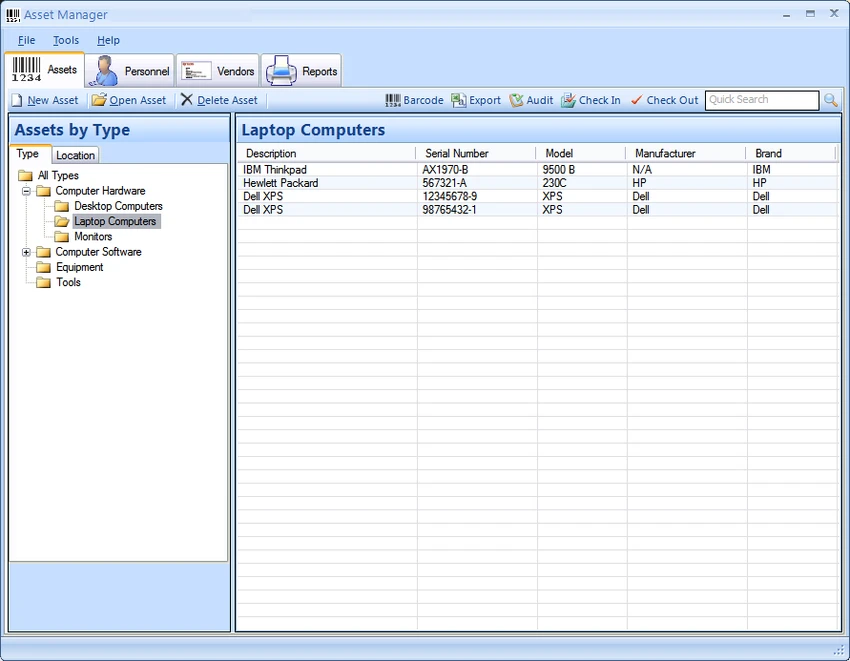

Asset Manager is a professional asset tracking software designed to help organizations monitor, manage, and maintain their physical assets. It supports barcode labeling, check-in/check-out tracking, and detailed service history management, making it a practical solution for businesses that need structured asset control.
Asset Manager is built to solve a common business problem: keeping track of tools, equipment, and other valuable assets across employees and locations. It allows users to register assets in a centralized database, assign them to employees, and monitor their status over time. A key feature is its barcode integration. Users can generate and print barcode labels for assets or use existing ones to streamline tracking. This makes check-in and check-out processes faster and reduces manual tracking errors. The software also emphasizes documentation. Users can attach manuals, service logs, and other files to each asset, ensuring that maintenance history and usage instructions are always accessible.
Features of Asset Manager
- Track an unlimited number of assets
- Create and print barcode labels for asset identification
- Use existing barcodes for tracking and scanning
- Check assets in and out to employees
- Maintain full asset ownership and usage history
- Attach manuals, documents, and images to assets
- Track service records, maintenance instructions, and vendor details
- Store contact information for related suppliers and service providers
- Generate and export detailed asset reports
- Quick asset lookup via barcode scanner or search
- Enterprise edition supports shared network database access
- Multi-user support in centralized database environments
User Experience
Using Asset Manager feels like working with a structured inventory control system built for real-world business environments. Adding assets is straightforward, and barcode integration significantly speeds up tracking tasks. The check-in/check-out workflow is particularly useful for companies that share tools or equipment among employees. Instead of relying on manual logs, the system keeps a clear digital record of who is using what and when.
Search functionality is efficient, allowing users to quickly locate assets either by name or barcode. The ability to attach service documents and manuals also improves workflow efficiency during maintenance or troubleshooting.
Who Should Use Asset Manager?
- Businesses managing tools and equipment
- IT departments tracking hardware assets
- Warehouses and logistics teams
- Schools or institutions managing shared resources
- Organizations needing barcode-based tracking systems
Conclusion
Asset Manager provides a reliable and organized way to track company assets, manage usage, and maintain service records. Its barcode integration and check-in/check-out system make it especially valuable for operational environments.


