CoolUtils PDF Combine logo

CoolUtils PDF Combine 8.1.0.76/13

  • User Rating:
    ★★★★★
    ★★★★★
    0.0 0Votes
  • Requirements:
    Windows
  • Version: 8.1.0.76/13
  • Latest updated: 5 days ago
  • License: Free Trial  
  • Publisher: CoolUtils
  • Size: 126 MB
× app stores

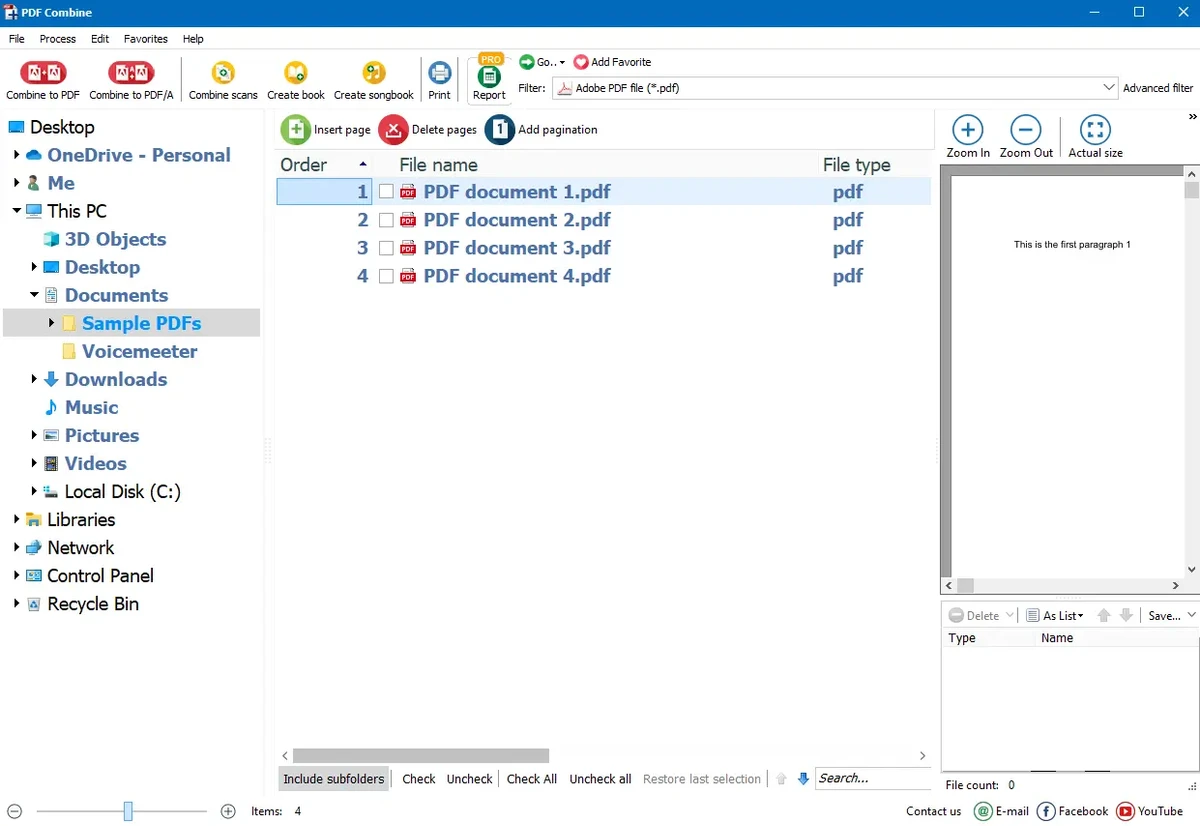
CoolUtils PDF Combine is a straightforward PDF utility designed to merge multiple PDF files into a single document. It is built for users who need fast, reliable document consolidation with additional features like bookmarks, encryption, and folder-based processing.

Overview

PDF Combine focuses on simplicity and efficiency, allowing users to merge large numbers of PDF files with minimal effort. It supports combining documents such as invoices, contracts, e-books, and reports into a single organized file. The tool stands out for its ability to preserve folder structure and generate a table of contents automatically, making it especially useful for managing large document collections. It can also be used via command line, enabling automation in business workflows. For advanced users, the Pro version extends functionality by supporting additional file formats such as Word, Excel, RTF, TXT, JPEG, and TIFF.

Features of CoolUtils PDF Combine

  • Combine multiple PDF files into one document
  • Batch processing of large numbers of files
  • Combine PDFs by folder structure or filename pattern
  • Preserve directory structure in output files
  • Automatic table of contents creation
  • Bookmark generation based on file names
  • Add custom bookmarks for navigation
  • Set document metadata (author, keywords, creator, etc.)
  • Encrypt PDFs with permission controls (print, edit, annotate)
  • Add headers and footers (page numbers, dates, etc.)
  • Digital signature support for output PDFs
  • Command-line operation for automation
  • GUI-based simple interface for beginners
  • Pro version supports multiple file formats (Word, Excel, images)
  • Server and ActiveX versions available for enterprise use

User Experience

Using CoolUtils PDF Combine is straightforward and beginner-friendly. The interface is minimal, focusing on selecting files, setting output options, and running the merge process. The folder-based processing is particularly useful for users managing structured document libraries, such as legal, financial, or academic archives. Automatic bookmark creation improves navigation in large combined PDFs. The tool also performs well in batch scenarios, where multiple documents need to be merged quickly without manual formatting.

Who Should Use CoolUtils PDF Combine?

  • Office workers handling large document sets
  • Legal and financial professionals
  • Students combining research papers or notes
  • Businesses managing invoices and reports
  • Users needing fast PDF merging without complex tools

Conclusion

CoolUtils PDF Combine is a practical and efficient solution for merging PDF files into organized documents. Its simplicity, batch processing capability, and support for bookmarks make it especially useful for professional and administrative workflows.

Pros & Cons

Pros

  • Very easy to use with simple interface
  • Fast batch PDF merging
  • Supports folder-based organization
  • Automatic bookmarks and table of contents
  • Encryption and metadata options included
  • Command-line support for automation
  • No need for Adobe Acrobat

Cons

  • Limited advanced PDF editing features
  • Interface is functional but outdated in design
  • Some features require Pro version upgrade
  • Focused only on merging, not full PDF editing

Frequently Asked Questions

What is CoolUtils PDF Combine used for?

It is used to merge multiple PDF files into a single document quickly and easily.

Can it combine PDFs from folders automatically?

Yes. It can combine files based on folder structure or file naming patterns.

Does PDF Combine support bookmarks?

Yes. It can create bookmarks automatically based on file names or custom settings.

Can I encrypt combined PDF files?

Yes. It supports PDF encryption and permission control such as printing or editing restrictions.

Does it support batch processing?

Yes. It is designed for merging large numbers of PDF files at once.

Is Adobe Acrobat required?

No. PDF Combine works independently without requiring Adobe Acrobat.

Does it support command-line usage?

Yes. It includes command-line functionality for automation and integration into workflows.

Recommended apps [Freeware]:
  • BitTorrent 7.11.0.47255 BitTorrent logo peer-to-peer file sharing client for fast, decentralized downloads with bandwidth control and resume support
  • CalendarTask 3.30.290.9088 CalendarTask logo lightweight desktop calendar with note-taking, cloud sync, reminders, and desktop scheduling tools
  • Opera One 133.0.5932.10 Opera One logo a fast Chromium-based browser with built-in VPN, AI assistant, tab management, and productivity tools for Windows users
  • TickTick 8.1.0.1 TickTick logo Organize tasks, manage schedules, and stay focused with TickTick's calendar, Pomodoro timer, and collaboration tools
  • Directory Opus 13.24 Directory Opus logo a powerful Windows file manager with dual-pane navigation, FTP support, file tagging, and Explorer replacement
  • GOM Player 2.3.120 Build 5390 GOM Player logo a free Windows media player supporting many formats, subtitles, VR videos, and damaged file playback
Recommended apps [Shareware]:
  • VovSoft Audio to Lyrics Converter 1.0 VovSoft Audio to Lyrics Converter logo offline AI tool to transcribe audio into LRC, SRT, VTT, and text files.
  • EditPlus 6.1.899 EditPlus logo powerful Windows text editor with syntax highlighting, coding tools, FTP support, and web editing features
  • TweakNow Gallery 1.3.1 TweakNow Gallery logo a fast Windows photo viewer and organizer with slideshow and built-in image conversion tools
  • REAPER 7.76 REAPER logo a powerful digital audio workstation for multitrack recording, MIDI editing, mixing, and professional audio production
  • Movavi Video Editor 26.18.0 Movavi Video Editor logo easy video editing tool with AI subtitles, effects, transitions, and color correction for creators
  • DBF Recovery 4.74 DBF Recovery logo repairs corrupted DBF database files from dBASE, FoxPro, and Visual FoxPro formats with automatic recovery tools