


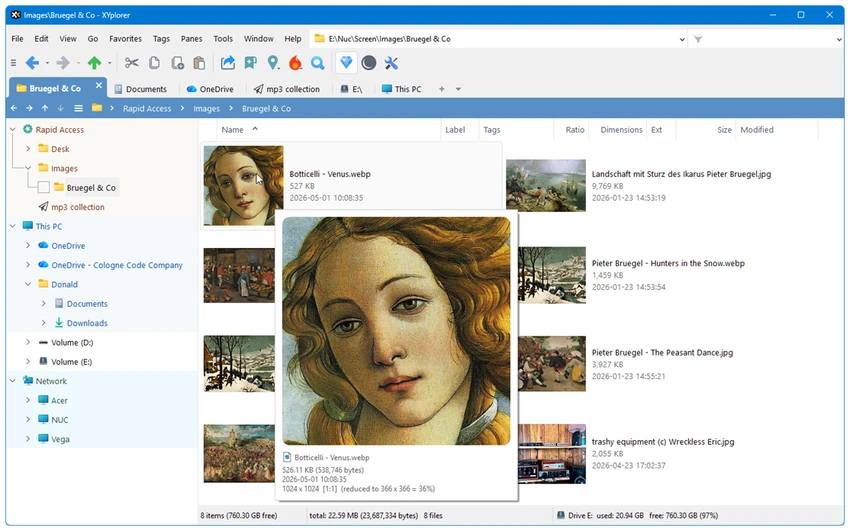

XYplorer is a feature-rich file manager designed to enhance productivity beyond what Windows File Explorer offers. With tabbed browsing, powerful file search capabilities, scripting support, and extensive customization options, it caters to users who manage files frequently and need a faster, more efficient workflow.
Overview
XYplorer is built around speed, flexibility, and usability. It replaces traditional file navigation with advanced features such as tabbed browsing, dual-pane views, customizable layouts, and task automation through scripting. Unlike many file managers that focus solely on file browsing, XYplorer emphasizes workflow optimization. Features like persistent tabs, advanced previews, and automation tools help users organize, locate, and manage files more efficiently. The application is also fully portable, allowing users to carry their settings and preferences between systems without requiring installation.
Features of XYplorer
- Tabbed file browsing
- Persistent tabs across sessions
- Tab management (lock, hide, rename, drag-and-drop)
- Tabsets for organizing multiple workspaces
- Optional dual-pane file management
- Advanced file search functionality
- Versatile file preview system
- Customizable user interface
- Scriptable automation engine
- Support for custom workflows and task automation
- Portable operation
- Low memory usage
- Fast startup performance
- Custom toolbar buttons
- Custom file icons and program associations
- Dark mode support
- Extensive interface customization
- Community-supported scripts and automation resources
User Experience
XYplorer immediately feels more capable than the default Windows File Explorer. The tabbed interface makes navigating multiple folders significantly easier, while dual-pane support improves file transfer and organization workflows.
One of its standout strengths is flexibility. Users can customize nearly every aspect of the interface, from colors and fonts to toolbar layouts and file associations. This level of personalization allows the software to adapt to different workflows rather than forcing users into a predefined structure. The search functionality is particularly useful when working with large file collections, helping users locate files quickly without relying on Windows Search. The preview tools further improve productivity by allowing users to inspect files without opening separate applications.
Advanced users will appreciate the built-in scripting engine, which enables automation of repetitive tasks without requiring external plugins. At the same time, beginners can benefit from community-created scripts that are ready to use. Despite its extensive capabilities, XYplorer remains lightweight and responsive, maintaining low memory consumption and fast loading times.
Who Should Use XYplorer?
- Power users managing large numbers of files
- IT professionals and system administrators
- Developers and technical users
- Content creators handling extensive project folders
- Users seeking an alternative to Windows File Explorer
- Anyone wanting advanced file organization and automation
Conclusion
XYplorer successfully combines speed, flexibility, and advanced functionality into a highly capable file management solution. Its tabbed interface, automation tools, search capabilities, and portability provide significant advantages over the standard Windows File Explorer.


