


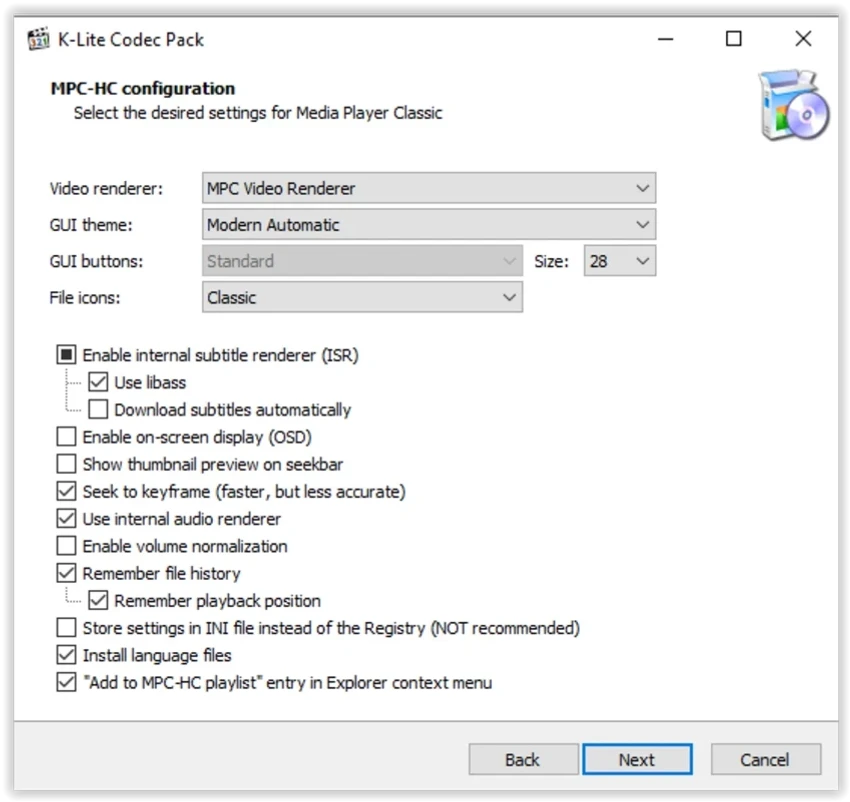

K-Lite Codec Pack Mega is a comprehensive collection of codecs, DirectShow filters, and decoding tools designed to enable seamless playback of virtually all audio and video formats on Windows. It integrates with media players such as Windows Media Player and Media Player Classic to ensure smooth playback without requiring additional configuration from the user. The package includes both common and advanced codecs, along with optional tools for encoding and video processing, making it one of the most complete multimedia codec solutions available for Windows.
Features of K-Lite Codec Pack Mega
- Supports playback of nearly all audio and video formats
- Includes DirectShow filters for multimedia decoding
- Provides VFW (Video for Windows) and ACM codecs
- Compatible with Windows Media Player and Media Player Classic
- Supports H.264, MPEG-4, and other modern video formats
- Includes tools for audio and video encoding
- Regular updates with latest codec versions
- Highly customizable installation options
- Advanced configuration tool for expert users
- Supports less common and legacy multimedia formats
- Removes cleanly without leaving system traces
- Lightweight design optimized for system performance
- Includes support for 3D video playback (with compatible hardware and OS)
User Experience
After reviewing K-Lite Codec Pack Mega, the installation process is straightforward but offers a wide range of customization options. Users can choose between a simple setup or a more advanced configuration mode, depending on their familiarity with codecs and multimedia systems. Once installed, the codec pack integrates directly into the Windows multimedia framework. This allows media players to immediately support a wide range of file formats without requiring additional plugins or manual configuration.
Playback performance is generally smooth, even on older systems, as the package is optimized to avoid unnecessary system overhead. The inclusion of Media Player Classic provides a ready-to-use media player that works well with the installed codecs. For advanced users, the configuration tools allow detailed control over which codecs handle specific formats. This level of customization is useful for optimizing playback behavior or resolving compatibility issues with certain file types.
Overall, the software performs its intended function efficiently: enabling reliable playback of almost any multimedia file without requiring multiple separate codec installations.
Who Should Use K-Lite Codec Pack Mega?
- Users unable to play certain video or audio formats
- Media enthusiasts with diverse file collections
- Users of Windows Media Player or Media Player Classic
- Video editors needing codec support for legacy formats
- Anyone requiring full multimedia compatibility on Windows
Conclusion
K-Lite Codec Pack Mega delivers a complete and efficient solution for multimedia playback on Windows. With broad format support, regular updates, and strong system integration, it remains one of the most trusted codec packs available.


