


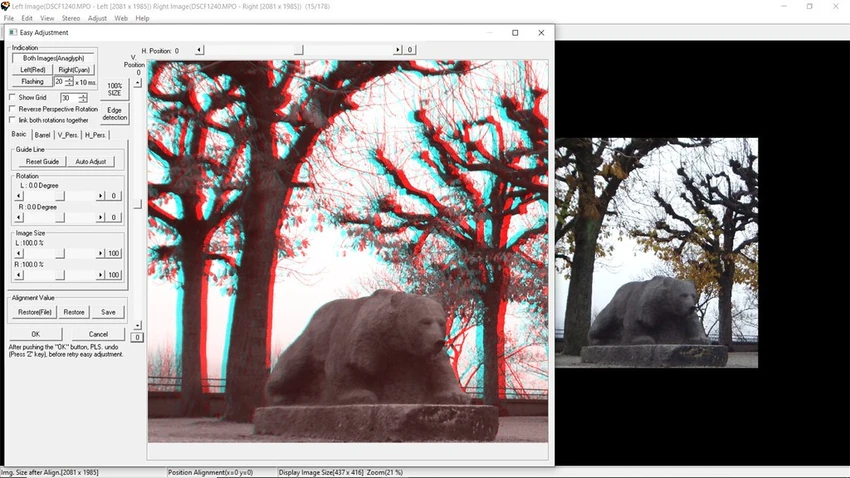

StereoPhoto Maker is a specialized image viewer and stereo image editor designed for creating, editing, and viewing stereoscopic (3D) images. It enables users to transform pairs of standard photographs into immersive 3D images by aligning, adjusting, and combining them using a wide range of stereo viewing techniques. The software is aimed at photography enthusiasts, hobbyists, and professionals interested in stereoscopic imaging.
Supporting most popular graphics formats, StereoPhoto Maker allows users to edit individual image pairs or process large collections through batch alignment. Once alignment parameters are configured, the application can automatically process hundreds of stereo image pairs, making it especially useful for users managing extensive 3D photo libraries.
In addition to image editing, the software includes multiple viewing modes compatible with various 3D display technologies, including anaglyph glasses, autostereoscopic displays, OpenGL stereo, and several dedicated 3D monitors and televisions. It also features a built-in HTML page generator that makes publishing stereo image galleries simple, even for users without web development experience.
Although some automatic alignment functions may require adjustment depending on the images being processed, StereoPhoto Maker provides practical manual alignment tools that offer precise control over the final stereoscopic effect.
Features of StereoPhoto Maker
- Create and edit stereoscopic (3D) images.
- View stereo images using multiple 3D display methods.
- Supports most common image formats.
- Align, move, and resize stereo image pairs.
- Batch alignment for processing hundreds of images.
- Open multiple editing windows simultaneously.
- Merge stereo image pairs into 3D images.
- Built-in HTML page generator for image galleries.
- Supports autostereoscopic displays using vertical interlacing.
- Compatible with IZ3D monitors, Sharp 3D LCDs, and 3D DLP TVs.
- Create single 2D output images for saving or printing.
- Free-viewing support (parallel-eyed and cross-eyed).
- Create color and grayscale anaglyph images.
- Supports red-cyan, red-green, red-blue, and yellow-blue anaglyphs with gamma correction.
- Supports liquid crystal shutter glasses with compatible hardware and drivers.
- OpenGL stereo viewing support.
Interface and Usability
StereoPhoto Maker provides a functional interface that emphasizes editing tools over visual polish. During use, the workflow revolves around opening stereo image pairs, aligning them, adjusting positioning and size, and previewing the resulting 3D effect using different viewing modes.
The application allows multiple editing windows to remain open simultaneously, making it easier to compare, align, or resize several image pairs before merging them. Batch processing is particularly useful when working with large photo collections, reducing repetitive manual adjustments.
While the software includes automatic alignment, results may vary depending on the source images. Fortunately, the manual alignment tools offer precise control and are straightforward once users become familiar with the workflow. The included HTML generator also simplifies publishing stereo image galleries without requiring HTML knowledge. Although beginners may need to consult the available documentation to understand stereoscopic editing concepts, the application offers considerable flexibility for users interested in creating high-quality 3D images.
Who Should Use StereoPhoto Maker?
- Stereo photography enthusiasts.
- Photographers creating 3D image collections.
- Users with compatible 3D displays or anaglyph glasses.
- Hobbyists interested in stereoscopic image editing.
- Users processing large batches of stereo photographs.
- Anyone looking to publish simple 3D image galleries.
Conclusion
StereoPhoto Maker is a capable and highly specialized application for users interested in stereoscopic photography. Its extensive support for 3D image formats, display technologies, batch processing, and manual alignment tools provides everything needed to create convincing stereo images from standard photographs.
Although the interface feels more practical than modern, it delivers a comprehensive feature set for users who regularly work with 3D photography. The built-in HTML generator and support for multiple viewing technologies further expand its usefulness beyond simple image editing.


