


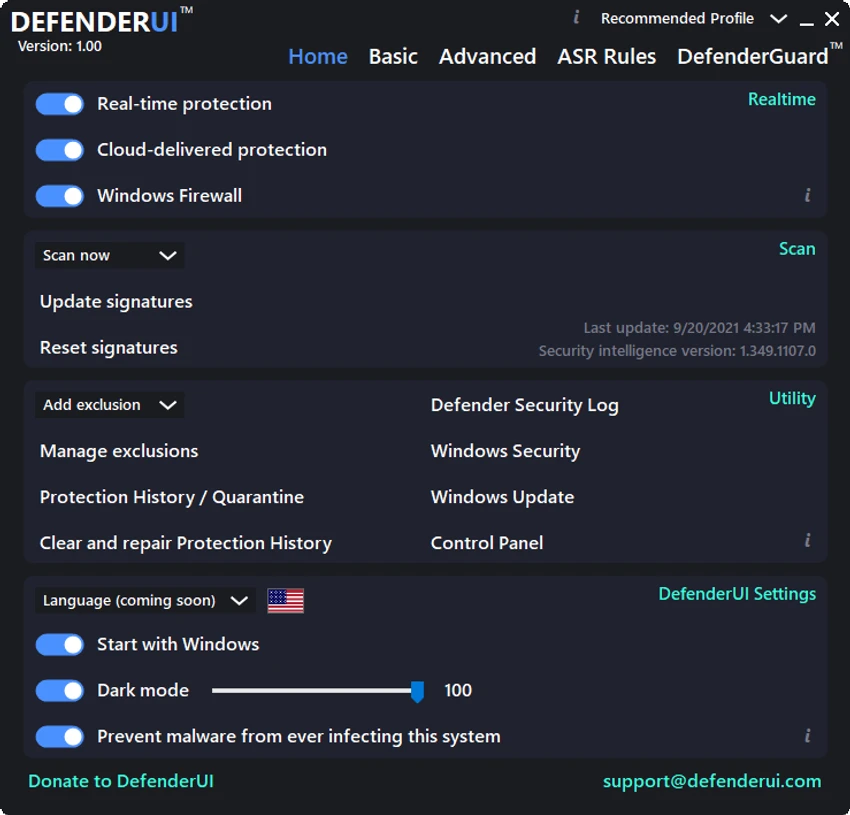

DefenderUI is a Windows utility designed to improve the usability of Microsoft Defender while unlocking advanced security settings that are not easily accessible through the default Windows Security interface. It provides a simplified control panel for managing antivirus protection, firewall settings, scanning options, and advanced security modules, making Microsoft Defender more flexible and easier to configure.
DefenderUI acts as a graphical enhancement layer for Microsoft Defender on Windows 10 and Windows 11. Instead of navigating multiple system menus, users can manage core security features from a centralized interface. The software introduces predefined security profiles that adjust Defender’s behavior based on user needs, ranging from default settings to highly restrictive protection modes. It also exposes hidden or advanced Defender features that are typically not available in standard Windows settings. In addition to configuration control, DefenderUI provides quick access to scans, logs, quarantine, and system security tools.
Features of DefenderUI
- Simplified interface for Microsoft Defender management
- Four security profiles: Default, Recommended, Interactive, Aggressive
- Enable or disable real-time protection and cloud-delivered protection
- Control Windows Firewall settings
- On-demand scanning: quick, full, custom, and offline scans
- Access to Defender quarantine and action history
- View security logs and system protection records
- One-click access to Windows Security, Windows Update, and Control Panel
- Behavioral protection and PUA (Potentially Unwanted App) controls
- Ransomware protection via controlled folder access settings
- Centralized dashboard for advanced security configuration
DefenderUI significantly simplifies interaction with Microsoft Defender by consolidating security controls into a single interface. Instead of navigating multiple Windows settings panels, users can adjust protection levels with a few clicks. The predefined security profiles are particularly useful for users who want quick configuration changes without manually tuning individual settings. The “Interactive” and “Aggressive” modes provide deeper control for users who prefer stricter security environments. Despite its added complexity, the interface remains organized and practical, making advanced Defender features more accessible.
Who Should Use DefenderUI?
- Users who rely on Microsoft Defender as their primary antivirus
- Security-conscious Windows users
- IT professionals managing multiple systems
- Users who want easier access to advanced Windows security settings
- Those who prefer built-in antivirus over third-party solutions
Conclusion
DefenderUI enhances Microsoft Defender by turning it into a more powerful and accessible security management tool. By exposing advanced features and simplifying configuration through security profiles, it gives users greater control over their system protection.


