


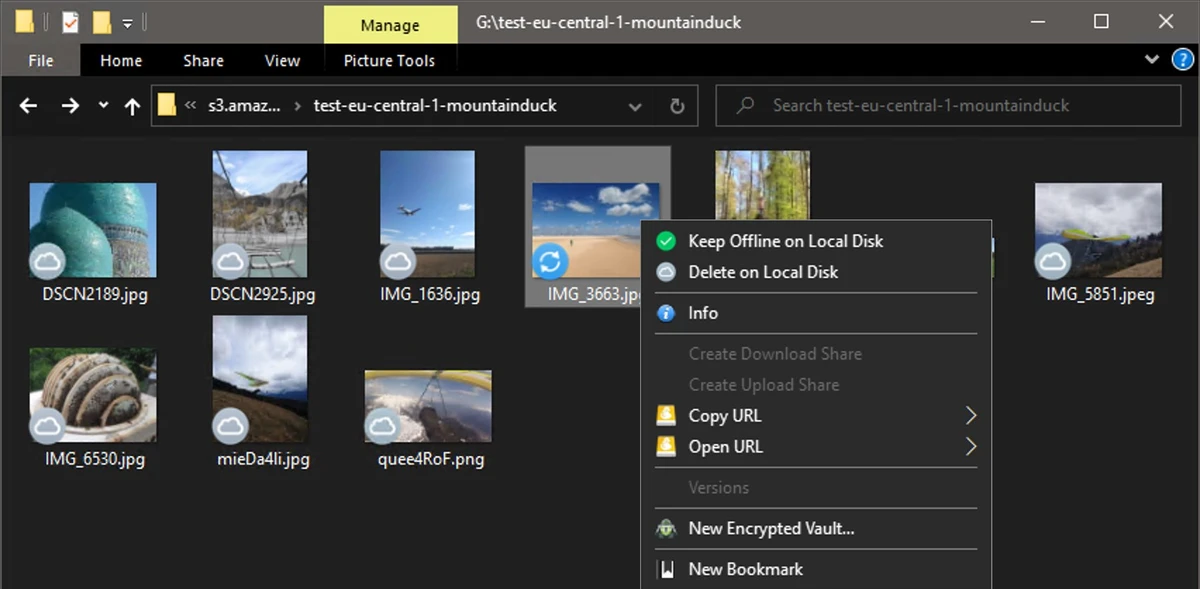

Mountain Duck is a cloud storage and server mounting tool that integrates remote storage directly into your operating system’s file manager. It allows users to access cloud files as if they were stored locally on their computer, making file handling more natural and efficient.
Overview of Mountain Duck
Mountain Duck transforms how users interact with cloud storage by mounting remote servers and cloud services as local disks in Finder on macOS and File Explorer on Windows. Instead of relying on traditional syncing applications, it provides direct access to remote files with on-demand downloading. The latest version introduces an integrated connection mode using native system APIs such as File Provider (macOS) and Cloud Files (Windows), eliminating the need for separate network drivers. It is built on the open-source foundation of Cyberduck and supports a wide range of protocols and cloud storage services.
Features of Mountain Duck
- Mount cloud storage and servers as local drives in Finder (macOS) and File Explorer (Windows)
- Integrated Connect Mode using File Provider (macOS) and Cloud Files (Windows) APIs
- Smart synchronization with on-demand file downloading
- Offline mode with selectable files and folders for local storage
- Background uploads that sync automatically when connection is available
- System tray / status bar integration for easy access and monitoring
- File sharing with expiring links (supports major cloud providers like Amazon S3, Azure, Google Drive, Dropbox, etc.)
- Search integration with macOS Spotlight and Windows Search
- Activity panel to monitor and cancel sync operations
- File history and transfer logs
- File locking to prevent conflicts in collaborative editing
- Versioning support with rollback options
- Custom versioning for additional file safety
- Cryptomator Vault support for client-side encryption
- Based on Cyberduck open-source foundation for broad protocol compatibility
User Experience
Mountain Duck feels like a bridge between traditional file systems and cloud storage platforms. Once connected, remote files appear directly in the file explorer, which makes working with cloud data intuitive and fast. The smart synchronization system is particularly useful, as it avoids filling local storage unnecessarily. Files are downloaded only when opened, while frequently used items can be pinned for offline access.
Features like file locking, version history, and background uploads make it suitable for collaborative environments where multiple users may edit shared data. The interface is minimal and unobtrusive, with most controls accessible from the system tray or menu bar, keeping the workflow clean and distraction-free.
Who Should Use Mountain Duck?
- Developers managing remote servers and repositories
- Teams collaborating on cloud-based projects
- Users working with large cloud storage datasets
- IT professionals handling multiple storage services
- Anyone who prefers file explorer-based cloud access instead of sync folders
Conclusion
Mountain Duck is a powerful cloud integration tool designed for users who want a more natural way to interact with remote storage. By turning cloud services into local drives, it simplifies workflows and reduces reliance on traditional sync-based applications.


