FileLegit Windows Utilities Personalization Tools MultiPack Visual C++ Installer
MultiPack Visual C++ Installer logo

MultiPack Visual C++ Installer 4.2

  • User Rating:
    ★★★★★
    ★★★★★
    0.0 ★ 0Votes
  • Requirements:
    Windows
  • Version: 4.2
  • Latest updated: 2 weeks ago
  • License: Freeware  
  • Publisher: BobSpwg
  • Size: 81 MB
× app stores

MultiPack Visual C++ Installer is a system utility designed to simplify the installation of Microsoft Visual C++ runtime packages on Windows computers. Many applications and games rely on these runtime components to function correctly, and missing versions can cause errors, failed launches, or compatibility problems. This tool combines multiple Visual C++ redistributable packages into a single convenient installer, removing the need to search for and install each version separately.

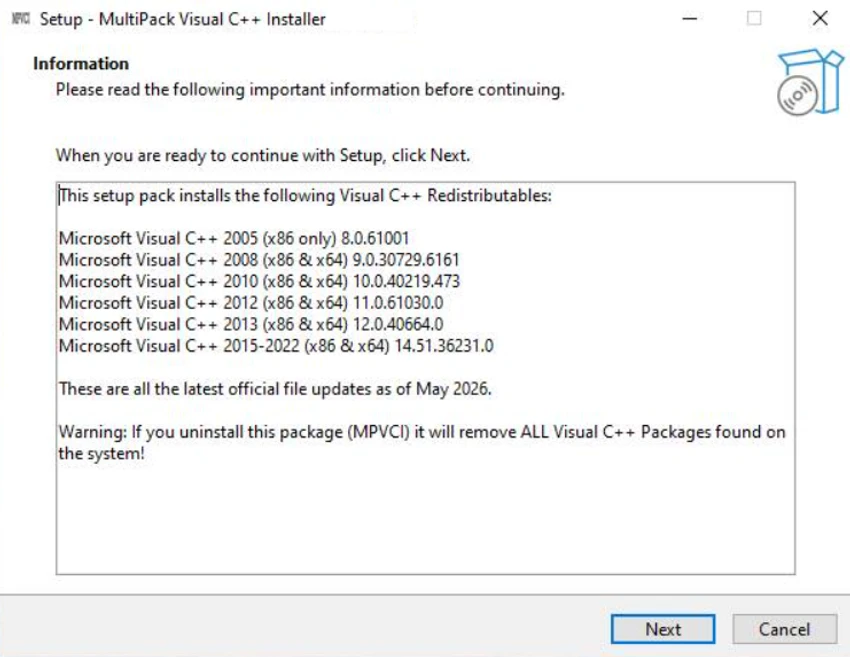
The application is designed for users who encounter problems caused by missing Visual C++ components. Instead of manually identifying which runtime package an application requires, users can run the executable and install the included runtime collections in one process. This makes it a practical troubleshooting tool for resolving common software and game startup issues. MultiPack Visual C++ Installer includes Visual C++ runtime packages ranging from 2005 through 2022, covering multiple x86 and x64 versions where available. The bundled packages include Microsoft Visual C++ 2005, 2008, 2010, 2012, 2013, and 2015-2022 runtimes.

The utility does not include a traditional installer or uninstaller interface. Its approach is simple: run the executable and allow the included Visual C++ components to be installed. Tested on Windows 10 and Windows 11, MultiPack Visual C++ Installer provides a straightforward solution for users who need to restore missing runtime dependencies quickly.

Features of MultiPack Visual C++ Installer

  • Installs multiple Microsoft Visual C++ runtime packages at once
  • Simplifies Visual C++ dependency installation
  • Helps resolve application and game startup issues
  • Includes Visual C++ packages from 2005 to 2022
  • Supports x86 and x64 runtime packages where available
  • No need to manually select individual runtime versions
  • Simple executable-based installation process
  • Designed for Windows compatibility troubleshooting

Included runtime packages:

  • Microsoft Visual C++ 2005 (x86)
  • Microsoft Visual C++ 2008 (x86/x64)
  • Microsoft Visual C++ 2010 (x86/x64)
  • Microsoft Visual C++ 2012 (x86/x64)
  • Microsoft Visual C++ 2013 (x86/x64)
  • Microsoft Visual C++ 2015-2022 (x86/x64)

Interface and Usability

MultiPack Visual C++ Installer focuses on simplicity rather than advanced configuration. The software avoids complicated installation choices and provides a straightforward way to install multiple Visual C++ runtime packages through a single executable.

This approach is useful for users who are unsure which Visual C++ version a particular application requires. Instead of searching through different redistributable packages, users can install the bundled runtimes together and potentially resolve compatibility problems more quickly. The lack of a traditional installer or uninstaller keeps the process simple, although users looking for detailed installation controls may find the minimal approach limiting.

Who Should Use MultiPack Visual C++ Installer?

  • Windows users experiencing missing Visual C++ errors
  • Gamers unable to launch applications due to runtime issues
  • Users reinstalling Windows and restoring common dependencies
  • Technicians troubleshooting software compatibility problems
  • Anyone who wants a simple way to install multiple VC++ runtimes

Conclusion

MultiPack Visual C++ Installer offers a convenient way to install commonly required Microsoft Visual C++ runtime components without manually searching for individual packages. Its all-in-one approach makes it useful when applications or games fail due to missing runtime dependencies. While it is a specialized troubleshooting tool rather than a general system utility, it can save time for users dealing with Visual C++ compatibility issues. If you need a quick method to install multiple Visual C++ runtimes on Windows, MultiPack Visual C++ Installer is a practical solution to consider.

Pros & Cons

✓

Pros

  • Installs many Visual C++ runtimes in one package
  • Saves time compared to manual installation
  • Helps fix common application and game launch errors
  • Simple one-executable workflow
  • Includes multiple Visual C++ generations
✕

Cons

  • Tested only on Windows 10 and Windows 11
  • Does not provide detailed installation controls
  • Installs multiple runtimes instead of identifying only required packages

Frequently Asked Questions

What is MultiPack Visual C++ Installer used for?

MultiPack Visual C++ Installer is used to install multiple Microsoft Visual C++ runtime packages that are required by many Windows applications and games.

Why do some applications require Visual C++ runtimes?

Many Windows programs are built using Microsoft Visual C++ libraries. If the required runtime components are missing, applications may fail to start or display compatibility errors.

Which Visual C++ versions are included?

The package includes Visual C++ runtimes from 2005, 2008, 2010, 2012, 2013, and 2015-2022, including x86 and x64 versions where available.

Does MultiPack Visual C++ Installer work on Windows 11?

Yes. According to the provided information, the tool has been tested on Windows 10 and Windows 11.

Do I need to choose which Visual C++ package to install?

No. The tool is designed to bundle the available Visual C++ runtime packages together, removing the need to manually select individual versions.

Can MultiPack Visual C++ Installer fix game launch problems?

It can help resolve some game launch issues caused by missing Visual C++ runtime components, but it cannot fix problems caused by other missing files or unrelated software issues.

Recommended apps [Freeware]:
  • Process Monitor 4.04 Process Monitor logo a Windows tool that tracks real-time file, registry, and process activity for system troubleshooting and malware analysis
  • CCleaner 7.08.1355 CCleaner logo removes junk files, clears browsing traces, and helps optimize Windows for better performance
  • Foxit Reader 2026.1.2.36540 Foxit Reader logo Read, annotate, fill forms, and print PDF files with Foxit Reader, a lightweight and feature-rich PDF tool for Windows
  • Shortcut Virus Removal Tool 2.2.0 Shortcut Virus Removal Tool logo Remove shortcut viruses from USB drives, recover hidden files, delete autorun threats, and repair Windows settings with one click.
  • Microsoft OneDrive 26.113.0614.0004 Microsoft OneDrive logo Store, sync, and access files across devices with cloud storage that automatically keeps documents, photos, and folders up to date.
  • Mullvad Browser 15.0.18 Mullvad Browser logo Browse with enhanced privacy using a Firefox-based browser that minimizes tracking, removes telemetry, and supports VPN connections.
Recommended apps [Shareware]:
  • FileCenter 12.5.36 FileCenter logo organize documents, scan files, manage PDFs, and build an efficient digital filing system
  • Disk Savvy 18.2.36 Disk Savvy logo analyze disk space usage, network shares, NAS storage, and generate detailed reports on Windows
  • Copy Protect 3.0.2 Copy Protect logo converts media files into secured executables to prevent copying, duplication, and unauthorized distribution on Windows.
  • QILING Disk Master Professional 8.8 QILING Disk Master Professional logo a backup and recovery tool for Windows offering system imaging, restore, and disk management
  • Argente Registry Cleaner 4.0.8.7 Argente Registry Cleaner logo Clean invalid registry entries safely with backup protection, multiple scan modes, and an easy-to-use Windows maintenance tool.
  • 3delite Duplicate Picture Finder 1.0.112.122 3delite Duplicate Picture Finder logo Find duplicate and similar pictures on your PC with image comparison, previews, EXIF details, and multi-threaded scanning tools.