v2rayN logo

v2rayN 7.23.3

  • User Rating:
    ★★★★★
    ★★★★★
    0.0 ★ 0Votes
  • Requirements:
    Windows
  • Version: 7.23.3
  • Latest updated: 2 weeks ago
  • License: Open Source  
  • Publisher: 2Dust
  • Size: 159 MB
× app stores

v2rayN is a Windows-based graphical client for V2Ray, a platform designed for creating secure and private network connections. It provides an easier way to manage V2Ray configurations through a user interface instead of manually editing configuration files or using command-line tools.

The software is designed for users who need more control over their network connections, including managing proxy servers, selecting communication protocols, and customizing traffic routing rules. v2rayN supports several protocols, including VMess, VLESS, Shadowsocks, SOCKS, and HTTP, allowing users to configure different connection methods depending on their network environment. Unlike traditional VPN applications that usually provide a simple connect-and-go experience, v2rayN focuses on flexibility and customization. Users can import server configurations through links or QR codes, manage multiple server nodes, and adjust routing settings according to their requirements.

The application is commonly used by privacy-focused users, developers, IT professionals, remote workers, and people who need additional control over how their internet traffic is handled. It can help create encrypted connections, manage proxy access, and improve privacy when using networks that require advanced configurations. Because v2rayN requires compatible server configurations and a certain level of technical knowledge, it is best suited for users who want deeper control over their network setup rather than beginners looking for a simple VPN solution.

Features of v2rayN

  • Windows GUI client for V2Ray
  • Supports multiple protocols including VMess, VLESS, Shadowsocks, SOCKS, and HTTP
  • Flexible traffic routing with customizable rules
  • Encrypted network communication
  • Import server configurations through links or QR codes
  • Manage multiple server nodes
  • User-friendly interface for controlling V2Ray settings
  • Supports advanced proxy configurations
  • Provides more customization than traditional VPN clients
  • Helps manage private and secure network connections

Interface and Usability

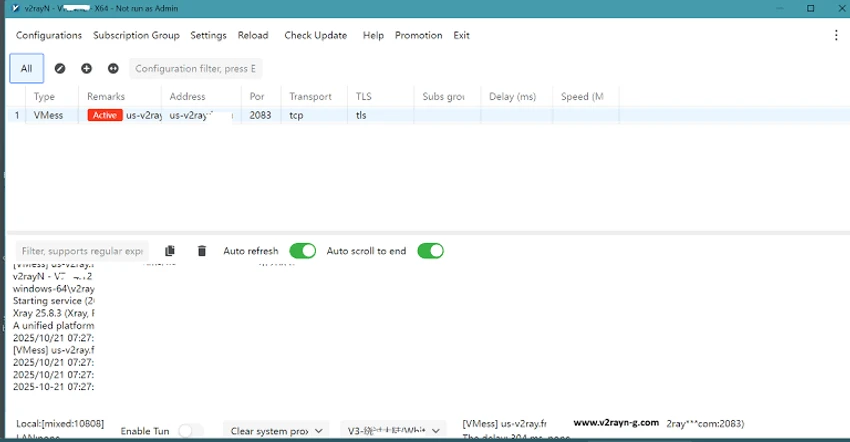
v2rayN provides a graphical interface that makes V2Ray management easier compared with direct command-line configuration. The dashboard allows users to view available servers, select connections, and manage settings from a more accessible environment.

The application runs from the v2rayN executable and can operate through the Windows system tray. Users can select configured servers, enable system proxy modes, and switch between different connection settings. The interface is focused on functionality rather than visual simplicity. Beginners may need time to understand concepts such as server configurations, routing rules, and proxy modes, while experienced users will appreciate the amount of control available.

For users familiar with networking tools, v2rayN offers a practical way to manage advanced proxy setups without constantly editing configuration files manually.

Who Should Use v2rayN?

  • Developers and IT professionals managing custom network setups
  • Privacy-focused users who want more configuration options
  • Remote workers who need secure connections
  • Users in regions with restricted internet access
  • Advanced users managing multiple proxy servers

Conclusion

v2rayN is a powerful network management tool for users who want greater control over private connections and proxy configurations. Its support for multiple protocols, flexible routing, and detailed customization options make it a strong choice for experienced users who need more than a standard VPN application. While the software may require additional setup and technical understanding, it provides a highly flexible environment for managing V2Ray-based connections. Users who are comfortable with networking concepts will find v2rayN a capable and customizable privacy tool.

Pros & Cons

✓

Pros

  • Supports multiple advanced protocols
  • Provides detailed routing control
  • Free and open-source
  • Offers flexible server management
  • More customizable than many standard VPN applications
✕

Cons

  • Requires technical knowledge to configure properly
  • Not designed for complete beginners
  • Requires access to compatible V2Ray servers
  • Advanced settings can be overwhelming for casual users

Frequently Asked Questions

What is v2rayN used for?

v2rayN is used to manage V2Ray-based network connections through a Windows graphical interface. It helps users configure proxy servers, manage protocols, and control traffic routing settings.

Is v2rayN a VPN?

v2rayN works similarly to a VPN client by managing secure proxy connections, but it is based on the V2Ray platform rather than a traditional VPN service. It requires compatible server configurations to operate.

Which protocols does v2rayN support?

v2rayN supports protocols including VMess, VLESS, Shadowsocks, SOCKS, and HTTP, allowing users to configure different types of network connections.

Is v2rayN easy to use for beginners?

The graphical interface makes v2rayN easier to manage than manual V2Ray configuration, but users still need some networking knowledge to set up servers and understand connection options.

Does v2rayN include its own servers?

No. v2rayN is a client application and requires users to provide compatible server configurations or connect to their own V2Ray servers.

Can v2rayN improve online privacy?

v2rayN can help manage encrypted connections and proxy traffic, which may improve privacy depending on the server configuration and how the software is used. Users should always follow applicable laws and service rules when using network tools.

Recommended apps [Freeware]:
  • Sysinternals Suite 2026.07.09 Sysinternals Suite logo a powerful collection of Windows tools for system monitoring, troubleshooting, process analysis, and performance optimization.
  • Tixati 3.43 Tixati logo a fast, ad-free BitTorrent client offering advanced peer control, bandwidth management, and detailed swarm analysis
  • HttpMaster Professional 7.0.0 HttpMaster Professional logo web testing tool for developers to automate HTTP requests, API testing, and response validation
  • FreeFileSync 14.10 FreeFileSync logo open-source tool for folder synchronization, file comparison, and efficient backups
  • DesktopOK 12.61 DesktopOK logo a free Windows utility that saves and restores desktop icon layouts across screen resolution changes
  • Revo Uninstaller Free 2.7.0 Revo Uninstaller Free logo Remove unwanted programs, clean leftover files, and manage Windows apps with a free uninstall utility designed for easier system maintenance.
Recommended apps [Shareware]:
  • Adobe Photoshop 2026 Adobe Photoshop logo powerful image editing and graphic design tool for creating, enhancing, and transforming photos, illustrations
  • EF Mailbox Manager 26.05 EF Mailbox Manager logo Manage multiple POP3 email accounts, remove spam on the server, and download messages securely
  • Royal TS 7.4.50622 Royal TS logo centralizes remote connections, credential management, automation, and secure team collaboration.
  • WiFi Explorer Pro 1.2.3.0 WiFi Explorer Pro logo Analyze, troubleshoot, and optimize Wi-Fi networks with WiFi Explorer Pro for Windows, supporting Wi-Fi 6, 6E, and 7
  • Wise Care 365 8.0.4.732 Wise Care 365 logo Optimize Windows performance with system cleanup, registry tools, privacy protection, and hardware monitoring features.
  • Lossless Extract 3.0.1 Lossless Extract logo Extract high-resolution audio from Blu-ray, SACD, MKV, and DVD-Audio while preserving lossless quality and immersive audio formats.