Classroom Spy Pro logo

Classroom Spy Pro 5.6.6

  • User Rating:
    ★★★★★
    ★★★★★
    0.0 0Votes
  • Requirements:
    Windows
  • Version: 5.6.6
  • Latest updated: 6 days ago
  • License: Free Trial  
  • Publisher: EduIQ
  • Size: 47 MB
× app stores

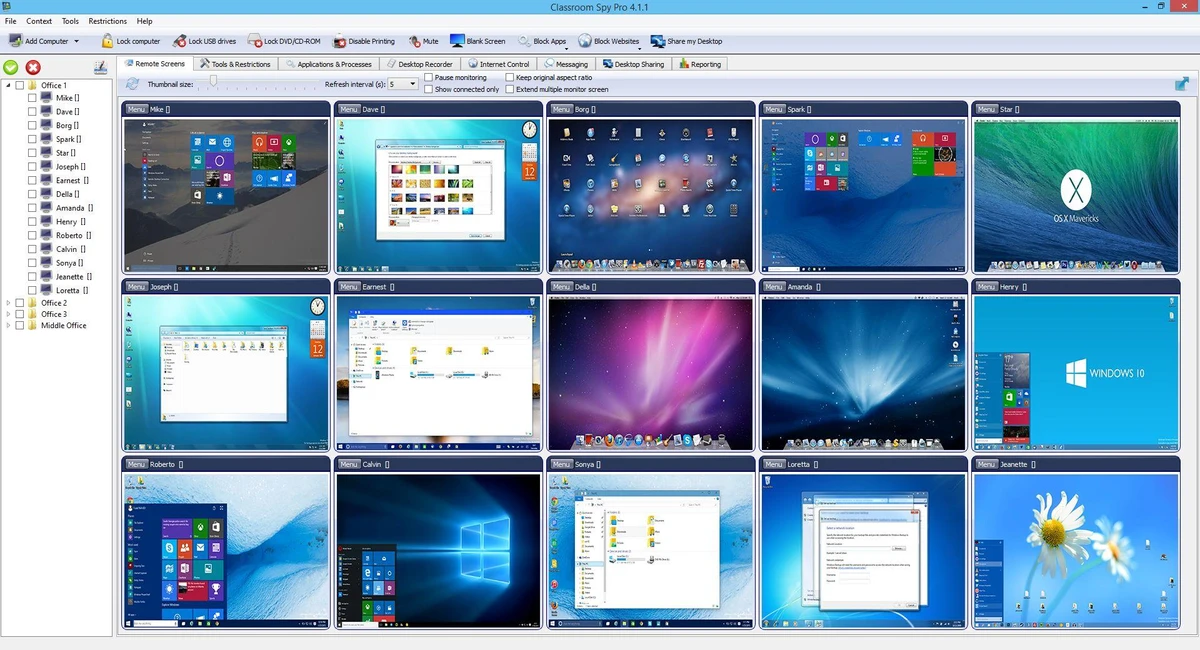
Classroom Spy Pro is a classroom management and computer monitoring solution designed for educators, trainers, and IT administrators. The software enables instructors to remotely monitor student computers, control desktops, share screens, record activity, and manage classroom devices from a central console. With a broad range of supervision and control features, Classroom Spy Pro aims to improve classroom engagement, reduce distractions, and simplify computer-based instruction.

Features of Classroom Spy Pro

  • View live screens of remote student computers
  • Remotely control mouse and keyboard on connected computers
  • Display multiple remote screens simultaneously in a grid layout
  • Organize computers into groups or classrooms
  • Zoom remote screens for closer inspection
  • Display connected user names
  • Record remote screens to MPEG4 video files
  • Share teacher screens with students
  • Share a student's screen with the entire class
  • Remotely power on, shut down, restart, hibernate, or suspend computers
  • Log off users and lock workstations
  • Clear desktop screens remotely
  • Control screensavers
  • Block internet access
  • Block specific applications
  • Mute remote computers
  • Control audio volume levels
  • Disable printing
  • Disable Ctrl+Alt+Del
  • Blank student screens
  • Launch programs remotely
  • Open web pages on remote computers
  • Multi-monitor support
  • Monitor and manage running processes and applications
  • Lock selected computers
  • Send messages to users
  • Adjustable refresh intervals for low-bandwidth environments
  • Password-protected remote connections
  • Encrypted agent settings
  • Remote agent deployment
  • Multi-session support for Remote Desktop, Terminal Services, and Citrix environments
  • Mobile access via smartphones and tablets
  • Log visited websites
  • Log application usage
  • Schedule desktop recordings

User Experience

After using Classroom Spy Pro, it becomes clear that the software is built for environments where instructors need direct visibility and control over student activity. The ability to view multiple student screens simultaneously is one of the software's strongest features. Instead of walking around the classroom to check progress, teachers can instantly identify who is following instructions and who may be distracted by unrelated activities.

Screen sharing is another practical feature. Teachers can demonstrate tasks directly on student screens or showcase a student's work to the rest of the class, making demonstrations more efficient and interactive. The remote control functionality allows instructors to provide assistance without physically accessing a student's workstation. This can save time during lessons and reduce interruptions.

Administrative controls such as internet blocking, application restrictions, workstation locking, and printing controls provide additional classroom management capabilities. These tools can help minimize distractions and maintain focus during training sessions. For larger educational environments, support for computer groups, remote deployment, and multi-session environments adds scalability that can benefit schools, training centers, and computer labs. While the feature set is extensive, new users may need some time to familiarize themselves with all available controls and monitoring options.

Who Should Use Classroom Spy Pro?

  • Teachers and educators
  • Computer lab administrators
  • Training centers
  • Schools and universities
  • Corporate trainers
  • IT administrators managing educational environments
  • Organizations delivering computer-based instruction

Conclusion

Classroom Spy Pro provides educators and administrators with extensive visibility and control over classroom computers. Features such as live screen monitoring, remote assistance, desktop sharing, application restrictions, and activity logging help create a more structured and productive learning environment.

Pros & Cons

Pros

  • Comprehensive classroom monitoring capabilities
  • Real-time viewing of multiple student screens
  • Remote control of computers through mouse and keyboard access
  • Screen sharing for demonstrations and presentations
  • Internet and application blocking tools
  • Desktop recording functionality
  • Remote power management options
  • Supports computer grouping and large classroom environments
  • Password-protected and encrypted settings
  • Multi-monitor and multi-session support
  • Mobile device compatibility

Cons

  • Large feature set may require an initial learning period
  • Primarily designed for managed classroom or training environments
  • Some advanced administrative functions may be unnecessary for smaller classrooms

Frequently Asked Questions

What is Classroom Spy Pro used for?

Classroom Spy Pro is used to monitor, manage, and control student or trainee computers remotely from a central instructor console.

Can teachers view multiple student screens at the same time?

Yes. The software can display multiple remote screens simultaneously in a customizable grid layout.

Does Classroom Spy Pro allow remote control of student computers?

Yes. Instructors can remotely control the mouse and keyboard of connected computers.

Can internet access be restricted?

Yes. The software includes options to block internet access and restrict specific applications.

Does Classroom Spy Pro support screen sharing?

Yes. Teachers can share their own desktop with students or present a student's screen to the class.

Can classroom activity be recorded?

Yes. Remote desktop activity can be recorded and saved as MPEG4 video files.

Which operating systems are supported?

Classroom Spy Pro supports Windows 7, Windows 8, Windows 10, and Windows 11 in both 32-bit and 64-bit versions.

Recommended apps [Freeware]:
  • FastCopy 5.11.3 FastCopy logo a lightweight Windows tool for ultra-fast file copying, syncing, and error-resilient data transfer
  • Far Manager 3.0 Build 6699 Far Manager logo Manage files efficiently with Far Manager's fast text-based interface, plugins, and archive support
  • ATTO Disk Benchmark 5.00.3 ATTO Disk Benchmark logo Measure SSD, HDD, RAID, and storage controller performance with ATTO Disk Benchmark on Windows systems
  • Microsoft PowerToys 0.100.2 Microsoft PowerToys logo adds powerful productivity tools and customization features to Windows 10 and 11
  • BDtoAVCHD 3.2.0 BDtoAVCHD logo convert Blu-ray and MKV files into AVCHD or MKV for DVD or USB high-definition backups
  • RustDesk 1.4.8 RustDesk logo open-source remote desktop solution with self-hosting, cross-platform support, and customizable remote access tools
Recommended apps [Shareware]:
  • Screenpresso 2.2.13 Screenpresso logo a versatile screen capture and video recording tool with editing and annotation features.
  • Any video Converter 9.2.3 Any video Converter logo video conversion tool that supports multiple formats, editing features, and device-ready output profiles
  • Sequence Generator Pro 4.5.0.1649 Sequence Generator Pro logo a Windows astrophotography capture suite for automating imaging, focus, and sequencing.
  • Kettler World Tours 3.0.4.20 Kettler World Tours logo Train indoors with real-world routes, GPS integration, and online racing using Kettler World Tours
  • My Music Collection 3.4.16.178 My Music Collection logo organize CDs, vinyl, and MP3s with cataloging, tracking, and export features on Windows
  • Okdo Pdf to All Converter Professional 6.0 Okdo Pdf to All Converter Professional logo Convert PDF files to Word, Excel, PowerPoint, images, HTML, text, and more with batch processing support