Speccy logo

Speccy 1.34.084

  • User Rating:
    ★★★★★
    ★★★★★
    0.0 0Votes
  • Requirements:
    Windows
  • Version: 1.34.084
  • Latest updated: 1 week ago
  • License: Freeware  
  • Publisher: Gen Digital Inc
  • Size: 20.5 MB
× app stores

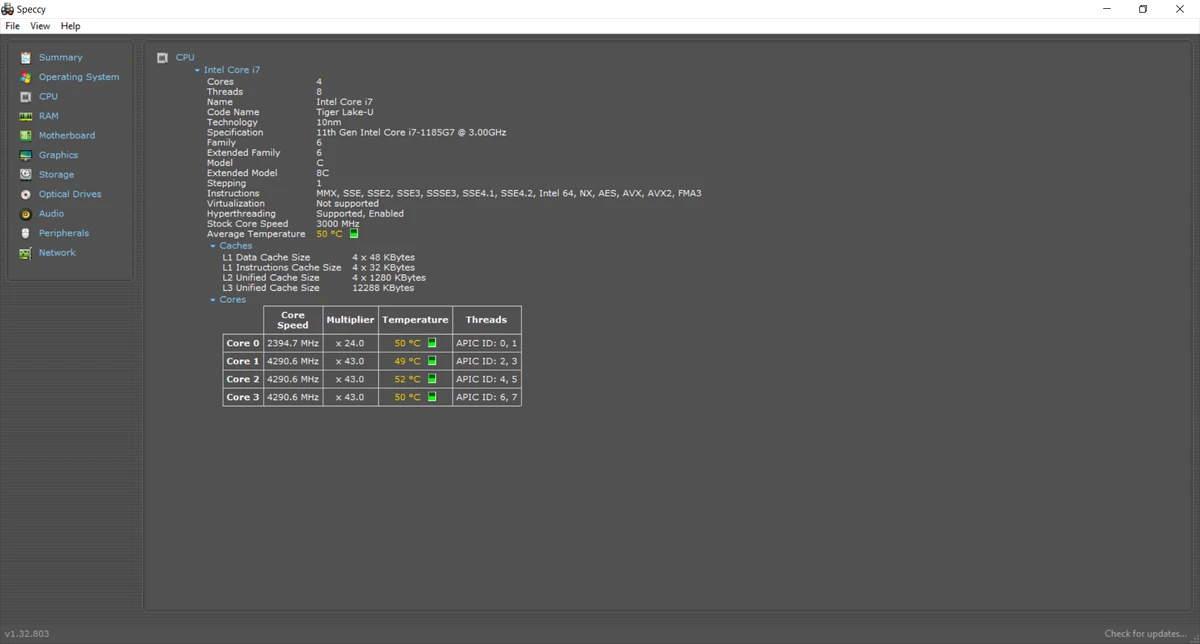
Speccy is a system information utility that helps users view detailed hardware specifications and real-time component temperatures from a single interface. Designed for both everyday users and advanced PC enthusiasts, it provides a comprehensive overview of a computer's internal hardware without requiring technical expertise.

Overview

Knowing exactly what hardware is installed in a computer can be essential when troubleshooting problems, upgrading components, or verifying system specifications. Speccy simplifies this process by collecting and displaying detailed information about key hardware components, including the processor, motherboard, memory, storage devices, graphics hardware, and audio systems. In addition to hardware inventory reporting, Speccy monitors component temperatures, helping users identify potential overheating issues before they lead to system instability or hardware damage.

The software presents technical information in an organized and accessible format, making it useful for both beginners and experienced users.

Features of Speccy

  • Detailed hardware information reporting
  • CPU information and specifications
  • Motherboard details and system information
  • RAM capacity and memory slot information
  • Graphics card information
  • Hard drive and storage device details
  • Optical drive information
  • Audio hardware reporting
  • Real-time temperature monitoring
  • Quick system summary view
  • Detailed component breakdowns
  • Save scan results as snapshots
  • Export reports in XML format
  • Export reports as text files
  • Easy sharing of hardware reports for troubleshooting

User Experience

One of Speccy's biggest strengths is its simplicity. Upon launch, the software immediately presents a clear summary of the system's most important hardware components, making it easy to understand what is installed without navigating through multiple menus.

For users who need more detailed information, each hardware category can be explored individually. The organized layout makes technical data much easier to read compared to manually searching through Windows system utilities. The temperature monitoring feature is particularly useful. Being able to view real-time temperatures for critical components allows users to identify potential cooling problems early, whether caused by dust buildup, failing fans, or demanding workloads.

Speccy is also practical when planning hardware upgrades. For example, users can quickly determine how much memory is installed, how many memory slots are available, and what type of RAM their system uses before purchasing upgrades. The snapshot and reporting tools further improve usability by making it simple to share system specifications with technical support or colleagues.

Who Should Use Speccy?

  • Home users checking system specifications
  • PC enthusiasts monitoring hardware performance
  • Users planning RAM or storage upgrades
  • Technicians diagnosing hardware issues
  • Gamers monitoring system temperatures
  • IT support professionals gathering system information

Conclusion

Speccy is an excellent utility for anyone who wants a clear overview of their computer's hardware configuration. It combines detailed system information, temperature monitoring, and reporting features into a lightweight package that is accessible to both beginners and experienced users.

Pros & Cons

Pros

  • Easy-to-read hardware information
  • Comprehensive system component reporting
  • Real-time temperature monitoring
  • Useful for hardware upgrades and troubleshooting
  • Quick summary view for essential information
  • Exportable reports and snapshots
  • Beginner-friendly interface
  • Lightweight and easy to use

Cons

  • Focuses on information reporting rather than performance testing
  • Does not include benchmarking tools
  • Advanced diagnostic capabilities are limited compared to specialized monitoring suites

Frequently Asked Questions

What is Speccy used for?

Speccy is used to display detailed information about a computer's hardware components, including the CPU, motherboard, RAM, storage devices, graphics card, and more.

Can Speccy monitor temperatures?

Yes. Speccy provides real-time temperature readings for supported hardware components, helping users monitor system health.

Is Speccy useful for PC upgrades?

Yes. It can identify installed hardware, available memory slots, and component specifications, making upgrade planning easier.

Can I export system information from Speccy?

Yes. Speccy allows users to save reports as snapshots, XML files, or text documents for sharing and record keeping.

Does Speccy benchmark hardware performance?

No. Speccy focuses on hardware information and monitoring rather than benchmarking or stress testing.

Which operating systems are supported?

Speccy supports Windows XP, Vista, Windows 7, Windows 8.1, and Windows 10 in both 32-bit and 64-bit editions, excluding Windows RT tablet editions.

Recommended apps [Freeware]:
  • OCCT 16.1.11.99 OCCT logo hardware monitoring and stress testing tool for CPU, GPU, memory, and power supply performance analysis.
  • Smart Defrag 11.4.0.508 Smart Defrag logo a fast Windows disk defragmenter that optimizes hard drives, improves speed, and system stability.
  • Hasleo Disk Clone 5.8.2.1 Hasleo Disk Clone logo clone disks, migrate Windows systems, and transfer partitions with fast and reliable tools.
  • Pale Moon 34.3.1 Pale Moon logo fast, open-source web browser based on Firefox technology, offering customization, stability, and efficient performance
  • Jux 4.900 Jux logo fractal explorer for Mandelbrot and Julia sets with advanced coloring, lighting effects, and high-resolution rendering tools
  • Shutter Encoder 20.2 Shutter Encoder logo free multimedia tool for converting, editing, compressing, and processing video, audio, and image files with advanced batch features
Recommended apps [Shareware]:
  • Wondershare AllMyTube 7.4.9.2 Wondershare AllMyTube logo download and convert videos from YouTube and 100+ sites into multiple formats for offline viewing.
  • HyperSnap 10.1.2 HyperSnap logo captures screenshots, scrolling windows, OCR text and video with advanced editing tools on Windows.
  • Duplicate Photos Fixer Pro 1.3.1086.1158 Duplicate Photos Fixer Pro logo finds and removes duplicate and similar photos to organize your library and save space
  • Diffchecker 7.1.4 Diffchecker logo offline tool for comparing text, images, PDFs, spreadsheets, and folders securely on Windows
  • Malwarebytes 5.24.0.4031 Malwarebytes logo cybersecurity tool that detects and removes malware, ransomware, spyware, and phishing threats with real-time protection on Windows
  • FinalMesh 6.5.0.714 FinalMesh logo 3D viewer and converter that publishes models to interactive PDF and WebGL while supporting multiple 3D formats and visualization tools