


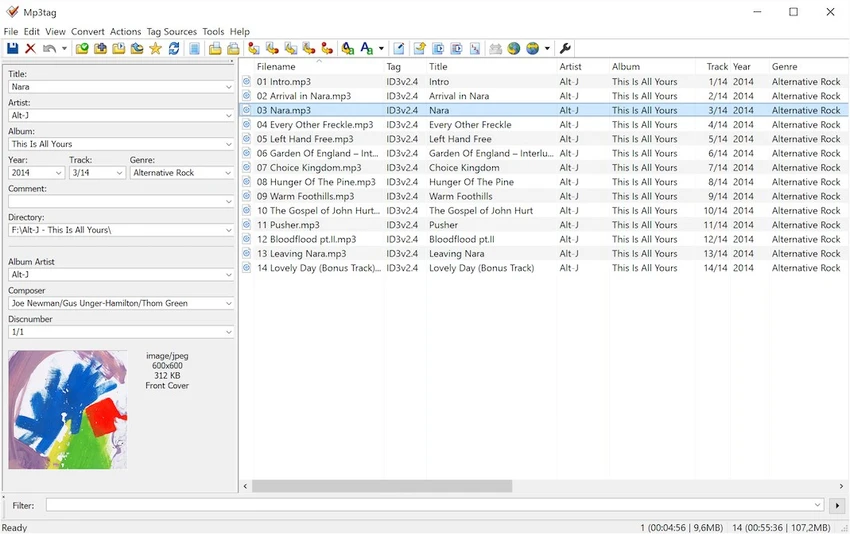

Mp3tag is a lightweight yet powerful metadata editor designed for managing and organizing digital music libraries. It allows users to edit tags such as artist, album, title, genre, and cover art across a wide range of audio formats.
The software is especially useful for users who maintain large music collections, as it supports batch editing, automatic tagging, and file renaming based on metadata. Mp3tag also integrates with online databases like Amazon, Discogs, and freedb, making it easier to automatically retrieve accurate album information and artwork. Despite its advanced capabilities, Mp3tag maintains a clean and simple interface, making it accessible for both casual users and professionals managing extensive audio libraries.
Features of Mp3tag
- Edit audio metadata tags including:
- ID3v1, ID3v2.3, ID3v2.4
- iTunes MP4 tags
- WMA tags
- Vorbis Comments
- APE tags
- Batch edit metadata for multiple audio files.
- Rename files based on tag information.
- Replace characters or words in tags and filenames.
- Import and export tag information.
- Create playlists from tagged music files.
- Download metadata and cover art from online databases:
- Amazon
- Discogs
- freedb
- Supports a wide range of audio formats:
- MP3
- AAC
- FLAC
- M4A / MP4
- WMA
- OGG Vorbis
- WAV-based formats and more
- Automatic tagging and library organization tools.
- Lightweight and fast performance on Windows systems.
Interface and Usability
Mp3tag uses a straightforward, spreadsheet-like interface where audio files and their metadata are displayed in a structured table. This layout makes it easy to edit multiple tags at once without navigating through complex menus. During use, batch operations such as renaming files or updating album information feel efficient and well-organized. The ability to customize actions and apply changes across large music libraries is one of Mp3tag’s strongest usability advantages. While the interface is minimalistic, it is highly functional and designed for speed rather than visual effects, making it especially suitable for users who prioritize efficiency in music management.
Who Should Use Mp3tag?
- Music collectors managing large libraries.
- DJs organizing playlists and tracks.
- Audiophiles maintaining clean metadata.
- Users fixing missing or incorrect song information.
- Anyone who wants to rename and organize audio files efficiently.
- Professionals managing audio archives across multiple formats.
Conclusion
Mp3tag is a highly reliable tool for managing and organizing music metadata across a wide range of audio formats. Its batch editing capabilities, file renaming features, and integration with online music databases make it especially valuable for users with large or poorly organized music collections.


