Quick CPU logo

Quick CPU 6.6.0

  • User Rating:
    ★★★★★
    ★★★★★
    0.0 0Votes
  • Requirements:
    Windows
  • Version: 6.6.0
  • Latest updated: 4 days ago
  • License: Freeware  
  • Publisher: Coderbag LLC
  • Size: 35 MB
× app stores

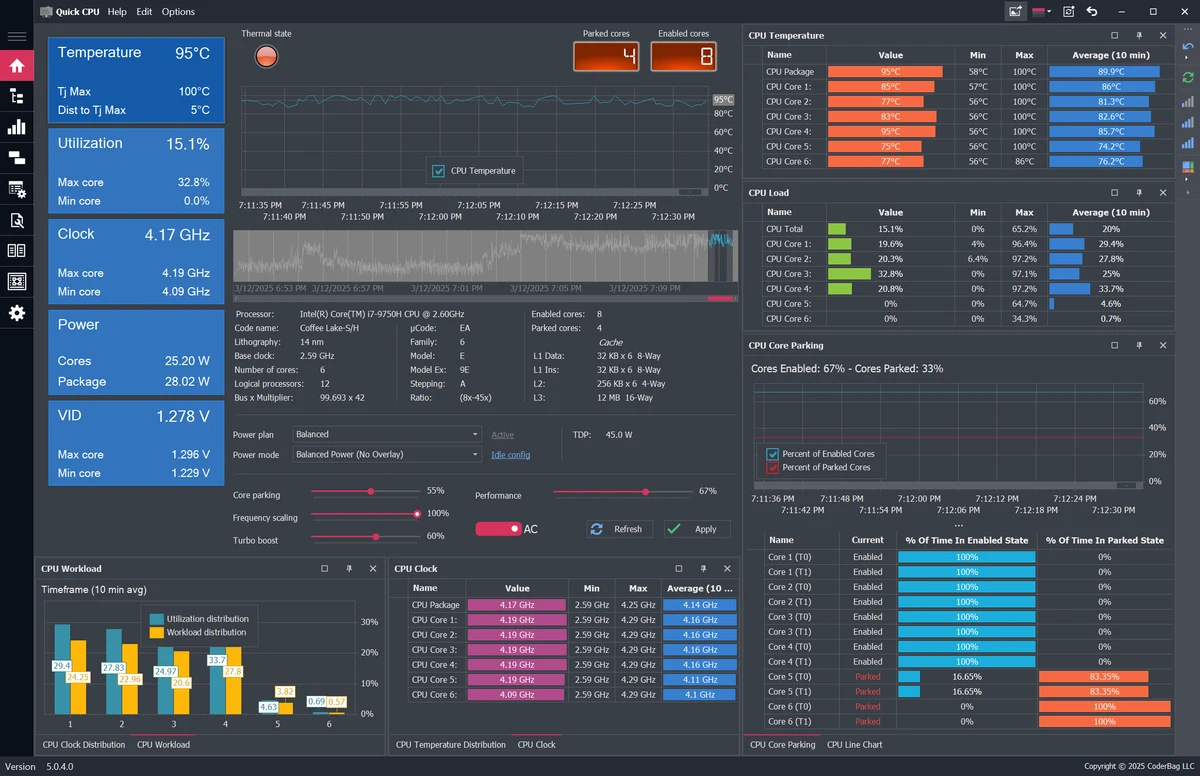
Quick CPU (formerly known as Core Parking Manager v3) is a Windows system utility designed for users who want greater control over their processor's performance. It allows you to monitor and fine-tune important CPU settings such as Core Parking, Frequency Scaling, Turbo Boost, and power management without requiring a system restart. Unlike basic hardware monitoring utilities, Quick CPU combines real-time performance data with advanced configuration options, making it a useful tool for users who want to optimize CPU behavior according to their workload.

Features of Quick CPU

  • Real-time performance graph for each CPU core
  • Displays whether each CPU core is Active or Parked
  • Adjustable size for individual CPU performance graphs
  • Live counter showing active versus parked CPU cores
  • Adjustable CPU Core Parking settings
  • Adjustable CPU Frequency Scaling settings
  • Adjustable CPU Turbo Boost settings
  • Real-time C-State residency indicators and configuration
  • Real-time CPU speed monitoring
  • Real-time CPU utilization monitoring
  • Real-time CPU temperature monitoring
  • System memory profile display
  • System power output monitoring
  • Support for AC/DC power state settings
  • Support for Windows power plans
  • Built-in application update support
  • Applies configuration changes instantly without requiring a restart

User Experience

After using Quick CPU, I found that its primary strength is the amount of control it provides over processor performance. The interface presents detailed real-time information, including CPU utilization, temperature, core activity, and operating speed, allowing performance changes to be observed immediately. Adjusting Core Parking, Frequency Scaling, and Turbo Boost settings is straightforward, and one of the biggest advantages is that changes take effect instantly. There is no need to reboot the system after applying new settings, making experimentation much more convenient. Because the application exposes advanced CPU controls, users should have at least a basic understanding of processor power management before making significant adjustments. Fortunately, the live monitoring graphs and indicators make it easier to observe how configuration changes affect overall system behavior.

Who Should Use Quick CPU?

  • Power users who want more control over CPU performance
  • PC enthusiasts interested in monitoring processor behavior
  • Users who frequently switch between performance and power-saving profiles
  • Anyone looking to fine-tune Windows CPU power management settings

Conclusion

Quick CPU is a capable Windows utility for monitoring and adjusting processor performance settings in real time. Its combination of live performance metrics, configurable Core Parking, Frequency Scaling, Turbo Boost controls, and instant application of changes makes it a practical solution for users seeking more control over their CPU's behavior.

Pros & Cons

Pros

  • Comprehensive CPU monitoring in real time
  • Fine-grained control over Core Parking, Frequency Scaling, and Turbo Boost
  • Live CPU temperature and utilization monitoring
  • Supports Windows power plans and AC/DC power settings
  • Configuration changes apply immediately
  • Compatible with Windows 11, Windows 10, Windows 8, and Windows 7

Cons

  • Advanced settings may be overwhelming for beginners
  • Focused specifically on CPU optimization rather than complete system tuning

Frequently Asked Questions

What is Quick CPU used for?

Quick CPU is used to monitor and fine-tune CPU performance settings, including Core Parking, Frequency Scaling, Turbo Boost, C-State residency, and Windows power management.

Does Quick CPU require a restart after changing settings?

No. Configuration changes are applied immediately without requiring a system restart.

Can Quick CPU monitor CPU temperature?

Yes. The software provides real-time CPU temperature monitoring along with CPU utilization and operating speed.

Which Windows versions are supported?

Quick CPU supports Windows 11, Windows 10, Windows 8, and Windows 7.

Is Quick CPU suitable for beginners?

The application is usable by most Windows users, but its advanced CPU tuning options are better suited for users who understand processor performance and power management.

Recommended apps [Freeware]:
  • EarthView 7.16.6 EarthView logo dynamic wallpapers and screensavers with day, night, and weather effects
  • DirPrintOK 7.61 DirPrintOK logo fast and portable tool to print or export directory contents in XLS, HTML, CSV, or TXT formats.
  • BleachBit 6.0.0 BleachBit logo a free Windows cleaner that removes junk files, protects privacy, and frees disk space with secure wiping.
  • VidCoder 12.20 VidCoder logo Convert, encode, and rip DVDs and Blu-rays with VidCoder, a powerful open-source video transcoding tool for Windows
  • Claude Desktop 1.15962.1 Claude Desktop logo Anthropic's AI assistant to Windows and macOS for writing, coding, research, and file analysis
  • Pale Moon 34.3.1 Pale Moon logo fast, open-source web browser based on Firefox technology, offering customization, stability, and efficient performance
Recommended apps [Shareware]:
  • iPubsoft Android Desktop Manager 3.7.22 iPubsoft Android Desktop Manager logo transfer files, manage Android data, back up and restore devices, and organize contacts and SMS from your PC
  • RadioCaster 3.7.2.0 RadioCaster logo Allows you to broadcast any computer or analog audio online using Icecast, Shoutcast, and many other formats.
  • Duplicate Photos Fixer Pro 1.3.1086.1158 Duplicate Photos Fixer Pro logo finds and removes duplicate and similar photos to organize your library and save space
  • My Music Collection 3.4.16.178 My Music Collection logo organize CDs, vinyl, and MP3s with cataloging, tracking, and export features on Windows
  • EF Mailbox Manager 26.05 EF Mailbox Manager logo Manage multiple POP3 email accounts, remove spam on the server, and download messages securely
  • TubeDownload Pro 7.5.6 TubeDownload Pro logo a Windows video downloader that supports HD downloads, playlists, speed boosts, and format conversion