


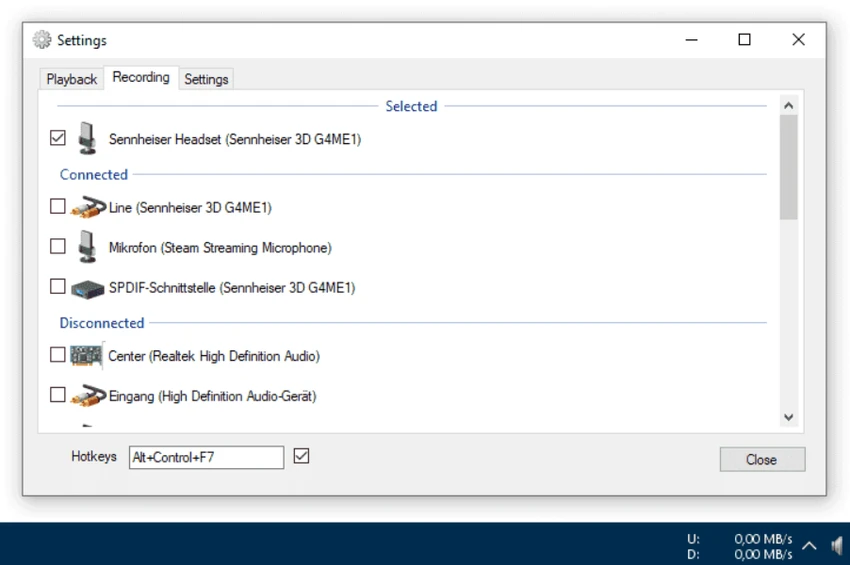

SoundSwitch is a lightweight Windows utility designed to simplify switching between multiple audio output devices. Instead of navigating through system settings or the volume mixer, users can toggle between headphones, speakers, and other audio devices instantly using a customizable hotkey. It is built for users who frequently switch audio outputs during gaming, streaming, meetings, or general multimedia use.
SoundSwitch runs quietly in the background and integrates into the Windows system tray. Once configured, it allows users to cycle through selected audio playback devices with a single keyboard shortcut. The tool is designed to eliminate repetitive manual navigation through Windows sound settings. Users choose which audio devices are included in the switching cycle, ensuring only relevant outputs are toggled. After setup, switching audio devices becomes immediate and notification-based, confirming the active output each time the hotkey is used.
Features of SoundSwitch
- Hotkey-based audio device switching
- Customizable keyboard shortcut (default Ctrl + Alt + F11)
- System tray integration for quick settings access
- Selective device list for controlled switching
- Instant switching between playback devices
- Lightweight background operation
- Notifications showing active audio device
- Support for multiple output devices (headphones, speakers, DACs, etc.)
SoundSwitch is designed for speed and simplicity. Setup involves selecting preferred audio devices and assigning a hotkey. Once configured, it requires no additional interaction. In everyday use, the experience is seamless—pressing a key instantly changes the active output without opening menus or interrupting workflow. This makes it especially useful during multitasking scenarios like gaming, video calls, or content creation. Because it runs silently in the background, it has minimal system impact and does not interfere with other applications.
Who Should Use SoundSwitch?
- Users with multiple audio devices (headphones + speakers)
- Gamers switching between voice chat and media audio
- Streamers and content creators managing audio sources
- Remote workers using headsets and speakers interchangeably
- Anyone frequently adjusting Windows audio output
Conclusion
SoundSwitch is a simple but highly practical utility that solves a common Windows frustration: switching audio devices quickly. With its hotkey-based system and lightweight design, it removes unnecessary steps and improves workflow efficiency.


