Xlight FTP Server logo

Xlight FTP Server 3.9.5

  • User Rating:
    ★★★★★
    ★★★★★
    0.0 ★ 0Votes
  • Requirements:
    Windows
  • Version: 3.9.5
  • Latest updated: 3 weeks ago
  • License: Freemium  
  • Publisher: Xlight FTP Server
  • Size: 3 MB
× app stores

Xlight FTP Server is a high-performance FTP server software for Windows designed to handle large-scale file transfer environments. It is built to support thousands of simultaneous clients while maintaining low CPU and memory usage, making it suitable for enterprise and high-traffic deployment scenarios.

The software is designed not only for basic FTP hosting but also for secure and scalable file transfer management. It integrates with enterprise authentication systems such as Active Directory and LDAP, and supports database-backed user management through ODBC. This allows organizations to centralize user control and integrate the FTP server into existing IT infrastructure.

Security and protocol flexibility are core parts of the system, with support for SSL encryption, SFTP (SSH2), and advanced logging and auditing features. It is intended for environments where controlled, secure, and monitored file transfer is required across multiple users and systems.

Features of Xlight FTP Server

Enterprise Integration

  • Active Directory authentication support
  • LDAP directory server authentication
  • Database-backed user management via ODBC
  • Stored procedures for database integration

Security and Protocol Support

  • 128-bit SSL encryption for secure FTP sessions
  • SFTP (SSH2) server support
  • SSL client authentication support
  • IPv6 compatibility

Logging and Monitoring

  • Detailed FTP session and error logs
  • UNIX xferlog format support
  • Transfer logs stored in external databases via ODBC
  • Syslog server integration for centralized logging

Server Administration

  • Remote GUI administration from any location
  • Real-time configuration changes without restarting server
  • Virtual server support on a single IP address
  • User isolation with independent virtual paths
  • Group and public directory access control
  • Fine-grained bandwidth control per user, group, or schedule

Performance and Transfer Features

  • Optimized for thousands of simultaneous FTP clients
  • Low CPU and memory usage design
  • MODE Z compression for faster transfers
  • Anti-leech protection for unauthorized link usage
  • UPnP support for easier router configuration
  • UTF-8 encoding support for file compatibility

Interface and Usability

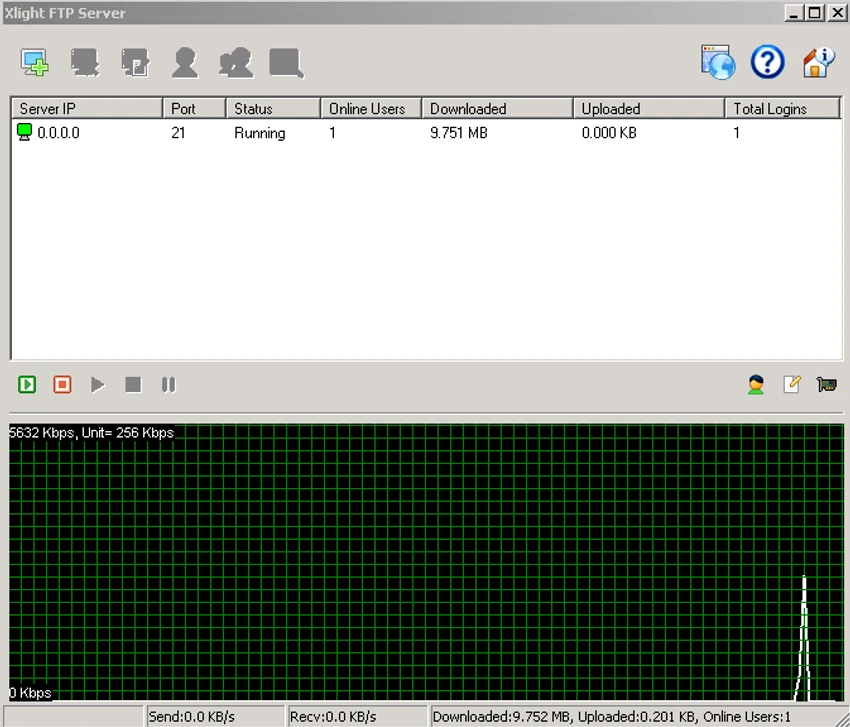
Xlight FTP Server uses a management-focused interface designed for server configuration and administration. It is structured around virtual servers, user accounts, and permission rules, allowing administrators to define detailed access control policies.

Most configuration tasks can be handled through a remote GUI administration system, which allows secure management without requiring direct server access. Changes take effect in real time, reducing downtime and eliminating the need for frequent restarts. While the interface is functional rather than visually modern, it prioritizes control, scalability, and precision for enterprise environments.

Who Should Use Xlight FTP Server?

  • IT administrators managing file transfer infrastructure
  • Enterprises needing secure internal or external file sharing
  • Organizations using Active Directory or LDAP authentication
  • Hosting providers managing multiple FTP virtual servers
  • Businesses requiring SFTP and SSL-secured file transfers
  • Users needing centralized logging and audit control

Conclusion & Recommendation

Xlight FTP Server is a powerful and scalable FTP solution designed for professional and enterprise environments. With support for multiple authentication systems, secure transfer protocols, and detailed logging, it provides a robust platform for managing large-scale file transfer operations.

Pros & Cons

✓

Pros

  • Supports FTP, FTPS, and SFTP protocols
  • Strong enterprise integration (Active Directory, LDAP, databases)
  • High performance with low resource usage
  • Real-time configuration without restart
  • Advanced logging and audit capabilities
  • Fine-grained access and bandwidth control
✕

Cons

  • Designed primarily for enterprise use, not casual users
  • Interface is functional rather than modern or beginner-friendly
  • Setup complexity may be high for non-technical users

Frequently Asked Questions

What is Xlight FTP Server used for?

Xlight FTP Server is used to host and manage file transfer services over FTP, FTPS, and SFTP protocols, mainly in enterprise and professional environments.

Does Xlight FTP Server support secure connections?

Yes. It supports SSL encryption for FTP sessions and also includes SFTP (SSH2) support for secure file transfers.

Can it integrate with Active Directory or LDAP?

Yes. It can authenticate users using Active Directory or LDAP and store user settings directly in those systems.

Can multiple users connect at the same time?

Yes. Xlight FTP Server is designed to handle thousands of simultaneous FTP clients with low system resource usage.

Does it support remote administration?

Yes. The server can be managed remotely through a secure GUI administration interface without needing direct access to the server machine.

Can I control user access and permissions?

Yes. It supports virtual paths, group-based access, user isolation, and detailed permission control for managing file access securely.

Recommended apps [Freeware]:
  • Dr.Web Live Disk 9.0.1 Dr.Web Live Disk logo free bootable antivirus rescue disk that removes malware and helps recover infected systems
  • Ventoy 1.1.16 + LiveCD Ventoy logo create bootable USB drives and boot directly from ISO files without extraction or reformatting
  • XnConvert 1.112.0.0 XnConvert logo batch image converter supporting 500 formats with 80+ editing actions and cross-platform compatibility
  • UninstallView 1.52 UninstallView logo View detailed information about installed programs and uninstall software on local or remote Windows computers
  • Jailer 17.2 Jailer logo database subsetting and data browsing tool for exporting consistent relational datasets and navigating database relationships
  • Free Music & Video Downloader 3.19 Free Music & Video Downloader logo Download music and videos from supported online sources, save MP3 files, and organize downloaded media with a simple search tool.
Recommended apps [Shareware]:
  • MobiKin Assistant for Android 5.1.47 MobiKin Assistant for Android logo back up, restore, and manage Android data, contacts, apps, and files from a PC
  • ON1 Effects 2026.4 ON1 Effects logo AI-powered photo effects, creative filters, presets, LUTs, and masking tools for stunning image enhancements
  • Start11 2.7.3 Start11 logo Windows customization tool that restores classic Start Menu styles and enhances taskbar functionality on Windows 10 and 11
  • HTMLPad 2025 v18.7.0.277 HTMLPad logo Fast HTML editor with CSS and JavaScript tools, code completion, FTP support, validation, and browser preview for Windows.
  • Neo Lighting Control 4.3.0 Neo Lighting Control logo Manage LED and architectural lighting systems with flexible control software designed for scalable production and professional environments.
  • TextPad 9.9.7 TextPad logo Edit large text files efficiently with a powerful Windows editor featuring macros, regular expressions, spell checking, file comparison, and more.