MemoryCleaner logo

MemoryCleaner 2.0.1

  • User Rating:
    ★★★★★
    ★★★★★
    0.0 0Votes
  • Requirements:
    Windows
  • Version: 2.0.1
  • Latest updated: 2 weeks ago
  • License: Freeware  
  • Publisher: Kilho.net
  • Size: 3 MB
× app stores

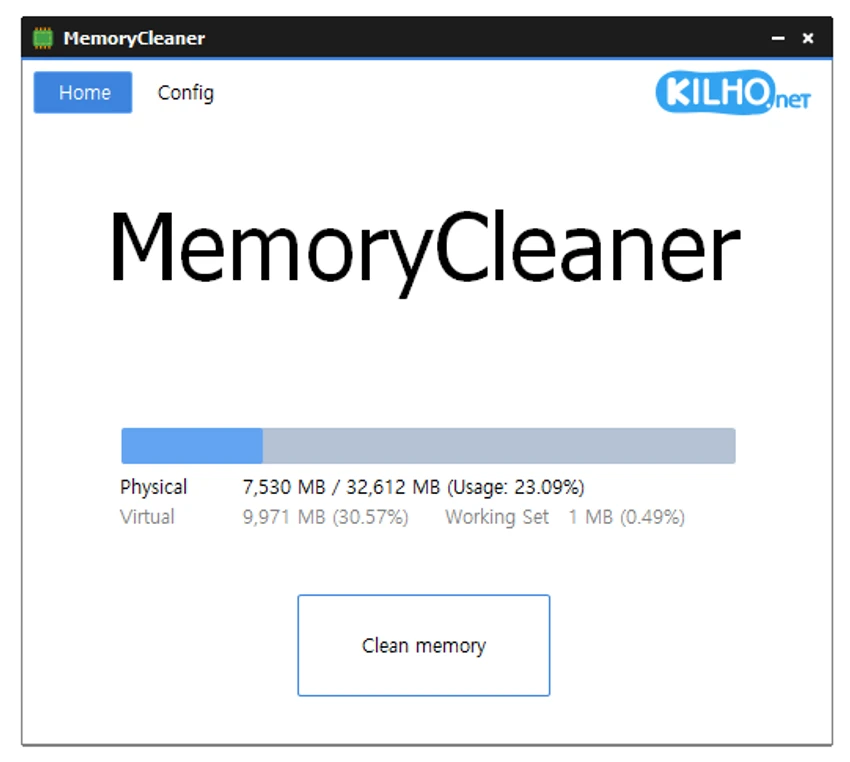
MemoryCleaner is a lightweight Windows utility designed to help users manage system memory with minimal effort. Rather than offering a broad suite of optimization tools, it focuses on one specific task: cleaning memory through a simple one-click process or automated rules. The application displays real-time information about both physical and virtual memory, allowing users to monitor current memory usage before initiating a cleanup.

The software is built with simplicity in mind, making it accessible even for users with little technical experience. Its interface presents only the essential information and controls, reducing the learning curve while keeping the primary function easy to access. For users who prefer automation, MemoryCleaner includes options to clean memory at scheduled time intervals or whenever memory usage exceeds a user-defined threshold. It can also launch automatically when Windows starts, ensuring the cleaning process is available without requiring manual intervention.

Instead of trying to replace advanced system optimization utilities, MemoryCleaner provides a focused solution for users who want a straightforward way to manage memory usage without unnecessary complexity.

Features of MemoryCleaner

  • Cleans system memory with a single click.
  • Displays live physical memory usage.
  • Shows current virtual memory usage.
  • Cleans the Working Set and Standby memory.
  • Supports automatic memory cleanup at specified time intervals.
  • Automatically cleans memory when a user-defined memory usage threshold is exceeded.
  • Option to launch automatically when Windows starts.
  • Simple interface designed for quick operation.

Interface and Usability

One of the first things I noticed about MemoryCleaner is how uncomplicated the interface feels. Everything is presented on a single screen, with live memory statistics clearly visible alongside the main Clean Memory button. There are no unnecessary menus or advanced options competing for attention, making the application easy to understand immediately after launching it.

The automatic cleaning settings are equally straightforward. Setting a memory usage threshold or configuring scheduled cleanup takes only a few clicks, and the startup option allows the utility to remain available in the background if desired. Overall, the software prioritizes ease of use over extensive customization, which makes it particularly suitable for users who simply want a quick way to trigger or automate memory cleanup.

Who Should Use MemoryCleaner?

  • Windows users looking for a simple memory cleaning utility.
  • Beginners who want an easy-to-use system maintenance tool.
  • Users who prefer automatic memory cleanup based on time intervals or memory usage.
  • Anyone seeking a lightweight application focused specifically on memory management rather than full PC optimization.

Conclusion

MemoryCleaner delivers exactly what its name suggests: a focused utility for cleaning system memory without unnecessary complexity. Its clean interface, live memory monitoring, and automation options make it easy to use whether you prefer manual control or scheduled maintenance.

Pros & Cons

Pros

  • Simple one-click memory cleanup.
  • Beginner-friendly interface.
  • Displays live physical and virtual memory information.
  • Supports scheduled automatic cleaning.
  • Can clean memory automatically when usage exceeds a defined threshold.
  • Optional startup with Windows.

Cons

  • Limited to memory cleaning features.
  • Minimal configuration options compared to comprehensive system optimization suites.
  • No built-in system optimization tools beyond memory cleanup.

Frequently Asked Questions

What does MemoryCleaner do?

MemoryCleaner is a Windows utility that helps clean system memory by clearing the Working Set and Standby memory. It also displays live information about physical and virtual memory usage, allowing users to monitor memory before performing a manual or automatic cleanup.

Can MemoryCleaner clean memory automatically?

Yes. MemoryCleaner can automatically clean memory at user-defined time intervals or whenever memory usage exceeds a threshold that you specify in the settings.

Is MemoryCleaner easy to use?

Yes. The software is designed with a simple, beginner-friendly interface. The main window displays memory usage information along with a single Clean Memory button, making it easy to perform a cleanup without navigating complex menus.

Can MemoryCleaner launch when Windows starts?

Yes. The application includes an option to start automatically with Windows, allowing it to be available immediately after your computer boots.

What memory information does MemoryCleaner display?

MemoryCleaner provides live counters for both physical memory and virtual memory. These real-time statistics help users monitor current memory usage and decide when to perform a cleanup.

Does MemoryCleaner include other system optimization features?

No. Based on the available information, MemoryCleaner is focused solely on memory cleanup and its automation options. It does not include additional PC optimization or maintenance tools.

Recommended apps [Freeware]:
  • CS Easy Unlocker 1.1.6.0 CS Easy Unlocker logo unlock restricted folders and fix “Access Denied” errors with a simple one-click tool.
  • Vektorrazor 2.2 Vektorrazor logo converts logos and image sources into clean, CAD-friendly vector contours for technical workflows
  • GetPixelColor 3.55 GetPixelColor logo Identify exact pixel colors on Windows with GetPixelColor, a lightweight tool supporting RGB, RGBA, and HLS color values
  • HFS: HTTP File Server 3.2.1 HFS: HTTP File Server logo Share files over the internet with HFS HTTP File Server. Easy setup, bandwidth control, virtual file system, and user management
  • Black Menu for Google 31.6.2 Black Menu for Google logo Access popular Google services quickly from your browser with a customizable menu extension for search, Gmail, Maps, Drive, and more.
  • Blender 5.2.0 Blender logo Create 3D models, animations, visual effects, and rendered scenes with a free, open-source suite for professional content creation
Recommended apps [Shareware]:
  • Topaz Photo 1.6.1 Topaz Photo logo advanced AI to sharpen photos, remove noise, and enhance image quality with ease
  • ReclaiMe Build 6447 ReclaiMe logo easy-to-use Windows data recovery tool for hard drives, USB drives, RAID arrays, and memory cards
  • FlexiPDF 2025.420.0626 FlexiPDF logo Windows PDF editor for editing text, images, OCR scanning, and converting PDFs into Word and other formats
  • FoneLab Android Data Recovery 3.1.56 FoneLab Android Data Recovery logo Recover deleted Android contacts, messages, photos, videos, documents, and more from phones, SD cards, and SIM cards.
  • SmartGit 26.1.045 SmartGit logo Manage Git repositories easily with visual history, merging tools, platform integrations, and customizable workflows.
  • 3delite Duplicate Picture Finder 1.0.112.122 3delite Duplicate Picture Finder logo Find duplicate and similar pictures on your PC with image comparison, previews, EXIF details, and multi-threaded scanning tools.