EarthTime logo

EarthTime 6.33.4

  • User Rating:
    ★★★★★
    ★★★★★
    0.0 0Votes
  • Requirements:
    Windows
  • Version: 6.33.4
  • Latest updated: 1 week ago
  • License: Freeware  
  • Publisher: DeskSoft
  • Size: 5.8 MB
×

EarthTime is a world clock application that helps users track the local time and date of cities across the globe. Combining time zone management, weather information, and an interactive world map, it provides a convenient solution for international communication, travel planning, and global business operations.

Overview

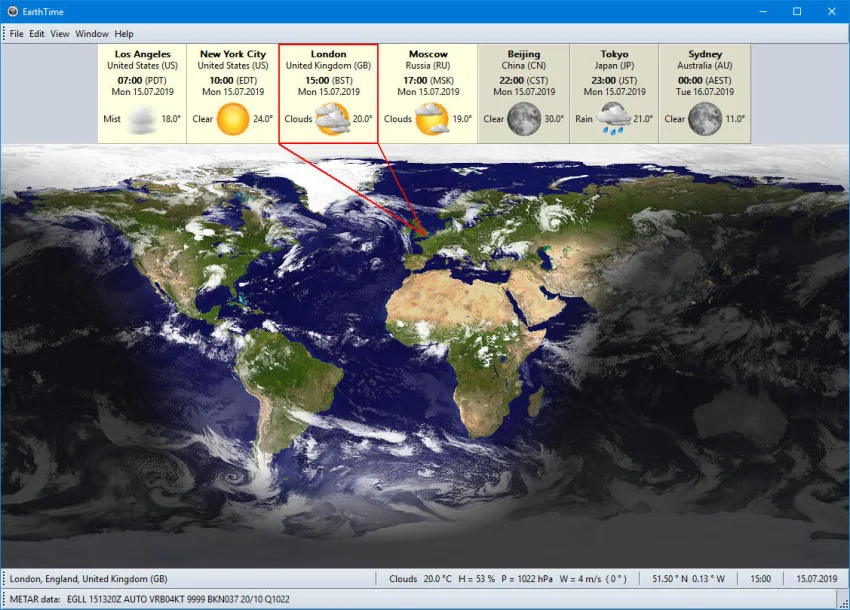
EarthTime is designed for users who need quick access to accurate local times around the world. The software includes a built-in database of more than 120,000 cities and allows users to add custom locations as needed. Beyond displaying world times, EarthTime enhances the experience with a visual map showing daylight and night zones, optional real-time cloud coverage, weather conditions, and customizable alarms based on any city's local time.

Its combination of practical time-tracking features and visual presentation makes it a useful desktop companion for professionals, remote teams, travelers, and anyone working across multiple time zones.

Features of EarthTime

  • Local time and date display for more than 120,000 cities worldwide
  • Ability to add unlimited custom locations
  • Alarms based on the local time of any city
  • Interactive Earth map with day and night visualization
  • Current weather information including:
    • Temperature
    • Humidity
    • Wind conditions
    • Air pressure
  • Optional cloud layer with current satellite cloud data
  • Full-screen viewing mode
  • Extensive customization options
  • Support for modern Windows operating systems

User Experience

Using EarthTime feels straightforward from the moment it launches. The interface makes it easy to monitor multiple cities simultaneously, while the visual world map provides a clear understanding of global time differences. The day-and-night display is particularly useful for quickly identifying business hours across different regions.

The built-in weather information adds extra value, allowing users to check local conditions without opening separate applications. Setting alarms for specific cities is simple and practical, especially for international meetings, calls, or travel schedules.

Customization options help tailor the display to individual preferences, making EarthTime suitable for both casual users and professionals who rely on accurate global time tracking every day.

Overall Rating

4.6/5

EarthTime offers a well-rounded combination of world clock functionality, weather monitoring, and visual time-zone management. Its extensive city database and customization options make it a reliable tool for users who frequently work across international locations.

Who Should Use EarthTime?

  • Remote workers collaborating across time zones
  • International business professionals
  • Frequent travelers
  • Event coordinators managing global schedules
  • Weather enthusiasts monitoring conditions worldwide
  • Anyone needing a reliable world clock application

Conclusion & Recommendation

EarthTime successfully combines world clock functionality with weather tracking and an informative global map. The ability to manage thousands of locations, create city-specific alarms, and visualize daylight and nighttime regions makes it a practical tool for both personal and professional use. If you regularly communicate with people around the world or need a convenient way to monitor multiple time zones, EarthTime is a solid choice worth considering.

Pros & Cons

Pros

    • Supports over 120,000 cities worldwide
    • Easy-to-use world clock interface
    • Visual day and night Earth map
    • Weather information for global locations
    • Flexible alarm functionality for different time zones
    • Full-screen mode available
    • Highly customizable

Cons

    • Available only for Windows platforms
    • Focused primarily on time and weather tracking rather than advanced scheduling tools

Frequently Asked Questions

What is EarthTime used for?

EarthTime is a world clock application that displays the local time and date for cities worldwide while also providing weather information, alarms, and a visual Earth map.

How many cities does EarthTime support?

The software includes a built-in database of more than 120,000 cities and allows users to add custom locations.

Can I set alarms for different time zones?

Yes. EarthTime lets you create alarms based on the local time of any city in the world.

Does EarthTime provide weather information?

Yes. It can display current weather conditions such as temperature, humidity, wind, and air pressure for supported locations.

Is EarthTime available for Windows 11?

Yes. EarthTime supports Windows Vista, Windows 7, Windows 8, Windows 10, Windows 11, and Windows Server editions in both 32-bit and 64-bit versions.

Can EarthTime display real-time cloud coverage?

Yes. The software can optionally download and display current satellite cloud data on the world map.

Recommended apps [Freeware]:
  • Trillian 6.6 Build 15 Trillian logo all-in-one chat software designed to simplify online communication
  • IObit Driver Booster 13.4.0.234 IObit Driver Booster logo updates outdated drivers automatically to boost system stability and gaming performance.
  • EarthView 7.16.4 EarthView logo dynamic wallpapers and screensavers with day, night, and weather effects
  • StaxRip 2.52.4 StaxRip logo powerful Windows GUI for video/audio encoding using FFmpeg, x265, AviSynth+, VapourSynth, and more.
  • Stretchly 1.21.0 Stretchly logo reminds you to take breaks while working on your computer, promoting better health and productivity.
  • Android Studio 2026.1.1.9 Android Studio logo Google’s official IDE for Android, offering intelligent coding, fast emulators, and cloud integration.
Recommended apps [Shareware]:
  • Amazing Laptop Cooling Wizard 1.1.5.8 Amazing Laptop Cooling Wizard logo Reduce laptop overheating by optimizing CPU and fan cooling performance on Windows.
  • Typing Instructor Platinum 21.1 Typing Instructor Platinum logo improve typing speed and accuracy through interactive lessons, games, and 10-finger typing practice.
  • Adobe Illustrator 2026 Adobe Illustrator logo professional vector graphic editor for creating logos, illustrations, and scalable designs.
  • Adobe After Effects 2026 Adobe After Effects logo advanced motion graphics, visual effects, compositing, and animation tools for creators.
  • Foxit PDF Editor 2026.1.1.36485 Foxit PDF Editor logo complete PDF solution for businesses, offering advanced editing, collaboration, and document security features.
  • Wondershare AllMyTube 7.4.9.2 Wondershare AllMyTube logo download and convert videos from YouTube and 100+ sites into multiple formats for offline viewing.