Driver Easy logo

Driver Easy 7.1.3.5200

  • User Rating:
    ★★★★★
    ★★★★★
    0.0 0Votes
  • Requirements:
    Windows
  • Version: 7.1.3.5200
  • Latest updated: 3 weeks ago
  • License: Free Trial  
  • Publisher: Easeware
  • Size: 7 MB
× app stores

Keeping hardware drivers updated is essential for maintaining system stability, compatibility, and performance. Driver Easy simplifies this process by scanning your computer, identifying outdated or missing drivers, and helping you download the appropriate updates. Designed for Windows users of all experience levels, Driver Easy combines hardware detection, driver management, and offline scanning into a single application, reducing the need to search manually for drivers online.

Overview

Driver Easy is a Windows driver management utility that scans your computer for missing, outdated, or unsupported drivers. It gathers detailed hardware information and compares installed drivers against its driver database to help users locate official driver updates. In addition to driver updates, the software includes offline scanning for computers without internet access and a driver uninstall feature for removing drivers associated with hardware that is no longer installed. Driver Easy supports Windows 7 through Windows 11 and is intended to simplify routine driver maintenance.

Features of Driver Easy

Driver Scanning

  • Detects missing drivers
  • Finds outdated drivers
  • Identifies driver-related issues
  • Displays available driver updates

Large Driver Database

  • Database containing over 8 million drivers
  • Daily driver database updates
  • Helps locate official driver versions
  • Reduces the risk of installing outdated drivers

Hardware Information

Displays detailed system information, including:

  • Operating system
  • RAM
  • Processor
  • Motherboard

Provides hardware details for:

  • Graphics cards
  • Monitors
  • Hard drives
  • Network adapters
  • Audio devices

Offline Scan

  • Scan computers without an internet connection
  • Generate a driver analysis file
  • Download required drivers using another internet-connected computer
  • Particularly useful for network driver installation

Driver Uninstall

  • Remove drivers for hardware that has been replaced
  • Clean unused drivers from the system
  • Help reduce potential hardware conflicts
  • Assist with removing obsolete graphics card drivers

Technical Support

  • Technical assistance for driver-related issues
  • Support for troubleshooting complex driver problems

User Experience

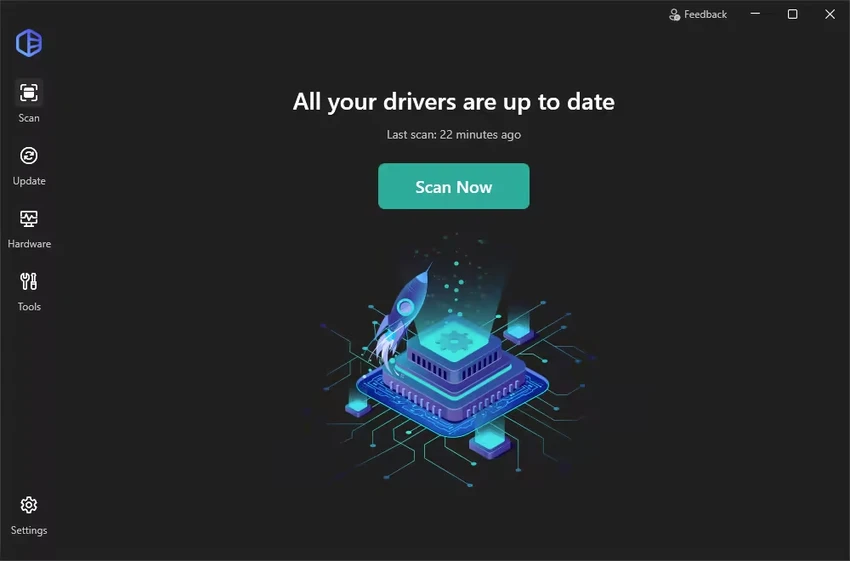
Driver Easy is built around simplicity. After launching the application, users can quickly scan their system to identify missing or outdated drivers without manually checking each hardware component. The interface presents system information in an organized way, making it easy to review hardware specifications alongside driver status. This is especially useful when troubleshooting devices or preparing for hardware upgrades. One of the software's most useful capabilities is its offline scanning feature. If a computer lacks internet access—often due to missing network drivers—users can create a hardware analysis file, transfer it to another computer, download the required drivers, and install them later.

The driver uninstall feature is another practical addition. Removing drivers associated with hardware that is no longer installed can help avoid unnecessary driver conflicts and reduce system clutter. The large driver database and regular updates help simplify driver maintenance by minimizing the need to search multiple manufacturer websites individually. Overall, Driver Easy offers a streamlined approach to keeping Windows drivers organized and up to date.

Who Should Use Driver Easy?

  • Home users maintaining Windows PCs
  • Users troubleshooting hardware issues
  • PC technicians
  • IT support professionals
  • Gamers updating hardware drivers
  • Users reinstalling Windows
  • Anyone looking for an easier way to manage drivers

Conclusion

Driver Easy provides a convenient way to keep Windows drivers current without manually searching hardware manufacturer websites. Its combination of automatic scanning, a large driver database, offline driver detection, and driver removal tools makes routine maintenance much easier.

Pros & Cons

Pros

  • Easy-to-use interface
  • Detects missing and outdated drivers
  • Extensive driver database
  • Daily database updates
  • Offline scanning for computers without internet access
  • Detailed hardware information
  • Driver uninstall tool for removed hardware
  • Supports Windows 7 through Windows 11
  • Technical support available

Cons

  • Driver downloads require an internet connection unless using Offline Scan
  • Primarily focused on driver management rather than broader system optimization
  • Some features may vary between editions

Frequently Asked Questions

What is Driver Easy?

Driver Easy is a Windows utility that scans your computer for missing or outdated hardware drivers and helps you locate compatible driver updates.

Can Driver Easy detect missing drivers?

Yes. It scans your computer and identifies missing, outdated, or unsupported drivers.

Does Driver Easy support offline computers?

Yes. Its Offline Scan feature generates a driver analysis file that can be transferred to another internet-connected computer to obtain the required drivers.

What hardware information does Driver Easy display?

The software displays information about the operating system, processor, RAM, motherboard, graphics card, monitor, hard drive, network adapter, and audio hardware.

Can Driver Easy remove old drivers?

Yes. It includes a Driver Uninstall feature that removes drivers associated with hardware that has been replaced or is no longer present.

Which Windows versions are supported?

Driver Easy supports Windows 11, Windows 10, Windows 8.1, and Windows 7.

How large is the Driver Easy database?

According to the provided information, Driver Easy is supported by a database containing over 8 million drivers with daily updates.

Recommended apps [Freeware]:
  • SoundSwitch 7.1.0 / 7.1.1 Beta 1 SoundSwitch logo a lightweight Windows tool that lets you switch audio devices instantly using customizable hotkeys
  • DiskMax 7.33 DiskMax logo cleans unnecessary files, optimizes Windows storage, and helps improve PC performance with automated maintenance tools
  • RustDesk 1.4.8 RustDesk logo open-source remote desktop solution with self-hosting, cross-platform support, and customizable remote access tools
  • Foobar2000 2.25.10 Foobar2000 logo a lightweight audio player supporting multiple formats, gapless playback, and advanced customization options
  • Jailer 17.1.3 Jailer logo database subsetting and data browsing tool for exporting consistent relational datasets and navigating database relationships
  • Rocrail Build 7065 Rocrail logo free model railroad control software that automates train layouts, accessories, schedules, and operations across multiple platforms
Recommended apps [Shareware]:
  • Bulk Image Downloader 6.64 Bulk Image Downloader logo Download full-size images and videos from galleries, forums, and image hosts with Bulk Image Downloader
  • EF File Catalog 26.05 EF File Catalog logo Catalog disks, folders, archives, and media for fast offline browsing, searching, and file organization
  • IntraWEB 16.2.2 IntraWEB logo web development framework for creating interactive web applications using a Windows application-style approach
  • Rollback RX 12.91 Rollback RX logo instant system restore software for Windows lets users recover PCs via snapshots in seconds
  • R-Studio 9.5 Build 191810 R-Studio logo powerful data recovery software for recovering deleted, formatted, or damaged files across multiple file systems
  • Start11 2.72 Start11 logo Windows customization tool that restores classic Start Menu styles and enhances taskbar functionality on Windows 10 and 11