Take Command logo

Take Command 36.50.70

  • User Rating:
    ★★★★★
    ★★★★★
    0.0 ★ 0Votes
  • Requirements:
    Windows
  • Version: 36.50.70
  • Latest updated: 3 weeks ago
  • License: Free Trial  
  • Publisher: JP Software
  • Size: 58 MB
× app stores

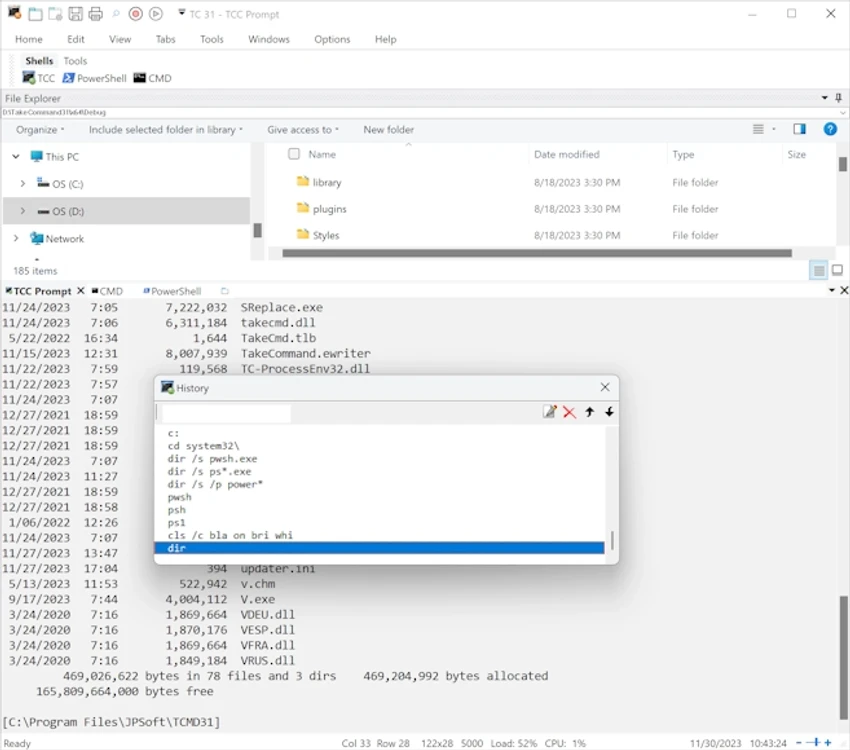
Take Command is a comprehensive Windows command-line enhancement tool designed to replace and extend the traditional CMD environment. It provides a more powerful, user-friendly interface for developers, system administrators, and advanced users who rely heavily on command-line operations and batch scripting. It retains compatibility with existing CMD commands while significantly expanding functionality through additional commands, improved scripting capabilities, and a fully integrated development environment. Unlike the basic Windows console, Take Command introduces tabbed consoles, syntax highlighting, and advanced command editing features. It also includes optional Windows Explorer integration, making file and system navigation more efficient.

For users working extensively with batch files or system automation, Take Command serves as both a productivity upgrade and a full scripting platform.

Features of Take Command

  • Enhanced Windows CMD replacement shell with improved usability
  • Tabbed console windows for better session management
  • Integration with Windows Explorer (optional)
  • Enhanced versions of standard CMD commands like COPY, DEL, MOVE, REN, SET, and START
  • Over 210 additional built-in commands
  • Command syntax coloring for improved readability
  • Advanced command-line editing and filename completion
  • Integrated IDE for batch file development
  • Built-in batch debugger for troubleshooting scripts
  • Support for extended scripting constructs such as DO loops and SWITCH statements
  • Error and exception handling capabilities for batch scripts
  • System monitoring and event trigger features
  • More than 700 built-in variables and functions
  • Support for third-party plugins

User Experience

Using Take Command feels significantly more structured and powerful compared to the default Windows CMD environment. The tabbed interface alone improves workflow efficiency by allowing multiple sessions to run side by side. The integrated IDE is particularly useful for users who regularly write and debug batch scripts. Instead of relying on external editors and manual debugging, everything is centralized within the application.

The improved command-line editing, autocomplete features, and syntax highlighting also reduce errors and make command execution more intuitive. However, due to its depth and feature richness, new users may need some time to become fully comfortable with its environment.

Who Should Use Take Command?

  • System administrators managing complex Windows environments
  • Developers who rely heavily on batch scripting
  • IT support professionals handling repetitive system tasks
  • Advanced users looking for a more powerful CMD alternative
  • Users who want an integrated scripting IDE for Windows command-line automation

Conclusion

Take Command is a robust Windows command-line replacement that significantly improves upon the default CMD experience. With its integrated IDE, enhanced scripting capabilities, and productivity-focused interface, it is a strong choice for professionals who rely on command-line automation.

Pros & Cons

✓

Pros

  • Powerful replacement for Windows CMD
  • Integrated IDE and batch debugger included
  • Highly enhanced command-line interface
  • Supports advanced scripting features
  • Improves productivity with tabbed consoles and syntax highlighting
✕

Cons

  • May feel complex for beginners
  • Focused mainly on advanced users and scripting workflows
  • No rating or user feedback data provided in source

Frequently Asked Questions

What is Take Command used for?

Take Command is used to enhance and replace the Windows Command Prompt with a more powerful shell and scripting environment.

Does Take Command support existing CMD commands?

Yes, it supports standard CMD commands while also extending them with improved functionality.

Is Take Command suitable for beginners?

It is primarily designed for advanced users, so beginners may need time to adapt to its features.

Does Take Command include a scripting environment?

Yes, it includes an integrated IDE and batch debugger for script development.

Recommended apps [Freeware]:
  • Google Drive 127.0.1 Google Drive logo secure cloud storage, file syncing, collaboration tools, and 15GB of free storage
  • PDF Shaper 15.6 PDF Shaper logo Windows PDF utility for splitting, merging, converting, encrypting, and editing PDF documents with powerful tools
  • Vovsoft Battery Alert 1.1 Vovsoft Battery Alert logo Monitor your laptop battery, receive charging alerts, and promote healthier battery habits with VOVSOFT Battery Alert
  • Dism++ 10.1.1002.2 Dism++ logo a lightweight Windows optimization tool for cleaning system files, managing startup items, updates, and system images
  • Microsoft Safety Scanner 1.453.370 Microsoft Safety Scanner logo removes viruses, spyware, and unwanted software with quick, full, or custom on-demand scans
  • NVIDIA App 11.0.8.299 NVIDIA App logo Manage GPU settings, update drivers, optimize games, and capture gameplay with a unified tool for NVIDIA graphics users.
Recommended apps [Shareware]:
  • VovSoft Tree Notes 3.3 VovSoft Tree Notes logo organize notes with a hierarchical structure, rich text editing, and single-file storag
  • eM Client 10.4.5606.0 eM Client logo a modern Windows email client with support for Gmail, Exchange, calendars, tasks, contacts, and chat in one app
  • Output Messenger 3.0.0 Output Messenger logo secure team chat, video calls, file sharing, task management, and remote desktop access
  • ProfiCAD 13.5.8 ProfiCAD logo easy-to-use CAD tool for creating electrical, electronic, control, pneumatic, and hydraulic diagrams
  • PrintFab 3.0.7 PrintFab logo advanced printer drivers, RIP functionality, color management, and ink optimization for high-quality printing
  • CrawlRhino SEO Crawler 1.1.36.0 CrawlRhino SEO Crawler logo Analyze website structure, detect SEO issues, audit backlinks, and generate detailed reports with a comprehensive website crawler.