


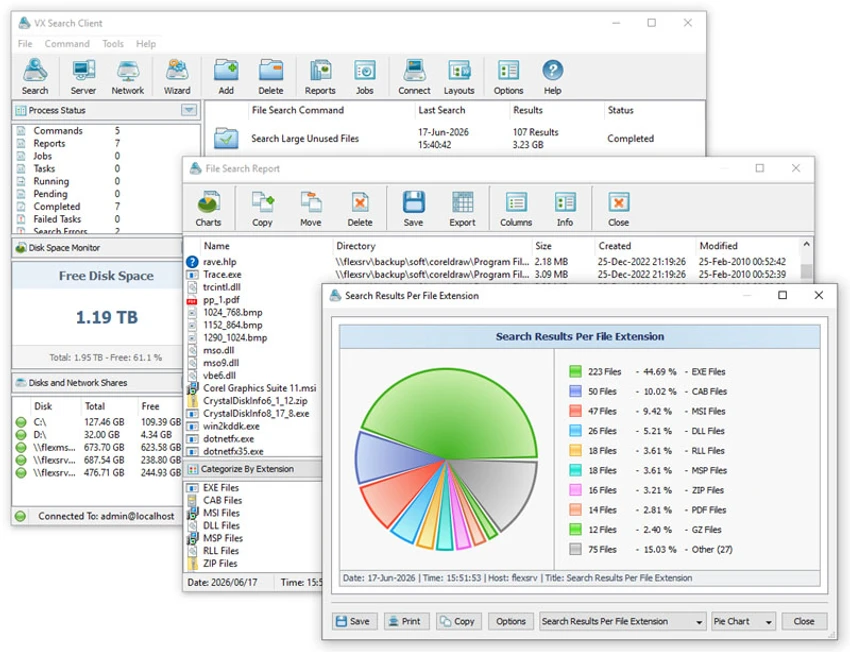

VX Search is an advanced file search and management solution designed for both individual users and IT administrators. Unlike basic Windows search tools, it allows rule-based searching using detailed filters such as file type, size, metadata, patterns, and even EXIF data. During my experience with it, I found it to be a highly capable tool for environments where precise file discovery and reporting are essential.
Key Features of VX Search
- Rule-based file search system
- Search by file type, category, extension, and name
- Filter by file size, location, and timestamps (creation, modification, access)
- Supports regular expressions for advanced queries
- Search using file attributes and binary/text patterns
- JPEG EXIF tag-based search
- Categorization and filtering of search results
- Visualization with pie charts and bar charts
- Export reports in multiple formats:
- HTML
- Excel
- CSV
- XML
- Text
- Export search results to SQL databases
- Network-wide file search across servers and NAS devices
- Automatic discovery of network shares and storage devices
- Periodic and automated search operations
- Conditional actions (email alerts, command execution)
- Command-line utility for scripting and automation
- Server version for background automated scanning
- Enterprise version with web-based management interface
- Batch file search operations across multiple systems
- Centralized reporting and analysis tools
User Experience
After using VX Search, I found its rule-based system to be significantly more powerful than standard Windows search. Instead of simply typing a filename, users can define precise conditions that control exactly what results are returned. The interface is structured around building search rules, which makes it suitable for IT environments and large-scale file systems. Results are displayed in a structured format, often accompanied by charts and summaries that help visualize file distribution across categories, sizes, or locations.
One of its strongest aspects is network integration. VX Search can scan multiple servers and NAS devices, which is particularly useful for system administrators managing distributed storage environments. The ability to automate searches and generate scheduled reports adds another layer of efficiency. The command-line utility further extends its flexibility, allowing integration into scripts and automated workflows. This makes it suitable for enterprise-level deployments where repeated or scheduled searches are required. Although powerful, VX Search is clearly designed with technical users in mind. The depth of options may be overwhelming for casual users who only need simple file lookup functionality.
Who Should Use VX Search?
- IT administrators managing large file systems
- Enterprise users with network storage environments
- Advanced users needing precise file filtering
- Users working with metadata-heavy file searches
- Organizations requiring automated file reporting
- Developers and engineers integrating file search into scripts
Conclusion
VX Search is a professional-grade file search and analysis tool built for users who need precision, automation, and scalability. Its ability to search across local and networked systems, combined with powerful filtering and reporting features, makes it an excellent solution for IT professionals and enterprises. If you require more than basic file search functionality, VX Search is a standout choice.


