FileLegit Windows Utilities System Tools Futuremark SystemInfo
Futuremark SystemInfo logo

Futuremark SystemInfo 5.92.1497

  • User Rating:
    ★★★★★
    ★★★★★
    0.0 0Votes
  • Requirements:
    Windows
  • Version: 5.92.1497
  • Latest updated: 1 week ago
  • License: Freeware  
  • Publisher: UL
  • Size: 4 MB
× app stores

Futuremark SystemInfo is a lightweight utility designed to perform detailed diagnostics and hardware analysis on Windows PCs. It gathers information about your operating system, processor, motherboard, memory, storage devices, and various system components. During my experience with it, I found it to be a straightforward tool that focuses on collecting and reporting system information rather than overwhelming users with unnecessary features.

Features of Futuremark SystemInfo

  • Performs comprehensive hardware and system analysis
  • Detects operating system version and hardware details
  • Collects information about CPU, RAM, motherboard, and storage devices
  • Reports service and performance-related information
  • Displays WMI, API, and DirectX information
  • Provides processor core details
  • Exports scan results to XML format
  • Includes System Diagnostics tools for additional testing
  • Updated CPUID module for improved hardware detection
  • Enhanced GPU detection with better compatibility for newer graphics cards
  • Designed for use with supported benchmark applications
  • Lightweight installation (approximately 3.4 MB)

User Experience

After launching Futuremark SystemInfo, the software quickly scans the entire system and gathers detailed information about hardware and software components. The process is automatic and requires little user interaction, making it easy to obtain a complete overview of the computer. The information collected includes processor specifications, motherboard details, memory configuration, hard drives, DirectX settings, and WMI-related data. I appreciated the ability to export results to XML, which can be useful for documenting hardware configurations or sharing system information for troubleshooting purposes.

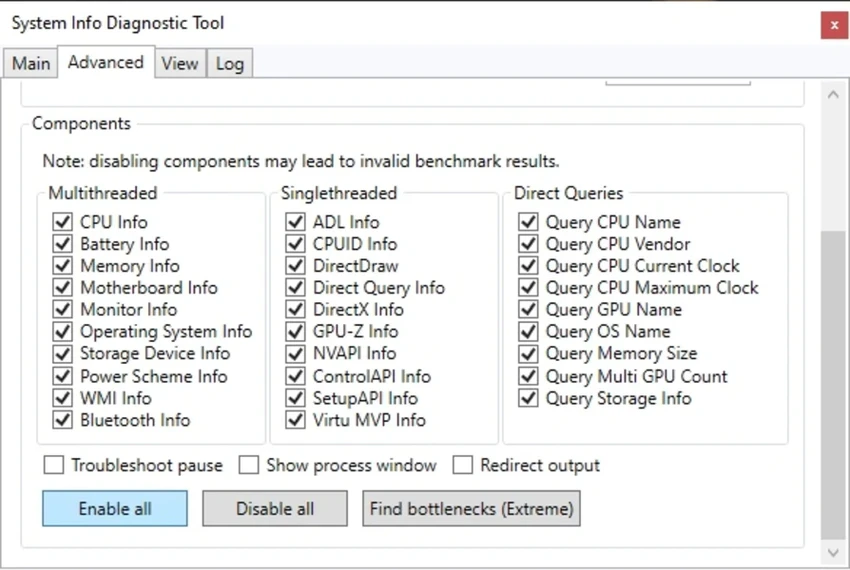
The interface is relatively simple and focused on diagnostics rather than visual presentation. Once installed, the utility also provides components that can be used by compatible benchmarking applications and system diagnostic tools. Although some details are aimed at more advanced users, the scanning process itself remains straightforward and easy to use.

Who Should Use Futuremark SystemInfo?

  • Users who want detailed hardware information
  • PC enthusiasts and benchmark users
  • Technicians troubleshooting computer issues
  • Users documenting system configurations
  • Gamers verifying hardware specifications
  • Advanced users interested in DirectX and WMI information

Conclusion

Futuremark SystemInfo is a practical utility for anyone who needs reliable information about their PC hardware and software environment. It performs fast system scans, provides detailed reports, and integrates well with supported benchmark tools. If you need a lightweight solution for hardware analysis and diagnostics, Futuremark SystemInfo is worth trying.

Pros & Cons

Pros

  • Lightweight installation size
  • Comprehensive hardware detection
  • Detailed system information
  • XML export support
  • Improved CPU and GPU detection
  • Easy-to-use scanning process
  • Useful for benchmarking applications

Cons

  • Interface is fairly basic
  • Some information is geared toward advanced users
  • Limited functionality beyond diagnostics and reporting
  • Windows XP support is no longer actively maintained

Frequently Asked Questions

What is Futuremark SystemInfo used for?

Futuremark SystemInfo is used to analyze hardware and software components, providing detailed diagnostic information about a computer system.

Can Futuremark SystemInfo export reports?

Yes. The utility can export scan results to XML files for later analysis or documentation.

What information does it collect?

It gathers information about the operating system, CPU, motherboard, RAM, storage devices, DirectX settings, WMI, APIs, and processor cores.

Does Futuremark SystemInfo support modern GPUs?

Yes. Updated GPU detection modules improve compatibility with newer graphics cards.

Is Futuremark SystemInfo useful for benchmarking?

Yes. It is designed to work as a supporting component for compatible benchmark applications and diagnostic tools.

Is Futuremark SystemInfo lightweight?

Yes. The application has a small installation size of approximately 3.4 MB.

Which Windows versions are supported?

Current versions are intended for modern Windows systems, while support for Windows XP is no longer actively maintained.

Recommended apps [Freeware]:
  • BitTorrent 7.11.0.47255 BitTorrent logo peer-to-peer file sharing client for fast, decentralized downloads with bandwidth control and resume support
  • FluentTweaker 26.06.02 FluentTweaker logo a Windows utility for safe, reversible system tweaks focused on UI, privacy, and performance control.
  • PilotEdit 21.0.0 PilotEdit logo a powerful text and hex editor for large files with FTP support, scripting, encryption, and search tools
  • GOM Player 2.3.120 Build 5390 GOM Player logo a free Windows media player supporting many formats, subtitles, VR videos, and damaged file playback
  • RustDesk 1.4.8 RustDesk logo open-source remote desktop solution with self-hosting, cross-platform support, and customizable remote access tools
  • PCSX2 2.6.3 PCSX2 logo Play PlayStation 2 games on your PC, explore its features, setup process, performance, and usability
Recommended apps [Shareware]:
  • Typing Instructor Platinum 21.1 Typing Instructor Platinum logo improve typing speed and accuracy through interactive lessons, games, and 10-finger typing practice.
  • Adobe Premiere Pro 2026 Adobe Premiere Pro logo professional 4K video editor with advanced audio, color, and motion graphics tools.
  • Send Anywhere 24.6.0 Send Anywhere logo free cross-platform file-sharing tool that transfers files of any size without registration.
  • DBF Converter 7.85 DBF Converter logo convert DBF files to CSV, Excel, SQL and text with fast batch processing and filtering
  • Lansweeper 12.8.1.3 Lansweeper logo network discovery and IT asset management tool for software inventory, compliance reporting, and device tracking
  • ON1 Effects 2026.4 ON1 Effects logo AI-powered photo effects, creative filters, presets, LUTs, and masking tools for stunning image enhancements