


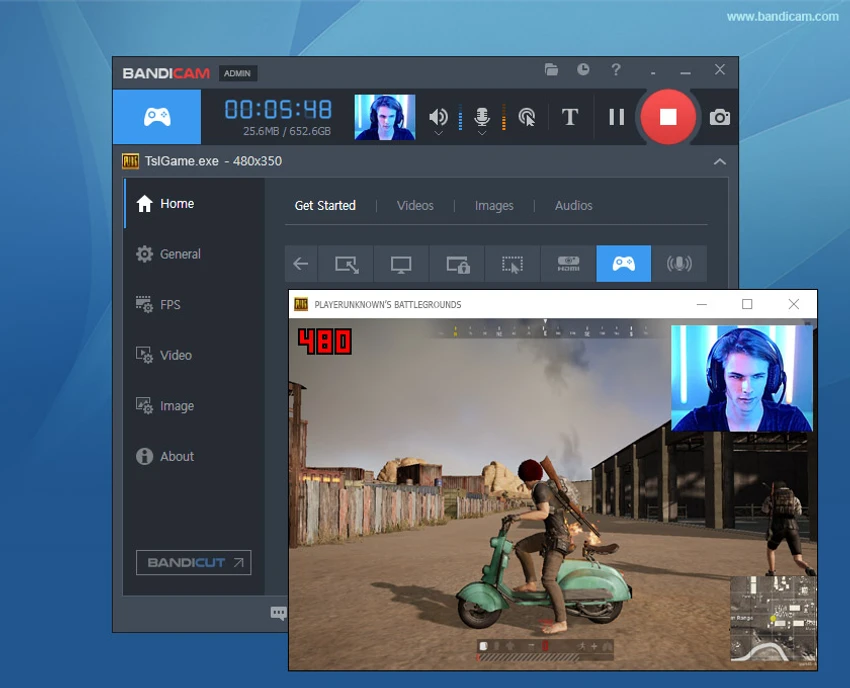

Bandicam is a powerful screen recording application for Windows that allows users to capture a selected area of the screen or record applications using DirectX and OpenGL graphics technologies. Designed with performance in mind, it delivers high-quality recordings while maintaining a high compression ratio, helping reduce file sizes without significantly compromising video quality.
Whether you're recording gameplay, online streaming videos, presentations, or desktop activities, Bandicam provides an efficient recording experience with support for multiple video and audio codecs.
Features of Bandicam
- Record a selected area of the computer screen.
- Capture games and applications using DirectX and OpenGL.
- Record gameplay from titles such as World of Warcraft and Minecraft.
- Record webcam footage and desktop activities.
- High compression ratio while preserving video quality.
- Supports H.264, Xvid, MPEG-1, and MJPEG video codecs.
- Supports PCM and MPEG-1 Layer II audio codecs.
- Saves recordings in AVI format.
- Supports MPEG-1 video codec VBR mode.
- Capable of recording videos up to 24 hours in length.
- Supports video resolutions up to 3840 × 2160.
- Compact installation size (approximately 31 MB).
User Experience
Using Bandicam is straightforward. The interface focuses on making screen recording simple, allowing me to select either a recording area or a supported game before starting the capture process. One feature that stands out is its ability to produce relatively small video files while maintaining good visual quality. During longer recording sessions, the software remains responsive, making it suitable for recording gameplay, tutorials, presentations, and streaming content.
The support for several popular video codecs also provides flexibility when choosing the best balance between quality and file size. For users who frequently record games, Bandicam's DirectX and OpenGL recording support helps capture gameplay efficiently.
Who Should Use Bandicam?
- Gamers who want to record gameplay.
- Content creators producing tutorials or demonstrations.
- Teachers and presenters recording lessons or presentations.
- Users who need to capture desktop activities.
- Anyone looking for a lightweight yet capable screen recording solution on Windows.
Conclusion
Bandicam is a reliable screen recording application that combines strong performance with efficient video compression. It supports desktop recording, gameplay capture, webcam recording, and streaming video capture while maintaining good recording quality and manageable file sizes.


