Norton 360 Remover logo

Norton 360 Remover 26.6.11050.2580

  • User Rating:
    ★★★★★
    ★★★★★
    0.0 0Votes
  • Requirements:
    Windows
  • Version: 26.6.11050.2580
  • Latest updated: 5 days ago
  • License: Freeware  
  • Publisher: Norton
  • Size: 56 MB
× app stores

Norton 360 Remover is a specialized Windows utility designed to completely uninstall Norton 360 security products. Unlike standard uninstallers, this tool ensures that all associated files, configurations, and leftover system components are fully removed. It is primarily used when users want to reinstall Norton software cleanly or resolve issues caused by incomplete or corrupted installations.

Features of Norton 360 Remover

  • Completely uninstalls Norton 360 security products
  • Removes leftover files and system settings
  • Ensures clean reinstallation of Norton software
  • Simple, user-friendly interface
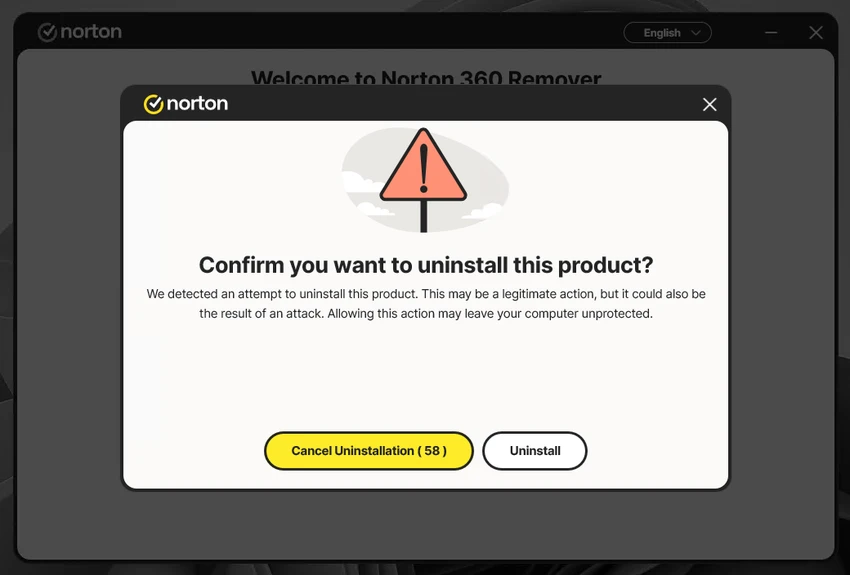
  • Two main operation options (standard removal or safe mode reboot)
  • Helps improve system cleanliness after uninstalling Norton products
  • Designed specifically for Norton security software removal

User Experience

During my experience with Norton 360 Remover, the tool felt extremely straightforward and focused. Unlike traditional uninstallers that may leave residual files behind, this utility is designed to perform a deeper cleanup of Norton-related components. The interface is minimal, presenting only the essential options required for the process. Users can choose between a standard removal method or rebooting into safe mode for a more thorough uninstall process, depending on the severity of the installation issue.

The tool is particularly useful in situations where Norton 360 cannot be removed through standard Windows uninstall methods or when a fresh reinstall is required. It helps eliminate conflicts that may arise from leftover configuration files or partially removed components. Because of its focused design, there are no advanced settings or customization options, which keeps the process simple and reduces the chance of user error.

Who Should Use Norton 360 Remover?

  • Users reinstalling Norton 360
  • Users experiencing uninstall issues with Norton software
  • IT technicians cleaning up security software installations
  • Users dealing with corrupted or incomplete Norton installations
  • Anyone needing a complete removal of Norton 360 products

Conclusion

Norton 360 Remover provides a reliable solution for fully uninstalling Norton security products from Windows systems. Its ability to remove leftover files and reset the system environment makes it a useful tool for troubleshooting and clean reinstallations.

Pros & Cons

Pros

  • Ensures complete removal of Norton 360 software
  • Removes leftover files and configuration data
  • Simple and easy-to-use interface
  • Offers safe mode removal option
  • Useful for fixing broken or incomplete installations
  • Helps prepare system for clean reinstallation

Cons

  • Only works with Norton 360 products
  • Limited functionality beyond uninstallation
  • Not needed for standard uninstall scenarios

Frequently Asked Questions

What is Norton 360 Remover used for?

Norton 360 Remover is used to completely uninstall Norton 360 security software and remove leftover files and settings.

Does it remove all Norton files?

Yes. The tool is designed to remove associated files, settings, and residual components from the system.

Can I use it for other Norton products?

It is primarily designed for Norton 360 products, and compatibility with other Norton software may be limited.

Is Norton 360 Remover difficult to use?

No. It has a simple interface with only a few options, making it easy for most users.

Does it require Safe Mode?

Safe Mode is optional but recommended in some cases for a more thorough removal.

Why should I use this instead of normal uninstall?

It helps remove leftover files and settings that standard uninstallers may leave behind.

What is the main purpose of this tool?

The main purpose is to ensure a complete and clean removal of Norton 360 software from Windows systems.

Recommended apps [Freeware]:
  • BleachBit 6.0.0 BleachBit logo a free Windows cleaner that removes junk files, protects privacy, and frees disk space with secure wiping.
  • Clean Space 2026 v721 Clean Space logo a Windows utility for removing system junk files, cache, logs, and improving online privacy protection.
  • Autoruns 14.30 Autoruns logo a Windows startup manager that reveals and controls all autostart programs, services, drivers, and registry entries
  • CCleaner 7.08.1355 CCleaner logo removes junk files, clears browsing traces, and helps optimize Windows for better performance
  • FlowHeater 4.5.5 FlowHeater logo data integration tool connecting files and databases like Excel, Access, SQL Server and MySQL
  • QueueExplorer 5.0.84 QueueExplorer logo helps developers and admins manage, test, troubleshoot, and monitor message queues across platforms
Recommended apps [Shareware]:
  • Send Anywhere 24.6.0 Send Anywhere logo free cross-platform file-sharing tool that transfers files of any size without registration.
  • Automatic PDF Processor 2.5.2 Automatic PDF Processor logo Automate PDF processing, renaming, printing, data extraction, and document organization on Windows.
  • Photo Supreme 2026.3.0.9285 Photo Supreme logo Organize, search, and manage thousands of photos with Photo Supreme's powerful cataloging features
  • Drive SnapShot 1.51.0.1811 Drive SnapShot logo creates complete disk image backups while Windows runs, allowing fast system recovery and file restoration
  • Lansweeper 12.8.1.3 Lansweeper logo network discovery and IT asset management tool for software inventory, compliance reporting, and device tracking
  • MailWasher Pro 8.0.119 MailWasher Pro logo blocks spam, scams, and unwanted emails before download with advanced filtering tools