Ideal Remote logo

Ideal Remote 26.8

  • User Rating:
    ★★★★★
    ★★★★★
    0.0 ★ 0Votes
  • Requirements:
    Windows
  • Version: 26.8
  • Latest updated: 3 weeks ago
  • License: Free Trial  
  • Publisher: Pointdev
  • Size: 49 MB
× app stores

IDEAL REMOTE is a remote desktop and systems administration solution designed for IT professionals who need to manage Windows, macOS, and Linux computers from a single interface. Beyond standard remote control, it combines remote administration tools with system management features, allowing administrators to perform maintenance tasks without switching between multiple utilities.

During my evaluation, I found that the software emphasizes simplicity. The setup wizard is designed to get administrators started quickly, while remote administration features can use existing administrative credentials without requiring prior agent installation on target Windows servers or workstations. For remote desktop sessions, IDEAL REMOTE incorporates RustDesk technology and supports secure connections to both local and internet-connected systems.

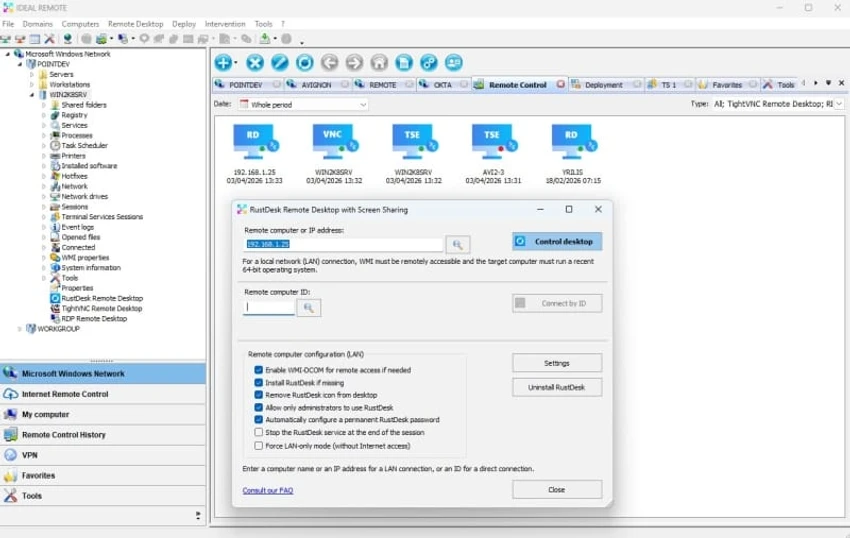
In addition to remote access, the software includes tools for managing the Windows registry, WMI, processes, services, sessions, printers, open files, and system information, making it a comprehensive platform for day-to-day IT administration.

Features of IDEAL REMOTE

  • Secure remote desktop access for Windows, macOS, and Linux.
  • RustDesk-powered remote control.
  • Remote access over the internet for off-network devices.
  • Remote access from iOS and Android mobile devices.
  • Chat during remote sessions.
  • Screen sharing and screenshot capture.
  • File transfer between local and remote computers.
  • Automatic deployment of remote agents.
  • Multi-tab interface for managing domains, workgroups, and VLANs.
  • Active Directory Q&A with Cloud AI.
  • Windows administration tools, including:
    • Registry management (32-bit and 64-bit)
    • WMI management
    • Remote command execution
    • Event management
    • Process management
    • Session management
    • Printer management
    • Open file management
    • System information
  • Wake on LAN support.
  • Remote configuration of hostname, IP address, and firewall settings.
  • Role and task delegation for administrators.
  • Quick setup wizard.
  • One administrator license supports unlimited managed systems.

Interface and Usability

IDEAL REMOTE provides a clean, multi-tab interface that helps administrators organize multiple domains, workgroups, and network environments from one console. Navigation feels structured, with remote access and administration features grouped logically for quick access.

The setup wizard simplifies initial configuration, making deployment relatively straightforward for IT teams. I also appreciated having remote desktop, system information, and administrative tools available from the same application, reducing the need to switch between separate utilities during troubleshooting or maintenance.

Who Should Use IDEAL REMOTE?

  • IT administrators
  • System administrators
  • Help desk and technical support teams
  • Managed service providers (MSPs)
  • Businesses managing Windows, macOS, and Linux environments
  • Organizations requiring centralized remote administration

Conclusion

IDEAL REMOTE combines secure remote desktop functionality with an extensive collection of Windows administration tools, making it more than just a remote support application. Its cross-platform remote access, centralized management interface, and built-in administrative features can help streamline daily IT operations for businesses of various sizes.

Pros & Cons

✓

Pros

  • Cross-platform remote desktop support
  • Remote access over both local networks and the internet
  • Comprehensive Windows administration tools
  • Supports file transfer, chat, screenshots, and screen sharing
  • Multi-tab interface for managing multiple environments
  • Quick setup with a guided wizard
  • Wake on LAN support
  • One license covers unlimited managed systems per administrator
✕

Cons

  • Some advanced administration features are Windows-specific
  • Requires Windows as the management platform

Frequently Asked Questions

What is IDEAL REMOTE used for?

IDEAL REMOTE is a remote desktop and systems administration solution that enables IT professionals to remotely access, monitor, and manage Windows, macOS, and Linux computers from a centralized interface.

Which operating systems can IDEAL REMOTE connect to?

IDEAL REMOTE supports remote control of Windows, macOS, and Linux systems. It also allows administrators to access remote computers from Windows PCs as well as mobile devices running iOS and Android.

Does IDEAL REMOTE require agents to be installed before remote administration?

According to the available information, IDEAL REMOTE does not require prior agent installation on Windows servers or workstations for its remote administration features when using existing administrative credentials. It also supports automatic remote agent deployment for remote desktop functionality.

Can IDEAL REMOTE transfer files between computers?

Yes. IDEAL REMOTE includes built-in file transfer capabilities, allowing administrators to move files between local and remote systems during remote support sessions.

What administration tools are included in IDEAL REMOTE?

In addition to remote desktop access, IDEAL REMOTE includes tools for managing the Windows registry, WMI, processes, sessions, events, printers, open files, remote commands, system information, Wake on LAN, and network configuration.

What are the system requirements for IDEAL REMOTE?

According to the available information, IDEAL REMOTE supports Windows 11, Windows 10, Windows 8, and Windows Server 2008, 2012, 2016, 2019, 2022, and 2025 as the management platform.

Recommended apps [Freeware]:
  • MakeMKV 1.18.4 MakeMKV logo disc ripper that converts DVD and Blu-ray discs into MKV files while preserving audio, video, subtitles, and metadata
  • Bulk Crap Uninstaller 6.2 Bulk Crap Uninstaller logo a free Windows tool that quickly removes multiple applications and cleans leftover files
  • Scriptboxie 2.0.1.4 Scriptboxie logo automate repetitive Windows tasks by recording actions and creating scripts without coding
  • Wagnardsoft Tools 1.0.8.2 Wagnardsoft Tools logo Clean temporary files, repair Windows system files, and maintain your PC with Wagnardsoft Tools (WTools)
  • MetaFox 2.6.3 MetaFox logo Convert popular video formats to MKV quickly with a lightweight drag-and-drop tool designed for simple and efficient conversion.
  • Alternate Textbrowser 4.520 Alternate Textbrowser logo View and edit source code with syntax highlighting, binary viewing, search tools, and built-in utilities in a lightweight editor.
Recommended apps [Shareware]:
  • Smart Game Booster 6.0.0.1164 Smart Game Booster logo Optimize Windows, monitor FPS and temperatures, and reduce lag with one click
  • WYSIWYG Web Builder 21.1.1 WYSIWYG Web Builder logo create responsive websites visually with drag-and-drop tools and automatic HTML generation
  • iToolab WatsGo 9.1.0 iToolab WatsGo logo transfer, back up, and restore WhatsApp data between Android and iPhone devices easily
  • Universal Maps Downloader 10.256 Universal Maps Downloader logo download offline map tiles from Google, Bing, OpenStreetMap, and 500+ map types for Windows
  • Light Image Resizer 7.6.4.173 Light Image Resizer logo Resize, compress, convert, organize, and watermark images quickly with batch processing, quality optimization, and format support.
  • Easy Duplicate Finder 8.1.0.1 Easy Duplicate Finder logo Find and remove duplicate files quickly with advanced scanning, file management tools, and safe deletion options.