Neo Lighting Control logo

Neo Lighting Control 4.3.0

  • User Rating:
    ★★★★★
    ★★★★★
    0.0 ★ 0Votes
  • Requirements:
    Windows
  • Version: 4.3.0
  • Latest updated: 2 weeks ago
  • License: Free Trial  
  • Publisher: Signify Holding
  • Size: 651 MB
× app stores

Neo Lighting Control is professional lighting control software designed to manage LED and architectural lighting environments through a scalable and flexible control platform. The software is developed to support demanding lighting applications by providing an expandable system that can adapt as user requirements grow.

The platform is designed around flexibility, allowing users to take advantage of modern LED lighting technology while maintaining an intuitive software experience. Neo Lighting Control can be integrated with the Vision.net system, enabling coordinated control of both production lighting and architectural lighting setups through a unified environment.

Rather than being a general-purpose lighting application, Neo Lighting Control is focused on professional lighting management scenarios where reliable system expansion and integration are important. Its scalable design allows organizations to develop their lighting control capabilities over time without needing to replace the entire system.

Features of Neo Lighting Control

  • Expandable lighting control system
  • Designed for professional LED lighting management
  • Supports scalable system growth
  • Provides an intuitive software interface
  • Integrates with the Vision.net system
  • Enables control of production and architectural lighting

Interface and Usability

Neo Lighting Control is designed with flexibility and scalability in mind. The software aims to provide an intuitive foundation for managing professional lighting systems while allowing users to expand their setup as requirements change.

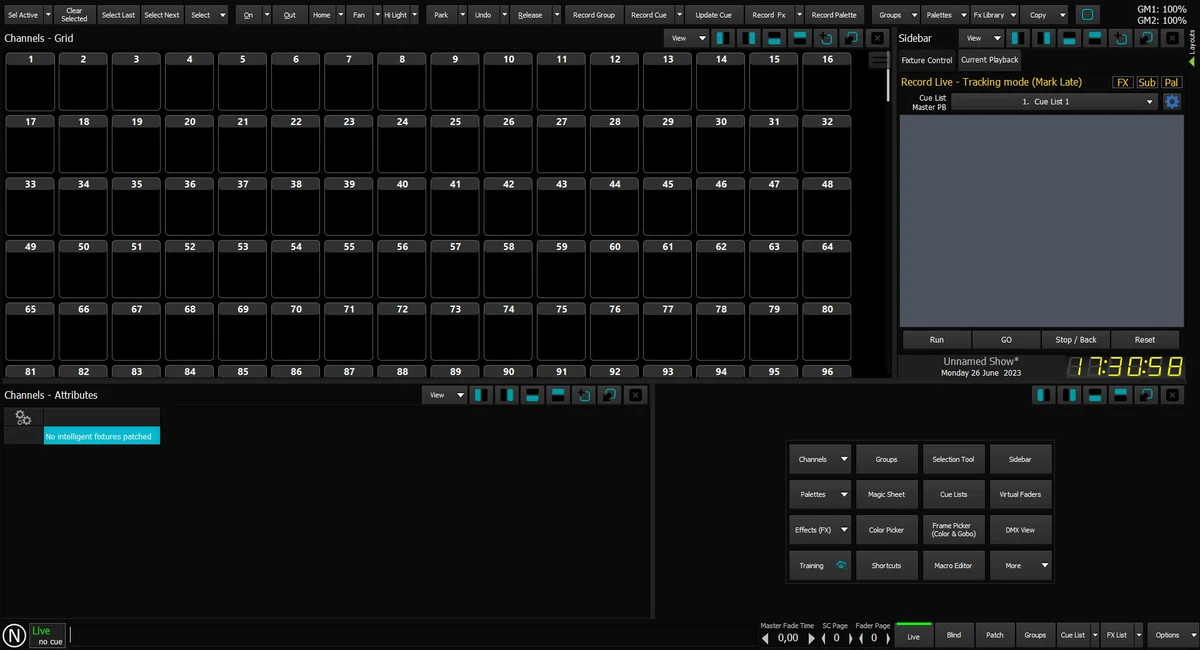
The integration with Vision.net helps create a more connected lighting control environment, allowing production and architectural lighting systems to work together. While detailed interface information is not provided, the software is positioned as a professional solution rather than a consumer lighting application.

Who Should Use Neo Lighting Control?

  • Professional lighting designers
  • Production lighting teams
  • Architectural lighting installers
  • Organizations using LED lighting systems
  • Users requiring scalable lighting control solutions

Conclusion

Neo Lighting Control provides a specialized platform for managing professional LED and architectural lighting systems. Its expandable design and Vision.net integration make it suitable for environments where lighting control needs to grow alongside changing requirements.

Pros & Cons

✓

Pros

  • Designed for professional lighting environments
  • Scalable system architecture
  • Supports LED lighting applications
  • Integration with Vision.net
  • Compatible with Windows 10 and Windows 11
✕

Cons

  • Designed for specialized lighting systems rather than general users

Frequently Asked Questions

What is Neo Lighting Control used for?

Neo Lighting Control is used to manage professional LED and architectural lighting systems. It provides a software platform for controlling lighting environments through a scalable system.

Does Neo Lighting Control support LED lighting systems?

Yes. The software is designed to support LED lighting applications and help users take advantage of modern LED-based lighting systems.

Can Neo Lighting Control work with Vision.net?

Yes. Neo Lighting Control can be fully integrated into the Vision.net system, allowing control of both production and architectural lighting.

Is Neo Lighting Control suitable for professional installations?

Yes. The software is designed for professional lighting environments where flexible and expandable control systems are required.

What operating systems does Neo Lighting Control support?

According to the provided system requirements, Neo Lighting Control supports Windows 10 and Windows 11.

Recommended apps [Freeware]:
  • DefenderUI 2.10 DefenderUI logo enhances Microsoft Defender on Windows 10/11 with advanced security profiles and easier system protection control
  • MSI Center 2.0.71.0 MSI Center logo a system utility for MSI devices that manages performance, gaming modes, monitoring, RGB, and hardware optimization tools
  • Evernote 11.24.3.43761 Evernote logo Capture, organize, sync, and access notes, tasks, web content, and research across all your devices
  • Wagnardsoft Tools 1.0.8.2 Wagnardsoft Tools logo Clean temporary files, repair Windows system files, and maintain your PC with Wagnardsoft Tools (WTools)
  • iTop Voicy 1.3.0.1696 iTop Voicy logo Transform your voice in real time with iTop Voicy using AI-powered voice changing, custom voice models, and built-in noise reduction
  • Argente System Repair 1.0.8.2 Argente System Repair logo scans and fixes Windows errors to improve performance with simple, recommended, and custom modes
Recommended apps [Shareware]:
  • ON1 Effects 2026.4 ON1 Effects logo AI-powered photo effects, creative filters, presets, LUTs, and masking tools for stunning image enhancements
  • Atlantis Word Processor 5.0.5.3 Atlantis Word Processor logo Create documents with Atlantis Word Processor, a fast and lightweight word processor featuring spell check, formatting, and eBook export
  • Draftable Desktop 26.6.200 Draftable Desktop logo compares PDF, Word, Excel, and PowerPoint files side by side securely on your computer without uploading documents online
  • Cyber Privacy Suite 4.5.5 Cyber Privacy Suite logo protect privacy with VPN, tracking protection, encryption, and real-time security tools for Windows users
  • Ref-n-write 7.2 Ref-n-write logo a Microsoft Word add-in that helps improve academic writing with paraphrasing and phrase suggestions
  • WinCam 4.0 WinCam logo Record screens, applications, audio, and tutorials with a lightweight Windows recorder featuring real-time capture and editing tools.