ESET Online Scanner logo

ESET Online Scanner 3.7.11.0

  • User Rating:
    ★★★★★
    ★★★★★
    0.0 ★ 0Votes
  • Requirements:
    Windows
  • Version: 3.7.11.0
  • Latest updated: 2 weeks ago
  • License: Freeware  
  • Publisher: ESET
  • Size: 9 MB
× app stores

ESET Online Scanner is a lightweight malware detection and removal tool designed to help users check their computers for viruses and other security threats without installing a full antivirus suite. Running through a simple scanning process, it uses ESET’s ThreatSense technology and malware detection signatures from ESET Smart Security and ESET NOD32 Antivirus to identify and remove various types of threats.

The tool is designed for quick and convenient system checks, making it useful when users want an additional security scan alongside their existing antivirus software. It can detect a wide range of threats, including viruses, Trojans, spyware, worms, phishing-related threats, and other forms of malware.

ESET Online Scanner can analyze important areas of a computer, including startup locations, boot sectors, system files, and the Windows registry. It also supports deeper scanning of files and archives to help identify hidden infections. If problems are detected, the software can attempt to resolve issues during a computer restart and scan previously infected files again. Using updated malware databases and ESET’s security technologies, the scanner helps users identify both known and potentially unknown threats. Its simple operation, automatic database updates, and ability to work alongside existing antivirus software make it a useful additional layer of protection for maintaining PC security.

Features of ESET Online Scanner

  • Browser-based malware scanning tool
  • Detects and removes viruses, Trojans, spyware, worms, and other threats
  • Uses ESET ThreatSense scanning technology
  • Uses detection signatures from ESET Smart Security and NOD32 Antivirus
  • Works alongside existing antivirus software
  • Scans startup locations, boot sectors, and registry areas
  • Checks files and archives for threats
  • Attempts malware removal during system restart when needed
  • Automatically checks for updated malware databases
  • Simple one-click scanning process
  • Supports regular security checks

Interface and Usability

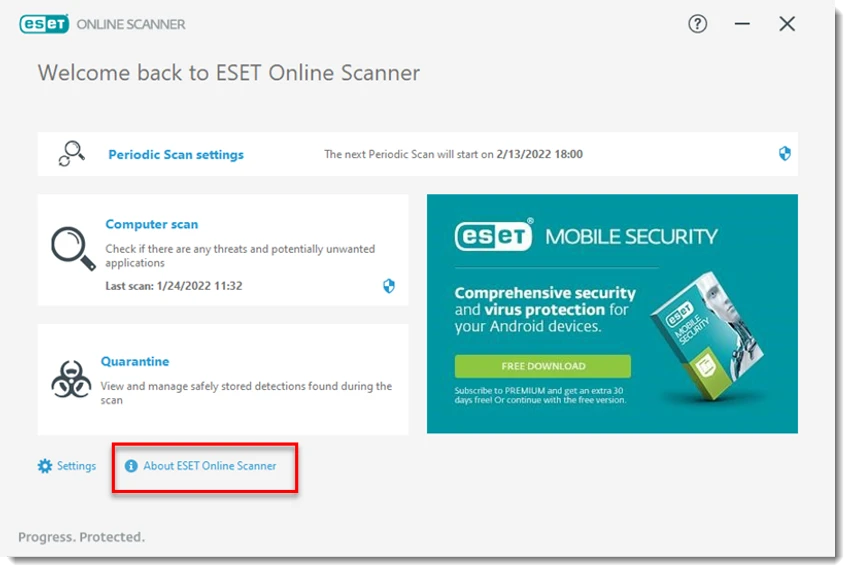
ESET Online Scanner focuses on simplicity and accessibility. The scanning process is designed to require minimal setup, allowing users to start checking their system without complicated configuration or account registration. The straightforward interface makes it suitable for users who need an additional malware scan without replacing their current security software. Once started, the application downloads the required detection updates and begins analyzing the selected areas of the computer.

The ability to run alongside existing antivirus solutions adds flexibility, while automated updates help ensure the scanner uses current threat detection information. Overall, the experience is designed around quick access to malware scanning rather than advanced security management.

Who Should Use ESET Online Scanner?

  • Users who want a second opinion malware scan
  • People checking a computer for possible infections
  • Users who already have antivirus software but want an additional security check
  • Home users looking for a simple malware removal tool
  • Anyone needing a lightweight threat detection utility

Conclusion

ESET Online Scanner provides a convenient way to check a PC for malware without installing a complete security suite. With support for virus, Trojan, spyware, and other threat detection, it offers an additional layer of protection for users who want to verify their system’s security.

Pros & Cons

✓

Pros

  • Uses ESET’s established ThreatSense technology
  • Detects a wide range of malware threats
  • Works alongside existing antivirus software
  • No complex setup required
  • Scans important system areas
  • Uses updated malware detection databases
✕

Cons

  • Designed mainly for scanning rather than full antivirus protection
  • Requires downloading scanning components before use
  • Not a replacement for continuous security software

Frequently Asked Questions

What is ESET Online Scanner used for?

ESET Online Scanner is used to scan computers for malware, viruses, spyware, Trojans, worms, and other security threats. It can detect and help remove infections from a PC.

Does ESET Online Scanner replace a full antivirus program?

No. ESET Online Scanner is designed as an additional scanning tool and is not a replacement for continuous antivirus protection.

Can ESET Online Scanner work with another antivirus program?

Yes. The tool is designed to run alongside existing antivirus software, allowing users to perform additional malware checks.

What threats can ESET Online Scanner detect?

The scanner can detect various threats, including viruses, Trojans, spyware, phishing-related threats, worms, and other types of internet-based malware.

What technology does ESET Online Scanner use?

ESET Online Scanner uses ESET ThreatSense technology and malware detection signatures from ESET Smart Security and ESET NOD32 Antivirus.

Does ESET Online Scanner check system files and startup areas?

Yes. The scanner can analyze areas such as autostart locations, boot sectors, registry entries, files, and archives to help identify infections.

Recommended apps [Freeware]:
  • PortKiller 3.3.3 PortKiller logo a network utility for monitoring TCP ports, managing processes, and handling tunnels on Windows.
  • ManicTime 2026.2.0.3 ManicTime logo Automatically track work hours, monitor productivity, and generate accurate reports with ManicTime
  • OcenAudio 3.20.0 OcenAudio logo a fast and easy-to-use audio editor with real-time effects, spectrogram analysis, and VST plugin support
  • Textadept 13.0 Textadept logo Write and edit code efficiently with Textadept, a lightweight, portable, and customizable cross-platform text editor
  • Alternate Pic View 3.660 Alternate Pic View logo View, edit, organize, and convert images with a lightweight photo viewer featuring batch tools, slideshows, and GIF support.
  • Fire Toolbox 45.1 Fire Toolbox logo Customize Amazon Fire tablets with tools for app management, interface changes, backups, troubleshooting, and Android feature support.
Recommended apps [Shareware]:
  • GiliSoft Private Disk 11.8 GiliSoft Private Disk logo Protect sensitive files with AES 256-bit encryption, hidden disk images, and portable encrypted storage
  • VX Search 18.2.34 VX Search logo a powerful rule-based file search tool with advanced filtering, reporting, and network search capabilities.
  • DiskBoss 17.0.14 DiskBoss logo powerful Windows file management tool for disk analysis, duplicate cleanup, file synchronization, and data migration
  • Lossless Extract 3.0.1 Lossless Extract logo Extract high-resolution audio from Blu-ray, SACD, MKV, and DVD-Audio while preserving lossless quality and immersive audio formats.
  • Rambox 2.7.0 Rambox logo Manage multiple email and messaging services in one open-source app with notifications, customization, and easy account access.
  • MassTube 22.1.0.216 MassTube logo Download online videos and convert audio into multiple formats with an easy-to-use tool designed for fast offline viewing and listening.