CrossFTP logo

CrossFTP 2.00.1

  • User Rating:
    ★★★★★
    ★★★★★
    0.0 0Votes
  • Requirements:
    Windows
  • Version: 2.00.1
  • Latest updated: 1 day ago
  • License: Freeware  
  • Publisher: CrossFTP
  • Size: 89.6 MB
×

CrossFTP is a versatile file transfer client for Windows designed to handle a wide range of protocols beyond traditional FTP. It supports FTP, FTPS, SFTP, FXP, WebDAV, and major cloud storage services such as Amazon S3, Amazon Glacier, Microsoft Azure, Google Storage, and OpenStack Swift. The tool is built for users who need a unified solution to manage both classic server transfers and modern cloud storage connections from a single application.

Overview

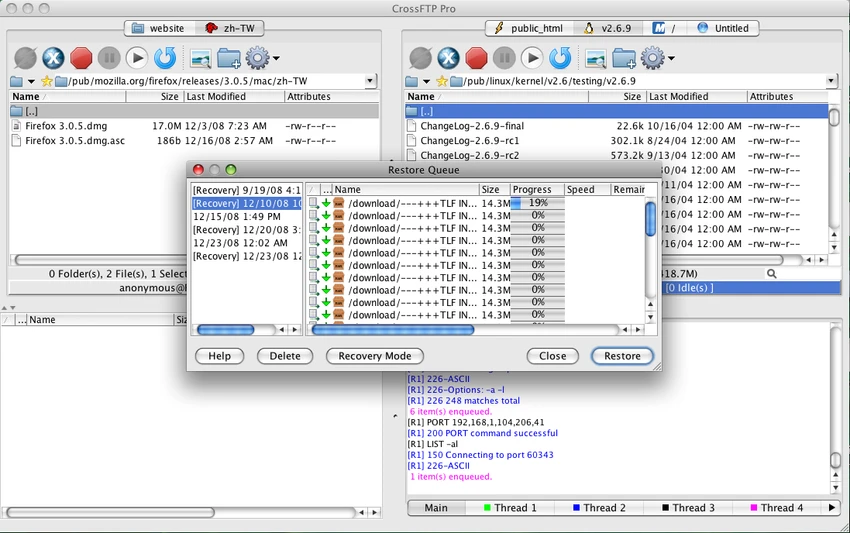
CrossFTP combines traditional FTP client functionality with advanced cloud storage integration. It provides a two-pane interface similar to classic file managers, making it easy to navigate local and remote directories side by side. Its multi-tab system allows users to connect to multiple servers simultaneously within one window. This makes it practical for managing several hosting environments or cloud accounts without switching between different tools.

The software is designed to support both basic file transfers and more advanced workflows such as synchronization, mirroring, and scheduled transfer tasks.

Key Features of CrossFTP

  • Supports FTP, FTPS, SFTP, FXP protocols
  • WebDAV compatibility for web-based file access
  • Cloud storage support: Amazon S3, Amazon Glacier, Microsoft Azure, Google Storage, OpenStack Swift
  • Two-pane, browser-like interface for easy navigation
  • Multi-tab connection management
  • File transfer queue system
  • Scheduling and automated transfer tasks
  • Synchronization and mirroring capabilities
  • Job management system for transfer workflows
  • Turbo multi-threaded transfer engine for performance
  • Advanced security with TLS/SSL/SSH support
  • Password encryption and master password protection
  • Integrity and signature checking

CrossFTP follows a traditional file manager layout, which makes it familiar to users who have experience with classic FTP clients. The two-pane design simplifies drag-and-drop transfers between local and remote locations. Managing multiple connections is straightforward thanks to the tab-based interface, which reduces clutter when working with several servers or cloud services at once. Performance is enhanced by its multi-threaded transfer engine, which helps improve speed during large file operations. Features like scheduling and job management also reduce manual workload for repetitive tasks.

Who Should Use CrossFTP?

  • Web developers managing multiple servers
  • IT administrators handling cloud and FTP infrastructure
  • Users transferring large volumes of files regularly
  • Teams working with mixed environments (FTP + cloud storage)
  • Advanced users needing scheduling and synchronization tools

Conclusion

CrossFTP is a strong all-in-one file transfer solution that bridges traditional FTP workflows with modern cloud storage support. Its wide protocol compatibility, scheduling tools, and secure transfer options make it especially useful for professionals managing complex file environments.

Pros & Cons

Pros

    • Supports a wide range of FTP and cloud protocols
    • Two-pane, easy-to-use interface
    • Multi-tab connection management
    • Strong automation (sync, scheduling, mirroring)
    • Advanced security features (SSL/TLS/SSH, encryption)
    • Multi-threaded transfer performance

Cons

    • No performance benchmarks or ratings provided
    • Interface may feel traditional compared to modern cloud-native tools
    • Feature-rich setup may be complex for beginners

Frequently Asked Questions

What is CrossFTP used for?

CrossFTP is used to transfer and manage files across FTP servers and cloud storage platforms using multiple protocols.

Does CrossFTP support cloud storage?

Yes, it supports Amazon S3, Amazon Glacier, Microsoft Azure, Google Storage, and OpenStack Swift.

Can CrossFTP handle multiple connections?

Yes, it supports multi-tab connections, allowing multiple servers to be managed simultaneously.

Does CrossFTP support secure transfers?

Yes, it supports FTPS, SFTP, TLS/SSL, SSH encryption, and additional security features.

Is CrossFTP suitable for automation?

Yes, it includes scheduling, synchronization, mirroring, and job management features.

Recommended apps [Freeware]:
  • All in One Runtimes 2.5.0 All in One Runtimes logo Package essential Windows runtime environment packages to improve software compatibility and system stability.
  • UltraSearch 4.9.2.1208 UltraSearch logo locates files and folders on local NTFS drives in seconds without building an index. Fast, precise, and lightweight.
  • Android Studio 2026.1.1.9 Android Studio logo Google’s official IDE for Android, offering intelligent coding, fast emulators, and cloud integration.
  • Winhance 26.06.12 Winhance logo Windows optimization tool to debloat apps, tweak settings, and customize Windows 10/11
  • FastCopy 5.11.3 FastCopy logo a lightweight Windows tool for ultra-fast file copying, syncing, and error-resilient data transfer
  • Automatic Email Processor 4.0.24 Automatic Email Processor logo Automatically save, archive, print, and process Outlook emails and attachments with customizable rules.
Recommended apps [Shareware]:
  • iBackup Viewer 4.3.14.2 iBackup Viewer logo extract contacts, messages, photos, and app data from iPhone backups
  • DSLR Remote Pro 3.31.5 DSLR Remote Pro logo Windows software for Canon DSLR control, photo booth creation, live view, HDR capture via USB connection
  • Foxit PDF Editor 2026.1.1.36485 Foxit PDF Editor logo complete PDF solution for businesses, offering advanced editing, collaboration, and document security features.
  • VMware InstallBuilder Enterprise 26.5.1 VMware InstallBuilder Enterprise logo It helps developers quickly create professional installers, RPM packages, and software bundles for multiple platforms.
  • COAA PlanePlotter 6.7.5.9 COAA PlanePlotter logo a Windows tool that decodes live aircraft data like ADS-B and ACARS and displays real-time radar-style tracking
  • Secret Disk 2026 v323 Secret Disk logo create hidden, password-protected virtual drives to securely store private files on Windows