FileLegit Windows Utilities System Tools Argente Registry Cleaner
Argente Registry Cleaner logo

Argente Registry Cleaner 4.0.8.7

  • User Rating:
    ★★★★★
    ★★★★★
    0.0 ★ 0Votes
  • Requirements:
    Windows
  • Version: 4.0.8.7
  • Latest updated: 2 weeks ago
  • License: Freemium  
  • Publisher: Argente
  • Size: 54 MB
× app stores

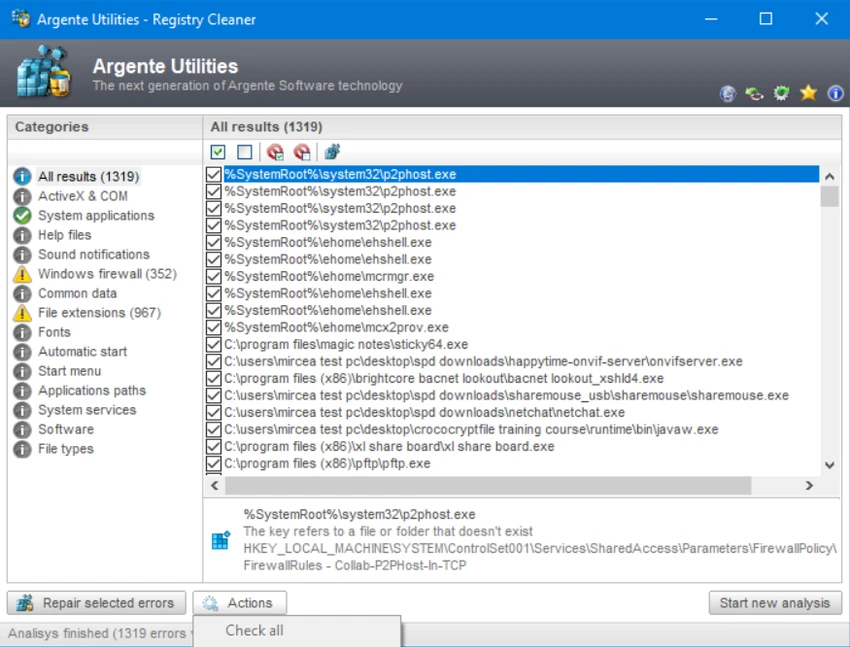
Argente Registry Cleaner is a lightweight Windows utility designed to identify and remove invalid or obsolete registry entries left behind by uninstalled applications, broken file paths, and other unnecessary data. Rather than promising dramatic performance improvements, it focuses on providing a safe and straightforward way to maintain the Windows Registry. After using it, I found its emphasis on safety particularly reassuring, thanks to automatic registry backups before every cleanup. With multiple scan modes, a clean interface, and an exclusion list for protecting specific registry entries, it offers an approachable solution for users who want basic registry maintenance without unnecessary complexity.

Features of Argente Registry Cleaner

  • Scans for obsolete and invalid Windows Registry entries
  • Removes leftover registry data from uninstalled programs
  • Three scan modes:
    • Safe
    • Normal
    • Deep
  • Automatically creates a registry backup before every cleanup
  • Registry exclusion list to protect selected entries
  • Clean and minimalist interface
  • Scan, review, and clean workflow
  • Free to use
  • Optional registration unlocks:
    • Automatic updates
    • Automatic maintenance
    • Removal of donation messages

Interface and Usability

Argente Registry Cleaner keeps the experience simple from start to finish. The interface is uncluttered, making it easy to begin a scan, review detected issues, and clean unwanted registry entries. During use, the three scan modes make it easy to choose between a conservative cleanup or a more thorough scan depending on your comfort level. I also appreciated that every cleanup is preceded by an automatic registry backup, adding an important layer of protection. The exclusion list is another practical feature, allowing advanced users to prevent specific registry entries from being modified.

Who Should Use Argente Registry Cleaner?

  • Windows users performing routine system maintenance
  • Users removing leftover registry entries after uninstalling software
  • Anyone troubleshooting registry-related issues
  • Casual users looking for a safe registry cleaning tool
  • Users who prefer a lightweight maintenance utility
  • Users who value automatic registry backups before making changes

Conclusion

Argente Registry Cleaner focuses on doing one job well: safely removing unnecessary registry entries without overwhelming users with advanced options. Its automatic backup feature, multiple scan modes, and straightforward interface make it a dependable choice for occasional registry maintenance. While it should not be viewed as a tool for dramatically improving system performance, it can be useful when cleaning up after software removal or resolving specific registry issues. If you're looking for a simple and cautious registry cleaner for Windows, Argente Registry Cleaner is worth considering.

Pros & Cons

✓

Pros

  • Easy to use with a clean interface
  • Three registry scanning modes
  • Automatic registry backup before every cleanup
  • Registry exclusion list for greater control
  • Lightweight and free to use
  • Simple scan, review, and clean process
✕

Cons

  • No built-in scan scheduling
  • Lacks advanced repair features found in some premium utilities
  • Some features require account registration
  • Automatic updates and maintenance require registration

Frequently Asked Questions

What is Argente Registry Cleaner used for?

Argente Registry Cleaner scans the Windows Registry for invalid, obsolete, or unnecessary entries left behind by uninstalled software and other system changes. It helps remove these entries safely after creating a backup.

Is Argente Registry Cleaner safe to use?

Yes. The application automatically creates a full registry backup before every cleanup, allowing you to restore the registry if any unexpected issues occur after cleaning.

What are the available scan modes?

Argente Registry Cleaner offers three scan modes: Safe, Normal, and Deep. Safe mode performs a cautious scan, Normal mode provides a balanced cleanup, and Deep mode performs a more extensive search for registry issues.

Does registry cleaning improve Windows performance?

Registry cleaning may help resolve certain software or registry-related problems, especially after uninstalling applications. However, it should not be expected to provide significant overall performance improvements on modern versions of Windows.

Can I prevent certain registry entries from being removed?

Yes. The software includes an exclusion list that lets you specify registry entries you want to protect from future scans and cleanups.

Is Argente Registry Cleaner completely free?

The core registry cleaning features are free to use. However, some additional features, including automatic updates, automatic maintenance, and removal of donation messages, require registration or creating an account.

Recommended apps [Freeware]:
  • CalendarTask 3.30.296.9122 CalendarTask logo lightweight desktop calendar with note-taking, cloud sync, reminders, and desktop scheduling tools
  • XRecode 3 v1.184 XRecode logo a powerful audio converter supporting many formats, CD ripping, and audio extraction from video files
  • AnyDesk 9.7.10 AnyDesk logo fast remote desktop access with secure connections, file sharing, and remote support for Windows users
  • PDF Shaper 15.6 PDF Shaper logo Windows PDF utility for splitting, merging, converting, encrypting, and editing PDF documents with powerful tools
  • Beeper 4.2.972 Beeper logo Bring multiple messaging services together in one app with unified chats, cross-platform support, searchable conversations, and synced notifications.
  • VidMasta 30.7 VidMasta logo Search, preview, and manage movie downloads with advanced filtering, subtitles, trailers, and detailed title information.
Recommended apps [Shareware]:
  • Bandicam 8.3.1.2537 Bandicam logo Record your screen, gameplay, and streaming videos with Bandicam, a fast screen recorder for Windows with high-quality compression
  • Epic Pen 3.12.182 Epic Pen logo Windows annotation tool for drawing, writing, and highlighting directly on your screen
  • Ideal Remote 26.8 Ideal Remote logo Manage Windows, macOS, and Linux systems remotely with IDEAL REMOTE, featuring secure remote access and built-in administration tools
  • Actual Window Rollup 8.15.4 Actual Window Rollup logo adds a roll-up button to Windows, letting you collapse windows into title bars for faster workspace management
  • UnHackMe 18.50.2026.708 UnHackMe logo Detect and remove rootkits, spyware, Trojans, and hidden malware with a security tool designed to protect your computer.
  • ComboTIFF Pro 2.97 ComboTIFF Pro logo Manage multipage TIFF files with image merging, extraction, conversion, resizing, compression, and advanced editing options.