


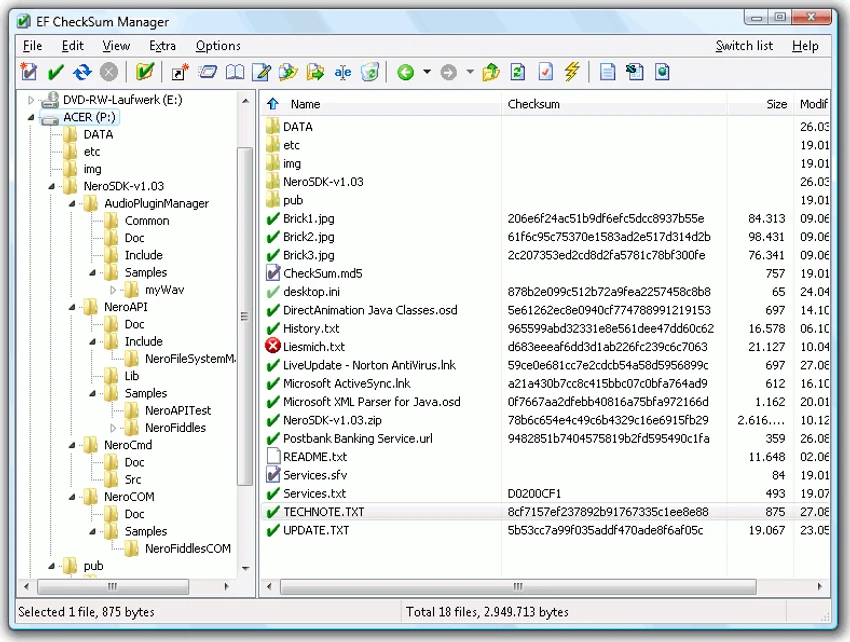

EF CheckSum Manager is a file integrity verification tool that enables users to create and validate checksums using a wide range of industry-standard algorithms. Supporting SFV (CRC32), MD5, SHA-1, SHA-2, and SHA-3 hash formats, the software helps verify that files remain unchanged during storage, transfer, backup, or distribution. Designed for both personal and professional use, EF CheckSum Manager simplifies the process of detecting file corruption, verifying downloads, validating backups, and ensuring data integrity across local drives, removable media, and internet transfers.
Features of EF CheckSum Manager
Checksum Creation & Verification
- Create checksum files
- Verify existing checksums
- Detect file corruption and modifications
- Validate data integrity
Supported Algorithms
- CRC32 (SFV)
- MD5
- SHA-1
- SHA-224
- SHA-256
- SHA-384
- SHA-512
- SHA-3 224
- SHA-3 256
- SHA-3 384
- SHA-3 512
Flexible Checksum Management
- Single checksum file for all files
- One checksum file per folder
- Individual checksum files for each file
- Recursive folder processing
Storage & Media Verification
- Verify archived files
- Validate burned CDs and other media
- Confirm data integrity after backup operations
- Check large file collections and entire drives
Download & Transfer Validation
- Verify downloaded files
- Confirm integrity of transferred data
- Detect incomplete or corrupted downloads
- Validate shared files received via email or internet transfer
Performance & Usability
- Fast checksum calculation
- Easy-to-use interface
- Supports processing large file structures
- Works with entire drives
Localization
- Multilingual support
- Includes numerous language translations
User Experience
EF CheckSum Manager focuses on one critical task: ensuring that files remain unchanged and intact. Whether you're archiving important data, downloading large files, or sharing documents over the internet, the software provides a straightforward way to verify integrity. The application is particularly useful for users who regularly work with backups, software distributions, ISO images, or archival data. By generating checksum files before storing or transferring data, users can later verify that the files remain identical to the originals.
One of the software's strongest advantages is its broad algorithm support. In addition to traditional formats such as MD5 and CRC32, it includes modern SHA-2 and SHA-3 variants, making it suitable for contemporary integrity verification requirements. Recursive processing is another practical feature. Rather than verifying files individually, users can process entire folder structures or even complete drives. This significantly reduces the effort involved in validating large datasets.
The interface is designed for efficiency rather than complexity. Creating or verifying checksums is straightforward, allowing users with minimal technical experience to perform integrity checks quickly. For anyone managing archives, backups, software repositories, or downloaded files, EF CheckSum Manager provides an effective and dependable verification solution.
Conclusion
EF CheckSum Manager offers a reliable way to verify file integrity and detect corruption before problems become costly. With support for SFV, MD5, SHA-2, and SHA-3 algorithms, along with recursive processing and large-scale verification capabilities, it serves as an excellent utility for backups, archives, downloads, and file transfers.


