WACUP logo

WACUP 1.99.52.24616 Preview

  • User Rating:
    ★★★★★
    ★★★★★
    0.0 ★ 0Votes
  • Requirements:
    Windows
  • Version: 1.99.52.24616 Preview
  • Latest updated: 2 weeks ago
  • License: Freeware  
  • Publisher: WACUP Community
  • Size: 10 MB
× app stores

WACUP (WinAmp Community Update Project) is a free community-driven project designed to keep the classic Winamp experience alive. Rather than replacing Winamp entirely, WACUP builds upon it by fixing long-standing bugs, improving performance, enhancing plugin management, and adding support for more media formats. For longtime Winamp fans, WACUP delivers the familiar interface and workflow while modernizing the application with ongoing community-driven improvements.

Features of WACUP

  • Free community-maintained update for the classic Winamp player.
  • Option to install over an existing Winamp installation or as a standalone portable application.
  • Full and Lite installation options.
  • Choice of four familiar startup skins.
  • Crash and security fixes.
  • New skins and cPro skin support.
  • Faster startup and shutdown performance.
  • Additional command-line options.
  • Improved plugin management.
  • Expanded support for additional media formats.
  • Ongoing feature additions based on community feedback.

User Experience

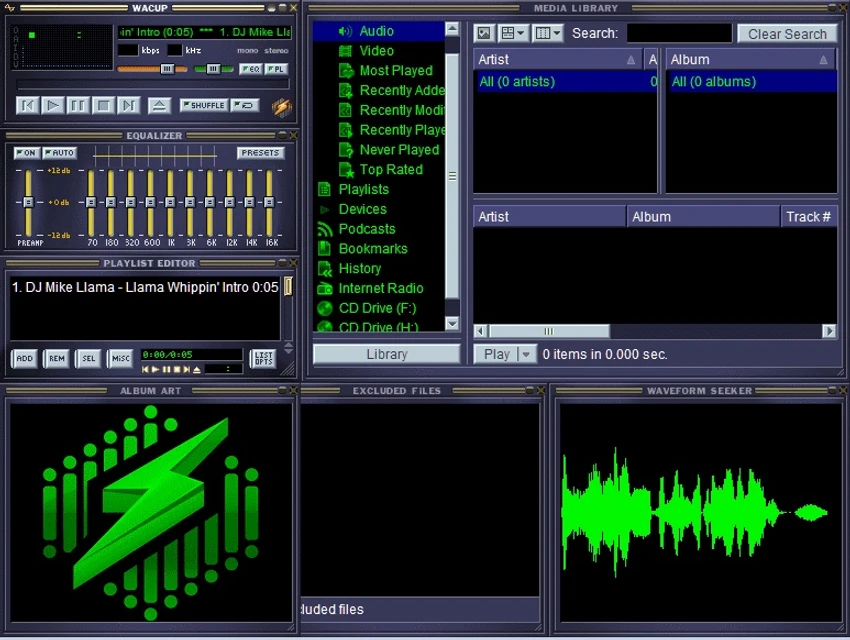
Using WACUP immediately feels familiar to anyone who has previously used Winamp. The interface, controls, playlists, and overall workflow remain largely unchanged, making the transition effortless. Installation is flexible, allowing either a clean standalone installation or integration with an existing Winamp setup. I particularly appreciated the standalone option, which lets you test WACUP without modifying an existing installation.

Although the user interface retains its classic appearance, many of the improvements happen behind the scenes. The application launches and closes more quickly, plugin management is smoother, and the additional media format support improves compatibility with modern audio collections.

The included skins maintain the nostalgic Winamp look while the expanded cPro skin support offers additional customization for users who enjoy personalizing their media player. At the time of writing, both the beta and preview releases have proven to be stable according to the available information, making WACUP a practical option for users who want a refreshed Winamp experience before the final release becomes available.

Who Should Use WACUP?

  • Longtime Winamp users.
  • Music enthusiasts who enjoy classic desktop media players.
  • Users looking for a lightweight Windows audio player.
  • People who rely on Winamp plugins and custom skins.
  • Anyone wanting a more modern version of the traditional Winamp experience.

Conclusion

WACUP proves that community-driven software can successfully extend the life of a beloved application. Instead of reinventing Winamp, it carefully improves the original experience with better stability, faster performance, expanded media support, and ongoing feature development.

Pros & Cons

✓

Pros

  • Preserves the classic Winamp experience.
  • Free and community-driven.
  • Flexible installation options, including standalone mode.
  • Improved stability with crash and security fixes.
  • Faster startup and shutdown performance.
  • Better plugin management.
  • Supports more media formats.
  • Familiar skins with additional cPro skin support.
  • Continues to receive community-requested improvements.
✕

Cons

  • Some users may prefer installing it separately rather than replacing an existing Winamp installation.
  • Primarily benefits users who already appreciate the classic Winamp interface.

Frequently Asked Questions

What is WACUP?

WACUP (WinAmp Community Update Project) is a free community-developed project that enhances the classic Winamp media player with bug fixes, performance improvements, new features, and broader media format support.

Can I install WACUP without replacing Winamp?

Yes. WACUP can be installed as a standalone portable application or integrated with an existing Winamp installation, allowing you to choose the setup that best fits your needs.

Does WACUP work like Winamp?

Yes. WACUP retains the familiar Winamp interface and overall user experience while improving performance, stability, and compatibility behind the scenes.

What improvements does WACUP include?

WACUP adds crash and security fixes, faster startup and shutdown times, improved plugin management, expanded media format support, new skins, cPro skin support, and additional command-line options.

Is WACUP free?

Yes. WACUP is freeware and is developed by the Winamp community to keep the classic media player updated and functional.

Should I install the preview version?

According to the available information, the preview and beta releases are both stable. However, until the final version is released, installing WACUP as a standalone application is the recommended approach.

Recommended apps [Freeware]:
  • NirLauncher Package 1.30.24 NirLauncher Package logo a portable Windows utility suite with 180+ NirSoft tools for system, network, and recovery tasks
  • ATTO Disk Benchmark 5.00.3 ATTO Disk Benchmark logo Measure SSD, HDD, RAID, and storage controller performance with ATTO Disk Benchmark on Windows systems
  • XRecode 3 v1.184 XRecode logo a powerful audio converter supporting many formats, CD ripping, and audio extraction from video files
  • Tixati 3.43 Tixati logo a fast, ad-free BitTorrent client offering advanced peer control, bandwidth management, and detailed swarm analysis
  • DriverHub 2.1.5 DriverHub logo scans your PC and installs the latest drivers automatically, helping keep hardware updated and stable on Window
  • FTP Rush 3.6.7 FTP Rush logo cross-platform FTP/SFTP and cloud storage client supporting server-to-server transfers, scripting, and multi-protocol file management
Recommended apps [Shareware]:
  • Adobe Premiere Pro 2026 Adobe Premiere Pro logo professional 4K video editor with advanced audio, color, and motion graphics tools.
  • Secret Disk 2026 v324 Secret Disk logo create hidden, password-protected virtual drives to securely store private files on Windows
  • Fast Video Cutter Joiner 7.1.4.0 Fast Video Cutter Joiner logo a lightweight video editing tool for quickly cutting, trimming, and joining videos
  • CareUEyes Pro 2.6.1 CareUEyes Pro logo eye care software for Windows that reduces blue light, adjusts brightness, and helps prevent eye strain
  • Network LookOut Administrator Pro 5.5.5 Network LookOut Administrator Pro logo Monitor and manage network computers remotely with screen viewing, administration controls, and secure access features for Windows environments.
  • ChrisPC Anonymous Proxy Pro 9.26.0714 ChrisPC Anonymous Proxy Pro logo Browse anonymously, access geo-restricted websites, and protect your online privacy using proxy servers and flexible browsing modes.