


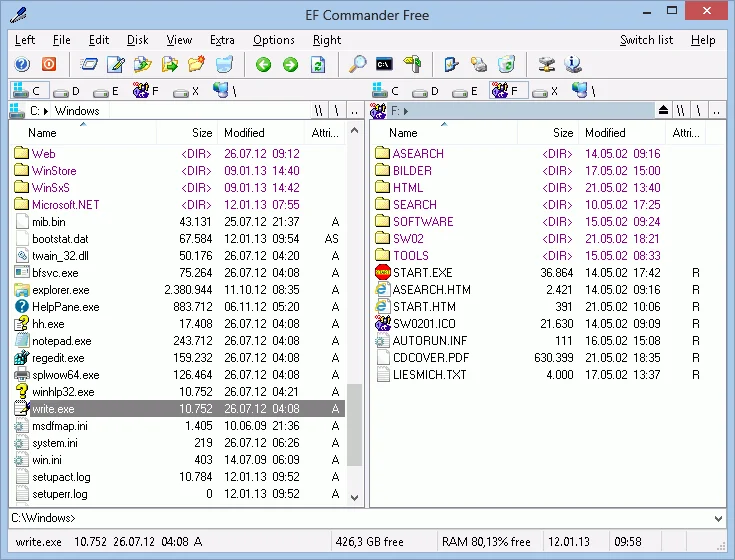

EF Commander is a long-standing and feature-rich file manager designed for Windows users who need more control over files and folders than the default system explorer provides. Built as a modern alternative inspired by classic tools like Norton Commander, it combines dual-pane navigation with advanced utilities such as file compression, FTP access, media playback, and file editing tools.
Overview
EF Commander is a complex yet user-friendly file management solution suitable for both beginners and advanced users. It uses a dual-pane interface that makes file operations more efficient and organized. Over time, it has evolved into a multi-tool environment that goes beyond simple file browsing. Users can manage archives, transfer files via FTP/FTPS, edit text and HEX data, and even play media files directly within the application. Its support for batch operations, synchronization, and plugin extensions makes it a versatile choice for users who deal with large or structured data workflows.
Key Features of EF Commander
- Dual-Pane Interface: Efficient file navigation with customizable views in each pane.
- Tabbed File Management: Organize multiple folders within tabs for better workflow control.
- Built-in Media Player: Plays MP3, Ogg/Vorbis, FLAC, WMA, and WAV files with playlist and ID3 tag support.
- File Compression Support: Handles over 20 archive formats including ZIP, RAR, 7-Zip, and TAR.
- Fast FTP/FTPS Client: Supports secure transfers, resume downloads, and server-to-server (FxP) transfers.
- Multirename Tool: Advanced batch renaming with flexible rule-based configuration.
- Internal Text & HEX Editor: Edit files directly without external software.
- File Splitting & Joining: Break large files into smaller parts and recombine them easily.
- Checksum Verification: Supports SFV, MD5, SHA1, SHA256, and SHA512 formats.
- Synchronization Tool: Sync files between devices, notebooks, or network locations.
- Thumbnail Preview: Quickly preview images and media collections.
- Plugin Support: Extends functionality with WLX, WCX, WFX, and Winamp plugins.
- CD/DVD Burning Support: Requires Nero Burning ROM integration.
- Direct PDA Connectivity: Supports Windows CE device integration.
User Experience
Using EF Commander feels powerful but slightly technical compared to modern minimalist file managers. The dual-pane layout significantly improves productivity once users get familiar with it, especially for copying, moving, or comparing files between directories. The built-in tools reduce the need for external applications, particularly for FTP transfers, file compression, and media playback. However, the interface is dense, and beginners may initially find it overwhelming due to the number of features available in a single environment. Performance is stable, and multi-tasking file operations run smoothly, even when handling multiple processes simultaneously.
Who Should Use EF Commander?
EF Commander is ideal for advanced users, IT professionals, system administrators, and anyone who frequently manages large volumes of files. It is also suitable for users who prefer classic dual-pane file managers with extensive built-in tools instead of relying on multiple separate applications.
Conclusion
EF Commander is a highly capable file manager that goes far beyond basic file browsing. With its wide range of integrated tools—FTP client, compression support, media playback, and advanced file operations—it serves as an all-in-one utility for serious Windows users. While the interface may feel complex for beginners, its depth and efficiency make it a strong choice for those who need powerful file management capabilities in a single application. If you’re looking for a feature-packed alternative to Windows Explorer, EF Commander is worth considering.


