R-Studio logo

R-Studio 9.5 Build 191810

  • User Rating:
    ★★★★★
    ★★★★★
    0.0 0Votes
  • Requirements:
    Windows
  • Version: 9.5 Build 191810
  • Latest updated: 5 days ago
  • License: Commercial  
  • Publisher: R-Tools Technology Inc
  • Size: 69 MB
× app stores

R-Studio is a professional-grade data recovery solution designed to recover lost, deleted, or corrupted files from a wide range of storage devices and file systems. Built for IT professionals and experienced users, it offers advanced recovery tools, RAID reconstruction, disk imaging, and forensic-level utilities.

Overview

R-Studio is developed as a comprehensive recovery suite that goes far beyond basic undelete tools. It supports recovery from local drives, external storage, and network-connected systems, even when partitions are damaged, formatted, or no longer recognized by the operating system. The software is compatible with multiple file systems, including NTFS, FAT variants, exFAT, HFS/HFS+, Ext2/Ext3/Ext4, and UFS formats used in UNIX-based systems. It also includes raw file recovery capabilities, allowing it to identify files based on known signatures when the file system structure is no longer usable.

Designed primarily for IT specialists and data recovery professionals, R-Studio combines several advanced tools into one platform, including RAID reconstruction, disk imaging, and a hex editor.

Features of R-Studio

  • Advanced file recovery for deleted, formatted, or corrupted data
  • Supports multiple file systems (NTFS, FAT, exFAT, HFS/HFS+, Ext, UFS)
  • Raw file recovery using file signature scanning
  • Network-based data recovery from remote machines
  • RAID reconstruction module for damaged or unrecognized arrays
  • Disk imaging and cloning with compression and splitting options
  • Recovery from bad sectors and failing storage devices
  • Support for dynamic, MBR, BSD, and GPT partition layouts
  • Hexadecimal editor for low-level data inspection and editing
  • Recovery from deleted partitions and damaged file structures
  • Ability to scan and reconstruct lost partitions
  • Integration with professional disk imaging hardware tools
  • Saves recovered files to local or network destinations
  • Support for encrypted NTFS 5 and alternative data streams

User Experience

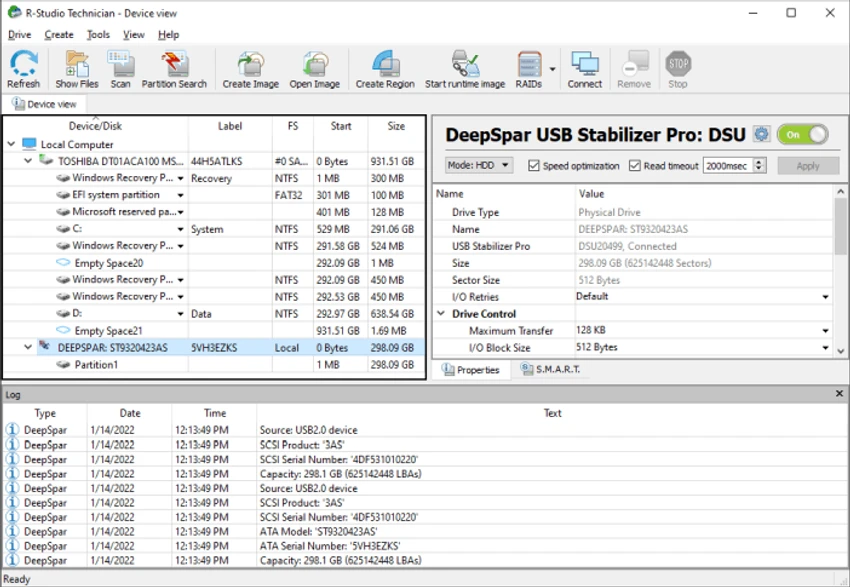
R-Studio offers a highly technical interface that resembles a professional disk management and recovery environment. While it may feel complex for casual users, it provides precise control over every stage of the recovery process. Scanning drives for recoverable data is detailed and thorough, with options to target specific file types or perform deep scans of damaged storage. The ability to preview files before recovery helps users verify data integrity.

Its disk imaging feature is particularly useful when dealing with failing drives, allowing users to create safe copies before performing recovery operations. RAID reconstruction tools also make it a strong choice for enterprise or server-level recovery scenarios. Overall, the experience is geared toward users who require accuracy and control rather than simplicity.

Who Should Use R-Studio?

  • IT administrators and system engineers
  • Data recovery professionals
  • Forensic analysts
  • Advanced users dealing with critical data loss
  • Enterprises managing RAID or network storage systems

Conclusion

R-Studio is a highly capable and professional data recovery solution designed for complex recovery scenarios. Its combination of RAID tools, disk imaging, and deep file system support makes it one of the most comprehensive recovery utilities available.

Pros & Cons

Pros

  • Extremely powerful data recovery capabilities
  • Supports a wide range of file systems
  • RAID reconstruction and advanced disk tools included
  • Network recovery support
  • Raw file signature scanning
  • Disk imaging for safe recovery workflows
  • Suitable for professional and forensic use

Cons

  • Steep learning curve for beginners
  • Complex interface not suited for casual users
  • Requires technical knowledge for best results
  • Full feature set may be overwhelming for simple recovery tasks

Frequently Asked Questions

What is R-Studio used for?

R-Studio is used to recover deleted, formatted, or damaged files from hard drives, SSDs, RAID arrays, and other storage devices.

Can R-Studio recover files from formatted drives?

Yes. It can recover data from formatted partitions, even if the file system has been changed or damaged.

Does R-Studio support RAID recovery?

Yes. It includes a RAID reconstruction module that can rebuild damaged or unrecognized RAID arrays.

What file systems does R-Studio support?

It supports NTFS, FAT12/16/32, exFAT, HFS/HFS+, Ext2/3/4, and UFS file systems.

Can R-Studio recover data over a network?

Yes. It supports remote data recovery from network-connected computers and servers.

Is R-Studio suitable for beginners?

Not really. It is designed for advanced users and IT professionals due to its technical interface and features.

Does R-Studio include disk imaging tools?

Yes. It can create disk images for safe recovery and processing without further damaging the original drive.

Recommended apps [Freeware]:
  • CheckMail 5.23.6 CheckMail logo a POP3 email checker that lets users preview, manage, and delete emails before downloading them
  • Burp Suite 2026.4.3 Burp Suite logo Test, analyze, and secure web applications with Burp Suite’s advanced proxy, scanning, and penetration testing tools
  • CCleaner 7.08.1355 CCleaner logo removes junk files, clears browsing traces, and helps optimize Windows for better performance
  • HeidiSQL 12.20 HeidiSQL logo manage MySQL, MSSQL, and databases, run queries, edit tables, and export data on Windows
  • Blank And Secure 8.41 Blank And Secure logo a portable Windows tool that securely deletes files by overwriting data to prevent recovery.
  • darktable 5.6.0 darktable logo a free open-source RAW photo editor and photography workflow tool for professional image management
Recommended apps [Shareware]:
  • HyperSnap 10.1.2 HyperSnap logo captures screenshots, scrolling windows, OCR text and video with advanced editing tools on Windows.
  • VueScan 9.8.56 VueScan logo Enhance scanner functionality with advanced tools for scanning documents, photos, videos, and slides.
  • VovSoft Batch Audio Converter 2.0 VovSoft Batch Audio Converter logo a Windows tool for fast bulk audio conversion with drag-and-drop simplicity and format flexibility
  • Yamicsoft Windows Manager 2.3.9 Yamicsoft Windows Manager logo optimizes, cleans, secures, and customizes Windows 10 and 11 with over 40 tools.
  • UVK Ultra Virus Killer 11.10.26.0 UVK Ultra Virus Killer logo removes malware, manages system processes, repairs Windows issues, and provides advanced system cleanup tools
  • ON1 Effects 2026.4 ON1 Effects logo AI-powered photo effects, creative filters, presets, LUTs, and masking tools for stunning image enhancements