FileLegit Windows Utilities Disk Tools ATTO Disk Benchmark
ATTO Disk Benchmark logo

ATTO Disk Benchmark 5.00.3

  • User Rating:
    ★★★★★
    ★★★★★
    0.0 ★ 0Votes
  • Requirements:
    Windows
  • Version: 5.00.3
  • Latest updated: 2 months ago
  • License: Freeware  
  • Publisher: ATTO
  • Size: 3.5 MB
× app stores

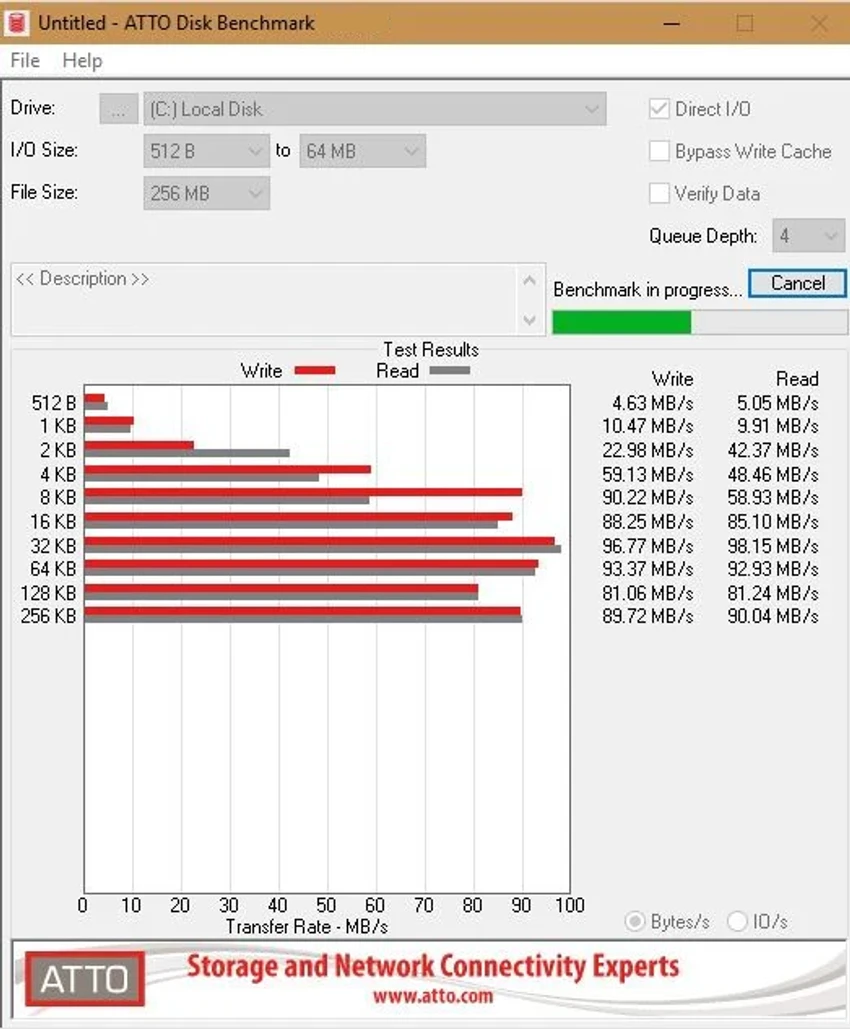
ATTO Disk Benchmark is a specialized storage performance testing utility designed to measure read and write speeds across a wide range of storage devices. Whether you're evaluating SSDs, hard drives, RAID arrays, storage controllers, or host adapters, the software provides detailed performance measurements using customizable transfer sizes and test lengths.

The application focuses on delivering accurate, non-destructive storage benchmarking, making it suitable for users who need to analyze and compare disk performance without risking data loss on formatted drives.

Features of ATTO Disk Benchmark

  • Measures read and write performance of storage devices
  • Transfer sizes ranging from 512KB to 8MB
  • Transfer lengths from 64KB to 2GB
  • Support for overlapped I/O testing
  • Multiple queue depth configurations
  • I/O comparisons using various test patterns
  • Continuous testing through Timed Mode
  • Comparison mode for performance evaluation
  • Non-destructive benchmarking on formatted drives
  • Compatible with RAID controllers, storage controllers, host adapters, HDDs, and SSDs
  • Supports Windows 11, Windows 10, Windows 8, and Windows 7

User Experience

After using ATTO Disk Benchmark, I found it to be a straightforward and focused benchmarking utility. The software is designed specifically for storage performance analysis rather than system optimization, which helps keep the interface centered on testing and measurement tasks. The ability to customize transfer sizes, queue depths, and test lengths provides flexibility for both quick checks and more detailed benchmarking sessions. Continuous testing mode is particularly useful when monitoring performance consistency over time.

One of the strongest aspects of the software is its support for a broad range of storage hardware. Whether testing a traditional hard drive, a modern SSD, or a RAID configuration, the benchmarking process remains consistent and easy to configure. Since the benchmark is non-destructive on formatted drives, users can safely evaluate performance without modifying existing data. The comparison options also make it easier to assess different storage devices or configurations side by side.

Who Should Use ATTO Disk Benchmark?

  • PC enthusiasts testing SSD or HDD performance
  • IT professionals evaluating storage hardware
  • System administrators managing RAID configurations
  • Hardware reviewers comparing storage devices
  • Users troubleshooting storage performance issues

Conclusion

ATTO Disk Benchmark is a dependable disk benchmarking utility that provides detailed insight into storage performance. With customizable test parameters, support for numerous storage technologies, and safe non-destructive testing, it serves as a practical solution for both professionals and advanced users.

Pros & Cons

✓

Pros

  • Wide range of configurable transfer sizes and test lengths
  • Supports SSDs, HDDs, RAID arrays, and storage controllers
  • Multiple queue depth options for advanced testing
  • Continuous testing mode available
  • Non-destructive benchmarking process
  • Compatible with several Windows versions
✕

Cons

  • Focused solely on storage benchmarking
  • May provide more technical options than casual users need

Frequently Asked Questions

What is ATTO Disk Benchmark used for?

ATTO Disk Benchmark is used to measure the read and write performance of storage devices, including SSDs, HDDs, RAID arrays, storage controllers, and host adapters.

Does ATTO Disk Benchmark support SSDs?

Yes. The software can benchmark SSDs as well as traditional hard drives and RAID storage configurations.

Can ATTO Disk Benchmark test RAID systems?

Yes. It supports testing RAID controllers and RAID-based storage setups.

Is ATTO Disk Benchmark safe to use?

Yes. The software performs non-destructive performance measurements on formatted drives.

Which operating systems are supported?

ATTO Disk Benchmark supports Windows 11, Windows 10, Windows 8, and Windows 7.

Can I run continuous storage performance tests?

Yes. The Timed Mode feature allows continuous benchmarking for extended performance testing.

Recommended apps [Freeware]:
  • iTop Easy Desktop 4.4.0.348 iTop Easy Desktop logo declutter, organize, and manage Windows desktop items efficiently and quickly
  • Tails 7.9.1 Tails logo a privacy-focused live operating system that enables anonymous browsing and secure communication
  • Mozilla Firefox 152.0.6 Mozilla Firefox logo Browse the web securely and quickly with Mozilla Firefox, a customizable browser with strong privacy and add-on support
  • Quick CPU 6.6.0 Quick CPU logo Monitor core parking, turbo boost, frequency scaling, and system power in real time
  • Media Player Codec Pack Plus 5.1.2.625 Media Player Codec Pack Plus logo Windows codec bundle that enhances video and audio playback with broad format support and advanced filters
  • NoMachine 9.8.2 NoMachine logo Access and control remote computers securely with a fast desktop sharing tool for working, accessing files, and remote management.
Recommended apps [Shareware]:
  • Rollback RX 12.91 Rollback RX logo instant system restore software for Windows lets users recover PCs via snapshots in seconds
  • SQL Backup Master 8.5.1120 SQL Backup Master logo SQL Server backups with cloud storage, encryption, scheduling, and recovery features
  • VovSoft Domain Checker 10.4 VovSoft Domain Checker logo check domain availability, perform WHOIS lookups, and analyze multiple domains in batch mode
  • Actual Window Menu 8.15.4 Actual Window Menu logo adds advanced commands like transparency, always-on-top, minimize to tray, and resize options to the Windows system menu
  • Blue Iris 6.0.8.6 Blue Iris logo a Windows surveillance software for managing IP cameras, DVRs, motion detection, recording, and remote monitoring
  • Actual File Folders 1.15.5 Actual File Folders logo Speed up folder navigation and access frequently used locations faster with a Windows tool designed for file dialogs.