


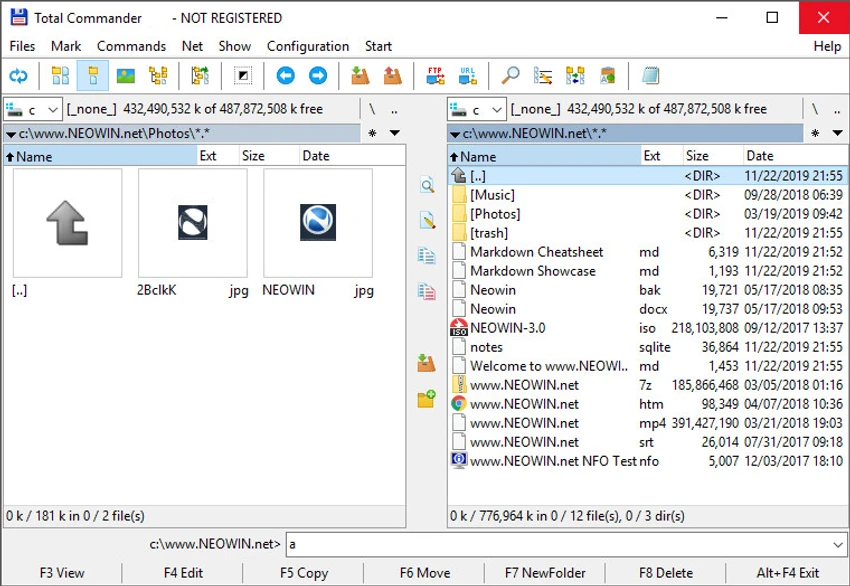

Total Commander is a long-standing file management utility for Windows that replaces the traditional single-pane Explorer layout with a dual-pane interface. Designed for efficiency and control, it offers advanced tools for file operations, archive handling, FTP transfers, and directory synchronization.
Overview
Total Commander (formerly Wincmd) is developed by Christian Ghisler and is widely known for its productivity-focused approach to file management. Unlike standard file explorers, it uses a fixed dual-window layout that allows users to view and manage two directories side by side. This design makes file copying, moving, and comparison significantly more efficient, especially for users handling large or complex directory structures.
Beyond basic file operations, Total Commander integrates a wide range of utilities including archive management, FTP access, batch renaming, and advanced search tools. It is designed as an all-in-one file management environment rather than a simple file browser.
Features of Total Commander
- Dual-pane file manager layout for faster file operations
- Multi-language and Unicode support
- Advanced file search with filtering options
- File comparison tool with synchronization support
- Built-in FTP client with FXP (server-to-server transfer) and proxy support
- Archive support (ZIP, RAR, TAR, GZ, CAB, and more) with plugin extensibility
- Tabbed browsing and folder history navigation
- Multi-rename tool for batch file renaming
- Quick View panel with image preview support
- Directory synchronization and empty folder handling
- Custom columns, thumbnails view, and enhanced file display options
- Support for long file names and Unicode across most functions
- USB direct transfer cable support for device connections
- Extensive plugin ecosystem for extended functionality
User Experience
Total Commander is clearly designed for experienced users who prioritize speed and control over modern visual design. The dual-pane interface feels highly efficient once mastered, especially for repetitive tasks like organizing files, syncing folders, or managing backups. The learning curve can be noticeable for new users, as the interface is more functional than modern file explorers. However, once familiar, users often find it significantly faster for everyday file operations.
Power users will appreciate the depth of customization and the ability to extend functionality through plugins. Features like synchronized browsing, multi-rename tools, and built-in FTP access make it a complete file management workstation rather than just a browser.
Who Should Use Total Commander?
Total Commander is best suited for power users, IT professionals, system administrators, and anyone who regularly manages large numbers of files or complex directory structures. It is especially useful for users who need advanced file synchronization, batch operations, or FTP-based workflows.
Conclusion
Total Commander remains one of the most capable and efficient file managers available for Windows. Its dual-pane design, combined with advanced tools for search, synchronization, and file handling, makes it a productivity-focused alternative to standard file explorers.


