


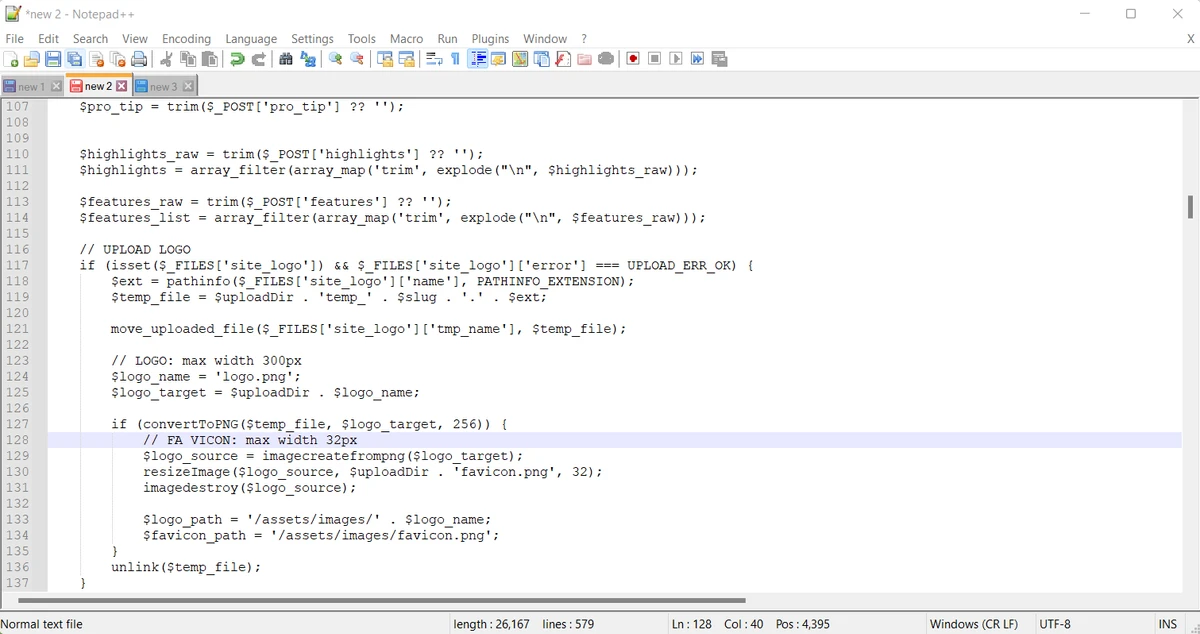

Notepad++ is a free, open-source text and source code editor designed for Windows. Built as a powerful alternative to the default Windows Notepad, it offers an extensive set of features for developers, IT professionals, and anyone who regularly works with text files. Despite its lightweight footprint, Notepad++ delivers a highly capable editing environment with support for numerous programming languages, making it suitable for coding, scripting, configuration file editing, and general text editing.
One of the biggest advantages of Notepad++ is its balance between simplicity and functionality. The editor supports syntax highlighting for a wide range of languages, making code easier to read and maintain. It also allows users to work with multiple documents simultaneously through a tabbed interface, while powerful search and replace tools help speed up editing tasks. Additional conveniences such as keyboard shortcuts, plugin support, session restore, auto-save, and customizable themes make it easy to tailor the editor to individual workflows.
Whether you're writing HTML, PHP, Python, Java, C#, ASP, JSP, or simply editing plain text, Notepad++ provides a fast, reliable workspace without consuming significant system resources. Its combination of speed, flexibility, and ease of use has made it one of the most widely used code editors on Windows.
What Is the Difference Between Notepad and Notepad++?
Although both applications are lightweight text editors, they target different types of users. Windows Notepad is designed for basic text editing, making it suitable for quick notes and simple text files. It lacks advanced programming features such as syntax highlighting, multiple document tabs, plugin support, and code editing tools.
Notepad++, on the other hand, is built with developers and power users in mind. It supports more than 70 programming languages, offers syntax highlighting and code folding, includes line numbering, auto-completion, powerful search and replace capabilities, macro recording, and an extensive plugin ecosystem. For anyone who regularly edits source code or configuration files, Notepad++ offers a much more productive editing experience.
Features of Notepad++
- Supports numerous programming languages including ASP, PHP, Java, C#, Python, and JSP.
- Syntax highlighting for improved code readability.
- Code folding for better navigation through large files.
- Tabbed interface for editing multiple files simultaneously.
- Powerful search and replace functionality.
- Plugin support for extending functionality.
- Customizable themes and appearance.
- Auto-save and session restore to help recover unsaved work.
- Keyboard shortcuts for faster editing.
- Supports WYSIWYG functionality.
- Create read-only files to help prevent unwanted modifications.
- Multi-language interface.
- Lightweight installation with portable version available.
Interface and Usability
Using Notepad++ feels both familiar and significantly more capable than the default Windows Notepad. The interface is clean and responsive, with clearly organized menus and a practical tabbed layout that makes switching between files effortless. Syntax highlighting immediately improves readability when working with source code, while line numbering and code folding help navigate larger projects more efficiently.
The search and replace tools are quick to access, keyboard shortcuts reduce repetitive actions, and the plugin system allows users to expand the editor without overwhelming the default experience. Despite offering numerous advanced features, Notepad++ remains approachable for beginners while providing enough flexibility for experienced developers.
Who Should Use Notepad++?
- Software developers writing code in multiple programming languages.
- Web developers editing HTML, PHP, JavaScript, CSS, and related files.
- System administrators managing scripts and configuration files.
- IT professionals who frequently work with log files and text-based data.
- Students learning programming.
- Power users looking for a more capable alternative to Windows Notepad.
Conclusion
Notepad++ continues to be one of the best lightweight code editors available for Windows. It combines speed, flexibility, and an impressive feature set while remaining easy to use. From syntax highlighting and plugin support to session recovery and multi-document editing, it offers nearly everything most developers and technical users need in a daily editor.


