


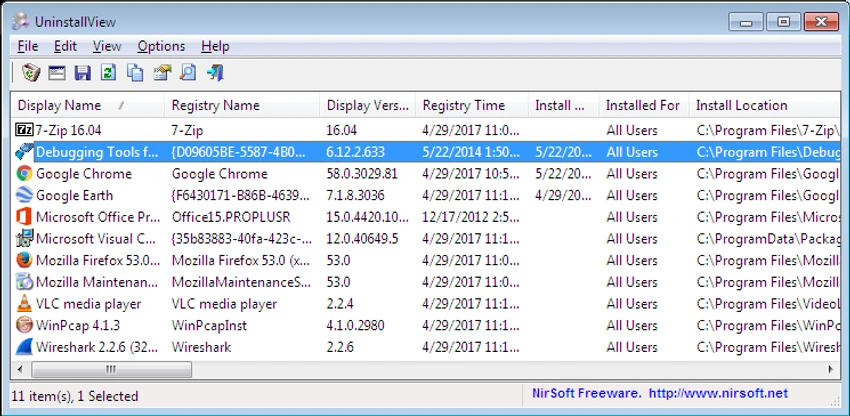

UninstallView is a lightweight Windows utility that gathers and displays detailed information about installed applications in a single, organized interface. Developed for users who need better visibility into installed software, it can scan the local computer, remote computers on a network, or external drives connected to the system. In addition to displaying software details, UninstallView also provides options to uninstall supported applications, including silent uninstall when available. One of its biggest advantages is that it is completely portable, requiring no installation before use.
Features of UninstallView
- Display detailed information about installed Windows applications
- Scan installed software on the local computer
- View installed programs on remote computers across a network
- Read installed application information from connected external drives
- Uninstall software directly from the interface
- Support for silent uninstall when supported by the application's uninstaller
- Portable application that requires no installation
- Multiple scan speed options:
- Slow (maximum details)
- Medium (balanced speed and information)
- Fast (quick scan with fewer details)
- Optional setting to skip loading program icons for faster scanning
User Experience
After using UninstallView, I found that it focuses on providing a clear overview of installed applications rather than replacing a full software management suite. Launching the program is simple since it doesn't require installation—just run the executable file, and it immediately begins scanning the selected system. The interface presents installed software in a table, making it easy to browse application information without navigating multiple Windows settings pages. This is particularly helpful when reviewing installed programs on several computers or examining an external Windows drive.
I also appreciated the adjustable scanning modes. The default mode retrieves the most detailed information, while the Medium and Fast modes reduce loading time when working with remote computers. There's also an option to skip loading application icons, which can further improve scan speed when performance is more important than visual details.
The ability to uninstall applications directly from the program is convenient, especially since it supports silent uninstall when the software being removed provides that capability. Overall, UninstallView delivers a straightforward experience for users who want quick access to installed software information and basic uninstall functionality without installing another management tool.
Who Should Use UninstallView?
- Windows users who want detailed information about installed applications
- IT administrators managing multiple computers
- Users who need to inspect software installed on remote PCs
- Technicians working with external Windows drives
- Anyone looking for a lightweight alternative to the standard Windows Programs and Features interface
Conclusion
UninstallView is a practical utility for viewing installed applications and performing basic software removal tasks. Its portable design, support for local and remote systems, adjustable scan modes, and detailed software inventory make it especially useful for IT professionals and advanced Windows users.


