FileLegit Windows Productivity Automation Tools QueueMonitor Professional
QueueMonitor Professional logo

QueueMonitor Professional 1.6.38

  • User Rating:
    ★★★★★
    ★★★★★
    0.0 ★ 0Votes
  • Requirements:
    Windows
  • Version: 1.6.38
  • Latest updated: 2 weeks ago
  • License: Free Trial  
  • Publisher: Cogin
  • Size: 12 MB
× app stores

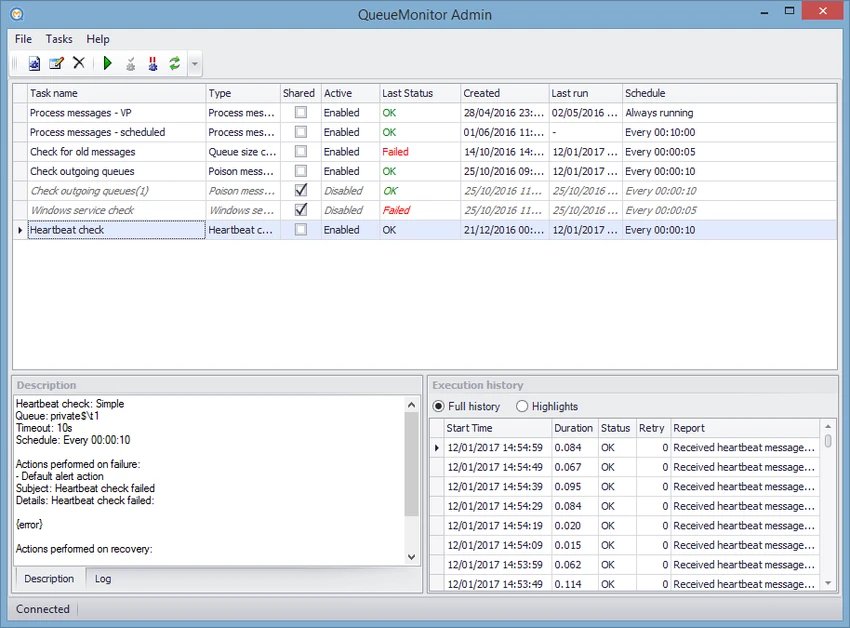
QueueMonitor Professional is a specialized monitoring and automation tool designed specifically for Microsoft Message Queuing (MSMQ) environments. The software continuously monitors MSMQ systems and their queues, helping administrators detect problems quickly and respond with alerts or automatic corrective actions.

Unlike general monitoring tools that include limited MSMQ support, QueueMonitor Professional focuses specifically on message queue management. It can identify queue-related issues such as poison messages and dead letter messages, helping administrators maintain reliable message processing workflows.

The software provides monitoring capabilities across multiple machines from a single administrative interface. It can perform heartbeat checks and include application monitoring as part of the overall system status review. When problems occur, automated actions can help resolve certain issues without requiring manual administrator intervention.

The Professional edition expands these capabilities with message processing and system integration features. Users can automate message handling without writing code, apply conditional processing based on message content, create backups, modify messages, and route messages between queues.

QueueMonitor Professional also provides built-in integrations with external systems, including SQL databases, FTP servers, HTTP requests, file-based integrations, and command-line applications. It supports Windows desktop and server operating systems, making it suitable for enterprise environments that rely on MSMQ-based applications.

Features of QueueMonitor Professional

  • Continuous monitoring of MSMQ queues
  • Alerts for MSMQ problems and queue issues
  • Automatic actions for selected problems
  • Detection of poison messages and dead letter messages
  • Heartbeat checks that can include applications
  • Monitoring of multiple machines from one interface
  • Automated message processing without coding
  • Conditional message processing based on message content
  • Periodic backup support
  • JSON and XML message parsing
  • Message modification capabilities
  • Macro-based operations
  • Message routing between queues
  • SQL Server and MSMQ integration
  • File-based integrations through folder monitoring
  • FTP and HTTP integration support
  • Command-line application integration

Interface and Usability

QueueMonitor Professional is designed for administrators who manage MSMQ-based applications and require centralized visibility into queue activity. Its interface focuses on monitoring, automation, and integration management rather than general system monitoring. The ability to monitor multiple machines from a single administrative interface helps simplify management in environments where MSMQ services are distributed across different systems. Automated actions and message-processing features reduce the need for repetitive manual tasks.

The Professional edition is designed to support complex workflows without requiring custom programming. Features such as conditional processing, message parsing, and external service integration provide flexibility for organizations managing automated message-based processes. Because the software focuses specifically on MSMQ, users will benefit from having familiarity with Microsoft Message Queuing concepts and enterprise application workflows.

Who Should Use QueueMonitor Professional?

  • System administrators managing MSMQ environments
  • IT teams supporting message-based applications
  • Organizations using Microsoft Message Queuing for business processes
  • Developers and administrators who need automated message workflows
  • Enterprises requiring queue monitoring across multiple machines

Conclusion

QueueMonitor Professional is a specialized solution for organizations that depend on Microsoft Message Queuing and need reliable monitoring, automation, and integration capabilities. Its dedicated MSMQ features provide deeper queue management than general-purpose monitoring tools.

Pros & Cons

✓

Pros

  • Built specifically for MSMQ monitoring
  • Detects queue-specific problems such as poison messages and dead letters
  • Supports automated fixes and message processing
  • Provides multiple integration options
  • Allows centralized monitoring of multiple machines
  • Works with a wide range of Windows Server versions
✕

Cons

  • Designed for specialized MSMQ environments
  • May be unnecessary for users without message queue systems
  • Requires knowledge of MSMQ and enterprise workflows

Frequently Asked Questions

What is QueueMonitor Professional used for?

QueueMonitor Professional is used to monitor and manage Microsoft Message Queuing (MSMQ) environments. It watches queues, detects issues, and can perform automated actions when problems occur.

What types of MSMQ problems can QueueMonitor Professional detect?

The software can detect queue-specific issues including poison messages and dead letter messages, helping administrators identify and handle message processing problems.

Does QueueMonitor Professional support automated message processing?

Yes. The Professional edition allows users to process messages automatically without writing code. It supports conditional processing, message modification, routing, and other automation features.

Can QueueMonitor Professional integrate with external systems?

Yes. The software includes integrations with SQL Server, FTP servers, HTTP requests, file-based systems, and command-line applications.

Which Windows versions are supported by QueueMonitor Professional?

QueueMonitor Professional supports Windows 7, Windows 8, Windows 10, and Windows 11. It also supports Windows Server versions including 2008, 2008 R2, 2012, 2016, 2019, and 2022.

Can QueueMonitor Professional monitor multiple machines?

Yes. The software allows administrators to monitor multiple machines from a single administrative interface.

Recommended apps [Freeware]:
  • Vivaldi Browser 8.1.4087.55 Vivaldi Browser logo a Chromium-based browser with built-in mail, calendar, notes, ad blocker, and deep customization features.
  • darktable 5.6.0 darktable logo a free open-source RAW photo editor and photography workflow tool for professional image management
  • Ultimaker Cura 5.13.0 Ultimaker Cura logo Prepare, slice, and manage 3D prints with Ultimaker Cura, an open-source software for beginners and professionals
  • Mozilla Thunderbird 152.0.1 Mozilla Thunderbird logo secure email client with spam filtering, RSS support, and advanced tools for managing multiple accounts
  • FotoSketcher 4.40 FotoSketcher logo Transform photos into artistic sketches with creative effects, drawing styles, filters, and simple image editing tools.
  • Inno Setup Unpacker 2.2.10 Inno Setup Unpacker logo Extract files from Inno Setup installers quickly with a lightweight command-line utility supporting advanced unpacking options.
Recommended apps [Shareware]:
  • DiskGenius 6.2.0.1829 DiskGenius logo a Windows tool for partition management, data recovery, disk cloning, and backup with advanced features.
  • REAPER 7.77 REAPER logo a powerful digital audio workstation for multitrack recording, MIDI editing, mixing, and professional audio production
  • ezAccounting 3.16.18 ezAccounting logo Manage accounting, payroll, invoicing, and tax forms locally with ezAccounting, an affordable desktop solution for small businesses
  • Artweaver Plus 8.1.6.4131 Artweaver Plus logo a digital painting tool with realistic brushes, layers, and teamwork features for artists
  • Process Lasso 18.2.2.10 Process Lasso logo Optimize process behavior, manage CPU priorities, monitor system responsiveness, and control background tasks with advanced tools.
  • 3delite Duplicate Picture Finder 1.0.112.122 3delite Duplicate Picture Finder logo Find duplicate and similar pictures on your PC with image comparison, previews, EXIF details, and multi-threaded scanning tools.