FileLegit Windows Graphics & Design 3D Modeling Agisoft Metashape Professional
Agisoft Metashape Professional logo

Agisoft Metashape Professional 2.3.2 Build 22626

  • User Rating:
    ★★★★★
    ★★★★★
    0.0 0Votes
  • Requirements:
    Windows
  • Version: 2.3.2 Build 22626
  • Latest updated: 1 day ago
  • License: Free Trial  
  • Publisher: Agisoft
  • Size: 199 MB
× app stores

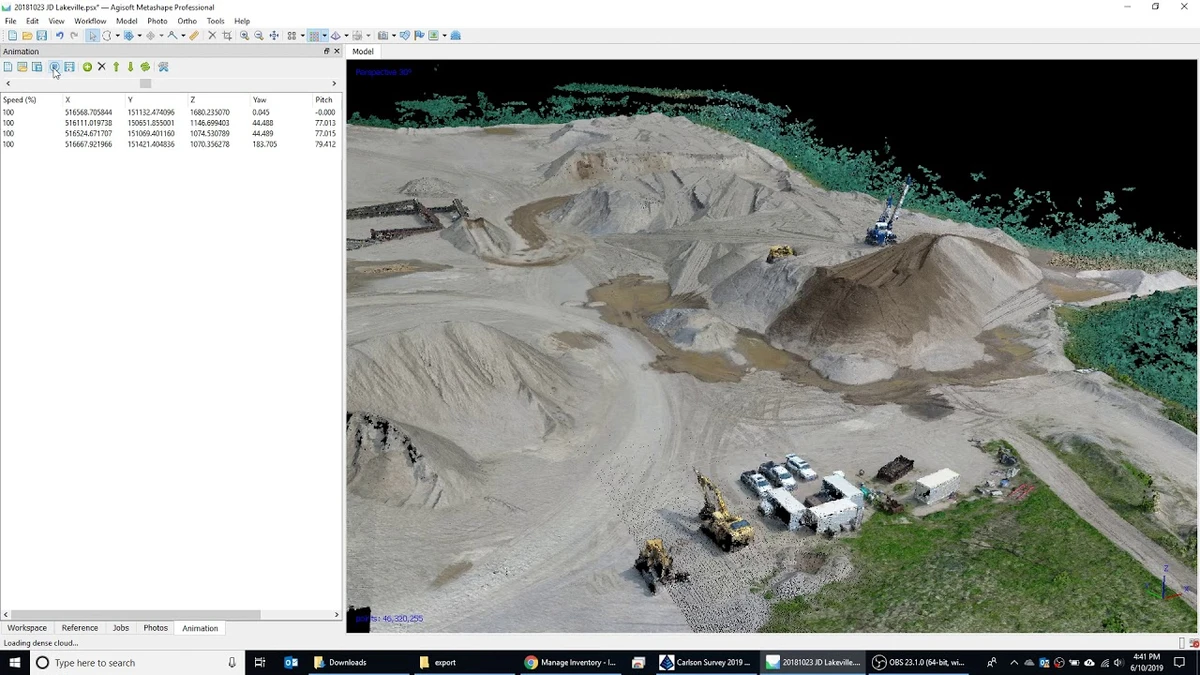
Agisoft Metashape Professional (formerly PhotoScan) is a powerful photogrammetry application designed to convert overlapping digital images into highly accurate 3D spatial data. It is widely used in fields such as GIS mapping, cultural heritage preservation, engineering, surveying, and visual effects production. By combining photogrammetry and computer vision techniques, Metashape automates much of the 3D reconstruction workflow while still offering advanced manual controls for professional users.

Features of Agisoft Metashape Professional

  • Photogrammetric triangulation for 3D reconstruction
  • Supports aerial (nadir, oblique) and close-range images
  • Automatic camera calibration (frame, fisheye, spherical, cylindrical)
  • Multi-camera project support
  • Dense point cloud generation
  • Point cloud editing and classification tools
  • Export support for .LAS format
  • Digital Elevation Model (DSM/DTM) generation
  • Orthomosaic creation (GeoTIFF, KML export)
  • Georeferencing using GPS, GCPs, and EXIF data
  • Support for EPSG coordinate systems (WGS84, UTM, etc.)
  • Measurement tools (distance, area, volume)
  • Color correction for large mosaic datasets
  • Block-based export for large-scale projects
  • Integration with external GIS and CAD tools

User Experience

Agisoft Metashape Professional provides a structured workflow that guides users from raw image input to final 3D output models. While beginners can follow automated processing steps, the software truly excels when used by professionals who understand photogrammetry principles. The interface is functional and task-oriented, with clear stages such as alignment, dense cloud generation, mesh creation, and texture mapping. Each stage offers adjustable parameters, allowing users to balance speed, accuracy, and computational load.

Processing can be resource-intensive, especially for large aerial datasets, but the software efficiently utilizes modern CPUs and GPUs to accelerate reconstruction tasks. One of its strengths is flexibility: users can produce everything from small-scale object scans to large geographic terrain models, depending on project requirements.

Who Should Use Agisoft Metashape?

  • GIS professionals and surveyors
  • Archaeologists and cultural heritage researchers
  • Drone mapping specialists
  • Civil engineers
  • 3D artists and VFX studios
  • Scientific researchers working with spatial data

Conclusion

Agisoft Metashape Professional is a high-end photogrammetry tool capable of transforming images into precise 3D spatial models and georeferenced datasets. Its combination of automation and advanced manual control makes it suitable for both research and production environments.

Pros & Cons

Pros

  • Extremely accurate 3D reconstruction
  • Supports GIS, surveying, and VFX workflows
  • Highly flexible and configurable pipeline
  • Strong support for georeferenced outputs
  • Works with both aerial and close-range imagery
  • Professional-grade measurement tools
  • GPU acceleration support

Cons

  • Requires significant hardware resources
  • Steep learning curve for beginners
  • Processing large datasets can be time-consuming
  • Interface is technical rather than beginner-friendly

Frequently Asked Questions

What is Agisoft Metashape used for?

It is used to generate 3D models, maps, and spatial data from overlapping photographs using photogrammetry techniques.

Can Metashape create 3D models from drone images?

Yes. It is widely used for processing aerial drone imagery to create terrain models and orthomosaics.

Does Metashape support GIS data?

Yes. It supports georeferenced outputs, coordinate systems, and formats compatible with GIS workflows.

Is Metashape suitable for beginners?

It can be used by beginners in basic workflows, but full capability requires understanding photogrammetry concepts.

What kind of hardware is recommended?

A multi-core CPU, 16–32 GB RAM, and a compatible NVIDIA or AMD GPU are recommended for optimal performance.

Recommended apps [Freeware]:
  • OCCT 16.1.11.99 OCCT logo hardware monitoring and stress testing tool for CPU, GPU, memory, and power supply performance analysis.
  • Sysinternals Suite 2026.6.17 Sysinternals Suite logo a powerful collection of Windows tools for system monitoring, troubleshooting, process analysis, and performance optimization.
  • Password Safe 3.72.0 Password Safe logo encrypted password manager for Windows to store, organize, and generate secure passwords
  • MSI Center 2.0.71.0 MSI Center logo a system utility for MSI devices that manages performance, gaming modes, monitoring, RGB, and hardware optimization tools
  • Disk Benchmark 1.0 Disk Benchmark logo measures SSD, HDD, NVMe, and USB drive performance with detailed speed, IOPS, and latency tests
  • Brave Browser 1.91.178 Brave Browser logo Browse faster and more privately, block ads, earn BAT rewards, and enjoy Chromium compatibility.
Recommended apps [Shareware]:
  • VMware InstallBuilder Enterprise 26.5.1 VMware InstallBuilder Enterprise logo It helps developers quickly create professional installers, RPM packages, and software bundles for multiple platforms.
  • Bandizip 7.44 Bandizip logo Fast and intuitive file compression software supporting ZIP, RAR, 7Z, and more with high-speed archiving features
  • Secret Disk 2026 v323 Secret Disk logo create hidden, password-protected virtual drives to securely store private files on Windows
  • ViewCompanion Pro 17.03.0.1203 ViewCompanion Pro logo View, convert, annotate, and compare PDF, DWF, CAD, and technical drawing files with powerful batch tools
  • GiliSoft USB Lock 11.2 GiliSoft USB Lock logo restricts USB, disk, program, and website access to prevent data leaks and misuse
  • Your Uninstaller! 7.5.3.1287 Your Uninstaller! logo powerful Windows uninstaller tool with deep scan, leftover removal, and system cleanup utilities for Windows PC