Autoruns logo

Autoruns 14.30

  • User Rating:
    ★★★★★
    ★★★★★
    0.0 0Votes
  • Requirements:
    Windows
  • Version: 14.30
  • Latest updated: 1 week ago
  • License: Freeware  
  • Publisher: Microsoft
  • Size: 3 MB
× app stores

Autoruns is a powerful Windows utility designed to provide complete visibility into everything that runs automatically when the system boots or when users log in. It goes far beyond standard startup managers by exposing every possible autostart location, helping users analyze, disable, or remove unwanted entries.

Overview

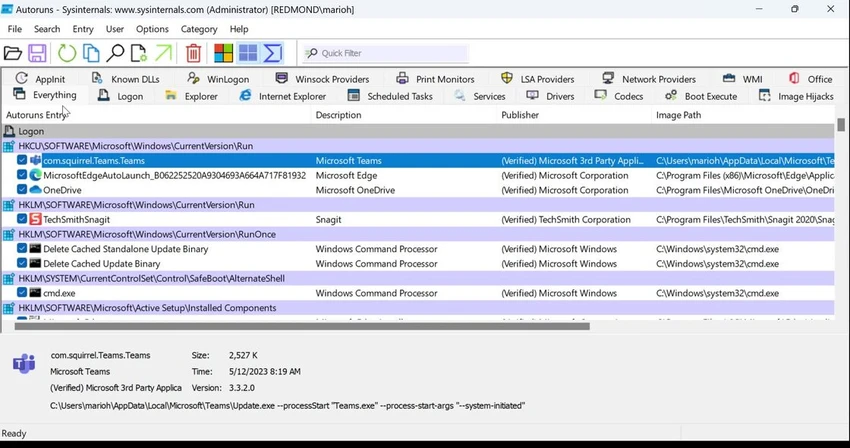
Autoruns is part of the Sysinternals Suite developed by Microsoft and is widely used by IT professionals and security analysts to investigate system startup behavior in detail. Unlike basic startup tools, Autoruns scans and displays all autostart locations in Windows, including registry keys, startup folders, services, scheduled tasks, browser extensions, and system-level components. It provides a structured view of what runs automatically during boot, login, and even when launching applications like browsers or Windows Explorer.

The tool is especially valuable for identifying hidden or persistent startup entries that may affect system performance or security.

Features of Autoruns

  • Displays all programs configured to run at system startup or user login
  • Shows autostart entries from registry, startup folders, services, and system components
  • Detects browser add-ons, toolbars, and helper objects (BHOs)
  • Supports multiple user accounts on the same system
  • Option to hide Microsoft-signed entries for easier third-party analysis
  • Allows disabling or deleting startup entries directly from the interface
  • Jump-to-location feature for registry or file system navigation
  • Integration with Process Explorer for running process inspection
  • Command-line version (Autorunsc) with CSV output support
  • Optional VirusTotal and digital signature verification for security checks
  • Filtering options to focus on non-Windows or suspicious entries

User Experience

Autoruns is highly technical but extremely informative once understood. The interface is tab-based, grouping autostart entries into categories such as logon items, services, drivers, and browser extensions. For system administrators and security professionals, the ability to quickly disable startup entries or jump directly to their system location is especially useful. The “Hide Signed Microsoft Entries” option significantly improves clarity by reducing noise from system-critical components.

However, the tool is not designed for casual users. The amount of information presented can be overwhelming, and making incorrect changes may affect system stability.

Who Should Use Autoruns?

Autoruns is best suited for advanced Windows users, IT administrators, and cybersecurity professionals who need full control and visibility over system startup behavior. It is particularly useful for diagnosing slow boot times, investigating malware persistence, and auditing system configurations.

Conclusion

Autoruns is one of the most comprehensive startup management tools available for Windows. It provides unmatched visibility into every autostart mechanism on a system, making it essential for deep system analysis and security auditing.

Pros & Cons

Pros

  • Extremely comprehensive startup analysis
  • Covers all autostart locations in Windows
  • Useful for malware and performance investigations
  • Integration with VirusTotal and signature verification
  • Lightweight and portable utility

Cons

  • Complex interface for beginners
  • Risk of system issues if entries are modified incorrectly
  • Highly technical output requires experience

Frequently Asked Questions

What is Autoruns used for?

It is used to view, analyze, and manage all programs and components that start automatically in Windows.

Can Autoruns improve system performance?

Yes, by identifying and disabling unnecessary startup items, it can help improve boot time and performance.

Is Autoruns safe to use?

Yes, but caution is required when disabling or deleting entries, as some are required by Windows.

Does Autoruns show malware?

It can help identify suspicious or unknown startup entries, especially when combined with VirusTotal scanning.

Recommended apps [Freeware]:
  • Awesome Miner 11.5.5 Awesome Miner logo manage Bitcoin, Litecoin and Ethereum mining, monitor rigs, switch pools, and optimize profitability
  • WifiInfoView 3.00 WifiInfoView logo scans nearby Wi-Fi networks and displays detailed technical information in real time
  • WildBit Viewer 6.20.1 WildBit Viewer logo a fast, lightweight image viewer for Windows with slideshow, compare tools and EXIF metadata support
  • PointerStick 7.17 PointerStick logo a virtual pointer to Windows desktops, helping presenters highlight mouse movements on large screens
  • TimVer 0.12.0 TimVer logo open-source Windows system information tool that provides detailed OS version, build, compatibility, and system data beyond standard Winver
  • Hasleo Backup Suite 5.8.2.2 Hasleo Backup Suite logo Windows backup software for system restore, disk imaging, and cloning with emergency recovery support
Recommended apps [Shareware]:
  • Teorex FolderIco 9.3.0 Teorex FolderIco logo Change folder colors or icons in one click and organize your files visually, so you can find everything instantly
  • Coolutils Total Doc Converter 5.1.0.394/167 Coolutils Total Doc Converter logo Convert DOC, DOCX, RTF, and TXT files into PDF, HTML, images, and more with fast batch processing
  • MacDrive 12.0.1.23 MacDrive logo Access, read, and write Mac-formatted APFS and HFS+ drives on Windows with full support for encrypted volumes and RAID
  • n-Track Studio 10.3.1.10917 n-Track Studio logo a powerful multitrack audio recording and editing software with MIDI support, VST plugins, live effects, and professional mixing tool
  • Coolutils PDF Splitter 5.2.0.43 Coolutils PDF Splitter logo split PDF files into individual pages, custom page ranges, or chapters defined by bookmarks
  • Coolutils PDF Splitter Pro 6.1.0.85/57 Coolutils PDF Splitter Pro logo Split large PDF files by keywords, page breaks, or document patterns with Coolutils PDF Splitter Pro for Windows.