Proton VPN logo

Proton VPN 4.4.1

  • User Rating:
    ★★★★★
    ★★★★★
    0.0 0Votes
  • Requirements:
    Windows
  • Version: 4.4.1
  • Latest updated: 4 days ago
  • License: Freeware  
  • Publisher: Proton VPN
  • Size: 121 MB
× app stores

Proton VPN is a privacy-focused virtual private network (VPN) application designed to secure internet connections and protect user anonymity online. Developed with a strong emphasis on security, it routes user traffic through encrypted tunnels and remote servers to hide the real IP address and protect against network-based attacks. The application is open-source and built with a strong commitment to transparency and privacy. It includes advanced security features such as a kill switch and traffic filtering tools to enhance protection during browsing sessions.

Features of Proton VPN

  • Strict no-logs policy for user privacy
  • Open-source and independently audited applications
  • Secure encrypted VPN connections
  • Kill switch to block internet access if VPN disconnects
  • Ability to include or exclude specific websites from VPN routing
  • VPN Accelerator for improved connection performance
  • Support for BitTorrent and P2P traffic
  • Access to streaming services and geo-restricted content
  • NetShield feature to block malware, ads, and trackers
  • Traffic routing through multiple secure servers for added protection

Free Version Limitations

  • Access to servers in 5 countries only
  • No advertisements
  • Medium connection speeds compared to paid tiers

User Experience

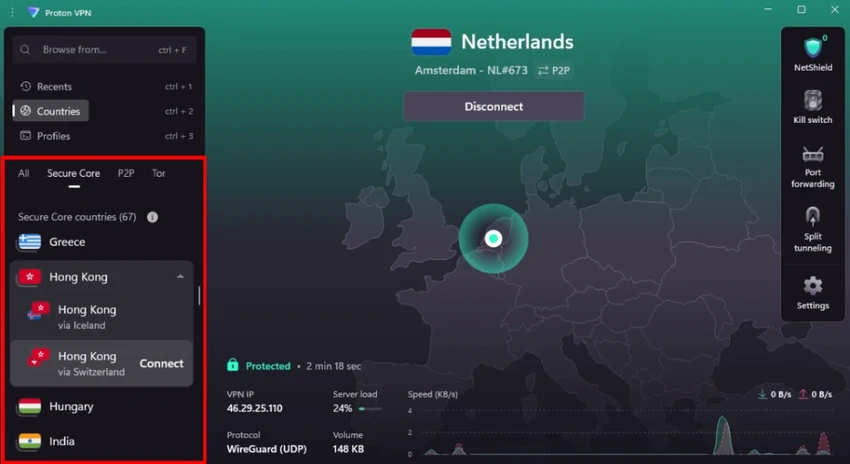
After using Proton VPN, the most noticeable aspect is its focus on security and ease of use. The interface is clean and straightforward, making it accessible even for users who are not familiar with VPN tools. Connecting to a server is simple and typically fast, with stable performance for everyday browsing and streaming. The VPN Accelerator feature helps improve connection speeds, especially on longer-distance servers.

The kill switch provides an important layer of protection by ensuring that no internet traffic is exposed if the VPN connection drops unexpectedly. This is particularly useful for users concerned about privacy leaks. NetShield is another valuable feature, helping block malicious domains, ads, and trackers before they load, which improves both security and browsing experience. Overall, Proton VPN offers a balanced combination of usability, privacy, and performance, making it suitable for both casual users and privacy-conscious individuals.

Who Should Use Proton VPN?

  • Users concerned about online privacy and anonymity
  • People accessing public Wi-Fi networks
  • Users who want to bypass geo-restrictions
  • Individuals looking for secure streaming or browsing
  • Users who prefer open-source security tools

Conclusion

Proton VPN is a reliable and privacy-focused VPN solution that prioritizes security, transparency, and ease of use. With features like a kill switch, NetShield protection, and a strict no-logs policy, it offers strong protection for everyday internet use.

Pros & Cons

Pros

  • Strong privacy and no-logs policy
  • Open-source and security-audited
  • Kill switch for connection protection
  • NetShield ad and malware blocking
  • Stable and easy-to-use interface
  • Supports streaming and P2P traffic
  • VPN Accelerator improves speed

Cons

  • Free version has limited server locations
  • Medium speeds on free tier
  • Some advanced features require paid plan
  • Performance may vary depending on server load

Frequently Asked Questions

What is Proton VPN used for?

Proton VPN is used to secure internet connections, protect privacy, and hide IP addresses while browsing online.

Does Proton VPN keep logs?

No. It follows a strict no-logs policy.

Is Proton VPN free?

Yes. It offers a free version with limited server locations and speeds.

Can I use Proton VPN for streaming?

Yes. It supports access to popular streaming services depending on the server and plan.

What is NetShield?

NetShield is a feature that blocks ads, trackers, and malware domains.

Is Proton VPN safe?

Yes. It uses strong encryption, a kill switch, and open-source code for transparency and security.

Recommended apps [Freeware]:
  • DirPrintOK 7.61 DirPrintOK logo fast and portable tool to print or export directory contents in XLS, HTML, CSV, or TXT formats.
  • Audacity 3.7.8 Audacity logo Free open-source audio editor and recorder with multi-track editing, effects, audio analysis, and format conversion
  • CheckMail 5.23.6 CheckMail logo a POP3 email checker that lets users preview, manage, and delete emails before downloading them
  • Password Safe 3.72.0 Password Safe logo encrypted password manager for Windows to store, organize, and generate secure passwords
  • Hasleo Disk Clone 5.8.2.1 Hasleo Disk Clone logo clone disks, migrate Windows systems, and transfer partitions with fast and reliable tools.
  • AIMP 5.40.2721 AIMP logo a lightweight audio player with high-quality sound, playlist tools, equalizer, and audio conversion features
Recommended apps [Shareware]:
  • VovSoft AI Requester 5.2 VovSoft AI Requester logo a program that can connect to OpenAI API and OpenAI-compatible APIs with ease
  • Ant Download Manager 2.17.4.96212 Ant Download Manager logo a Windows tool that speeds up downloads, captures streaming media, supports torrents, and integrates with browsers
  • Pazu StreamGet 3.1.5 Pazu StreamGet logo Download movies and TV shows from major streaming platforms to MP4 or MKV
  • Allavsoft 3.29.3.9669 Allavsoft logo video downloader and converter for batch downloads, HD quality, and audio extraction on Windows.
  • WavePad 24.38 WavePad logo audio editor for Windows, macOS, and mobile devices, offering effects, restoration tools, and batch processing
  • RapidRAW 1.5.8 RapidRAW logo a lightweight, GPU-accelerated RAW photo editor with advanced masking, non-destructive editing, and AI tools