SQL Backup Master logo

SQL Backup Master 8.5.1102.0

  • User Rating:
    ★★★★★
    ★★★★★
    0.0 0Votes
  • Requirements:
    Windows
  • Version: 8.5.1102.0
  • Latest updated: 1 week ago
  • License: Commercial  
  • Publisher: Key Metric Software, LLC.
  • Size: 35 MB
× app stores

SQL Backup Master is a database backup solution designed for Microsoft SQL Server environments. It simplifies the process of creating, managing, and storing database backups by supporting local storage, network locations, FTP servers, and popular cloud services such as Dropbox, OneDrive, Google Drive, Amazon S3, and Microsoft Azure.

Overview

Managing SQL Server backups is a critical task for businesses and database administrators. SQL Backup Master aims to streamline this process by combining backup automation, cloud integration, scheduling, compression, encryption, and recovery tools within a single application. The software supports multiple SQL Server backup types, including full, differential, and transaction log backups. It can automatically upload backup files to one or more storage destinations, providing redundancy and improving disaster recovery preparedness. With support for cloud services, FTP/SFTP/FTPS transfers, and local storage, SQL Backup Master offers flexible deployment options for organizations of various sizes.

Features of SQL Backup Master

  • Full SQL Server database backups
  • Differential database backups
  • Transaction log backups
  • Automated backup scheduling
  • Cloud backup support for:
    • Dropbox
    • Google Drive
    • OneDrive
    • Box
    • Amazon S3
    • Microsoft Azure
  • Local folder and network storage backups
  • FTP, SFTP, and FTPS backup destinations
  • Backup compression
  • Backup encryption
  • Email notifications for backup success, warnings, and failures
  • Automated backup retention and purge policies
  • Background operation as a Windows service
  • Backup logging and log viewer
  • Database recovery support
  • Execute custom SQL scripts before and after backups
  • Execute custom batch scripts as part of backup workflows

User Experience

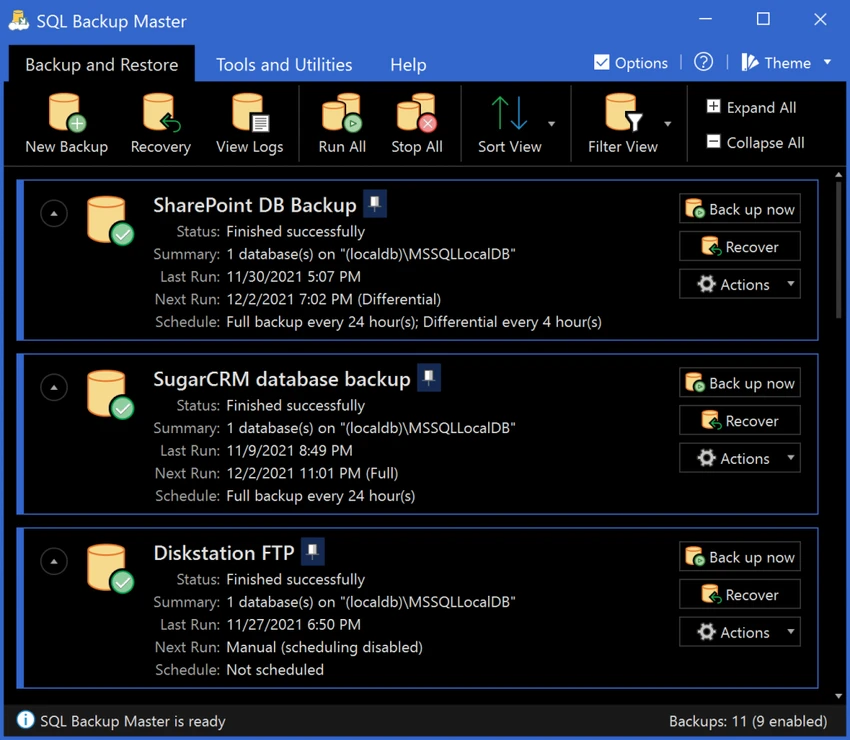
SQL Backup Master provides a straightforward interface that makes backup management more accessible than relying solely on SQL Server maintenance plans or manual scripting. Creating backup jobs is a simple process, with options for selecting backup types, destinations, schedules, retention policies, and notification settings. The software's cloud integration is particularly valuable, allowing backups to be stored automatically in remote locations without requiring additional synchronization tools.

The scheduling system helps automate recurring backup tasks, while email notifications ensure administrators remain informed about job status and potential issues. Advanced users will appreciate the ability to execute custom SQL and batch scripts before and after backup operations, enabling integration into existing database maintenance workflows. The built-in logging and recovery features also contribute to a more complete backup management experience.

Who Should Use SQL Backup Master?

  • SQL Server database administrators
  • Small and medium-sized businesses
  • IT professionals managing database infrastructure
  • Organizations requiring offsite backup storage
  • Companies implementing disaster recovery strategies
  • Users seeking automated database backup workflows

Conclusion

SQL Backup Master is a comprehensive backup solution for Microsoft SQL Server environments. Its combination of automated scheduling, cloud storage integration, encryption, compression, and recovery tools helps simplify database protection while reducing administrative effort.

Pros & Cons

Pros

  • Supports full, differential, and transaction log backups
  • Extensive cloud storage integration
  • FTP, SFTP, and FTPS support
  • Backup compression and encryption
  • Automated scheduling and retention policies
  • Email notifications for backup monitoring
  • Runs automatically as a background service
  • Recovery and restoration support
  • Custom scripting capabilities

Cons

  • Focused specifically on Microsoft SQL Server
  • Advanced database concepts may require technical knowledge
  • Cloud storage costs may apply depending on provider

Frequently Asked Questions

What is SQL Backup Master used for?

SQL Backup Master is used to automate SQL Server database backups and store them locally, on network drives, FTP servers, or cloud storage platforms.

Which cloud services does SQL Backup Master support?

It supports Dropbox, Google Drive, OneDrive, Box, Amazon S3, and Microsoft Azure.

Does SQL Backup Master support encrypted backups?

Yes. The software includes backup encryption features to help protect sensitive database data.

Can it perform transaction log backups?

Yes. It supports full, differential, and transaction log backups.

Does SQL Backup Master run automatically?

Yes. It can run as a Windows system service and execute scheduled backup jobs automatically.

Can old backups be deleted automatically?

Yes. The software can automatically purge backups based on retention policies.

Recommended apps [Freeware]:
  • DriversCloud 12.1.6 DriversCloud logo scan system hardware, update drivers, monitor performance, and analyze blue screen errors (BSODs) on Windows.
  • Burp Suite 2026.4.3 Burp Suite logo Test, analyze, and secure web applications with Burp Suite’s advanced proxy, scanning, and penetration testing tools
  • BDtoAVCHD 3.2.0 BDtoAVCHD logo convert Blu-ray and MKV files into AVCHD or MKV for DVD or USB high-definition backups
  • PrivaZer 4.0.124.1 PrivaZer logo a privacy cleaning tool that removes PC traces, frees disk space, and helps protect personal data
  • FreeFileSync 14.10 FreeFileSync logo open-source tool for folder synchronization, file comparison, and efficient backups
  • GnuCash 5.16 GnuCash logo open-source accounting software for tracking personal and small business finances with double-entry bookkeeping
Recommended apps [Shareware]:
  • Adobe Photoshop 2026 Adobe Photoshop logo powerful image editing and graphic design tool for creating, enhancing, and transforming photos, illustrations
  • Screenpresso 2.2.13 Screenpresso logo a versatile screen capture and video recording tool with editing and annotation features.
  • 4DDiG File Repair 4.4.2.9 4DDiG File Repair logo a Windows tool for repairing damaged photos and videos in batch mode with a simple, automated workflow
  • Drive SnapShot 1.51.0.1811 Drive SnapShot logo creates complete disk image backups while Windows runs, allowing fast system recovery and file restoration
  • Movavi Video Editor 26.18.0 Movavi Video Editor logo easy video editing tool with AI subtitles, effects, transitions, and color correction for creators
  • Total Image Converter 8.5.0.320 Total Image Converter logo Windows tool for converting, resizing, and editing images in bulk with support for RAW, TIFF, PSD, and more