AB Download Manager logo

AB Download Manager 1.9.2

  • User Rating:
    ★★★★★
    ★★★★★
    0.0 0Votes
  • Requirements:
    Windows
  • Version: 1.9.2
  • Latest updated: 1 week ago
  • License: Freeware  
  • Publisher: AB Download Manager App
  • Size: 67 MB
× app stores

AB Download Manager is a lightweight download management application designed to make downloading files from the internet faster and more organized. It provides tools for managing multiple downloads, improving download speeds, scheduling tasks, and controlling bandwidth usage. With support for browser integration and automatic link detection, AB Download Manager simplifies the process of downloading documents, images, videos, software, and other online files. Its clean interface and practical management features make it a convenient alternative to basic browser download tools.

Features of AB Download Manager

  • User-friendly download management interface
  • Dark mode interface by default
  • Faster downloads using multiple connections
  • Download speed improvements compared to traditional methods
  • Download queue creation and management
  • Download scheduling
  • Automatic start and stop controls for download queues
  • Download speed limit settings
  • Browser context menu integration
  • "Download With AB DM" option for supported browsers
  • Link selection download pop-up
  • Automatic capture of download links
  • Management of multiple files simultaneously

User Experience

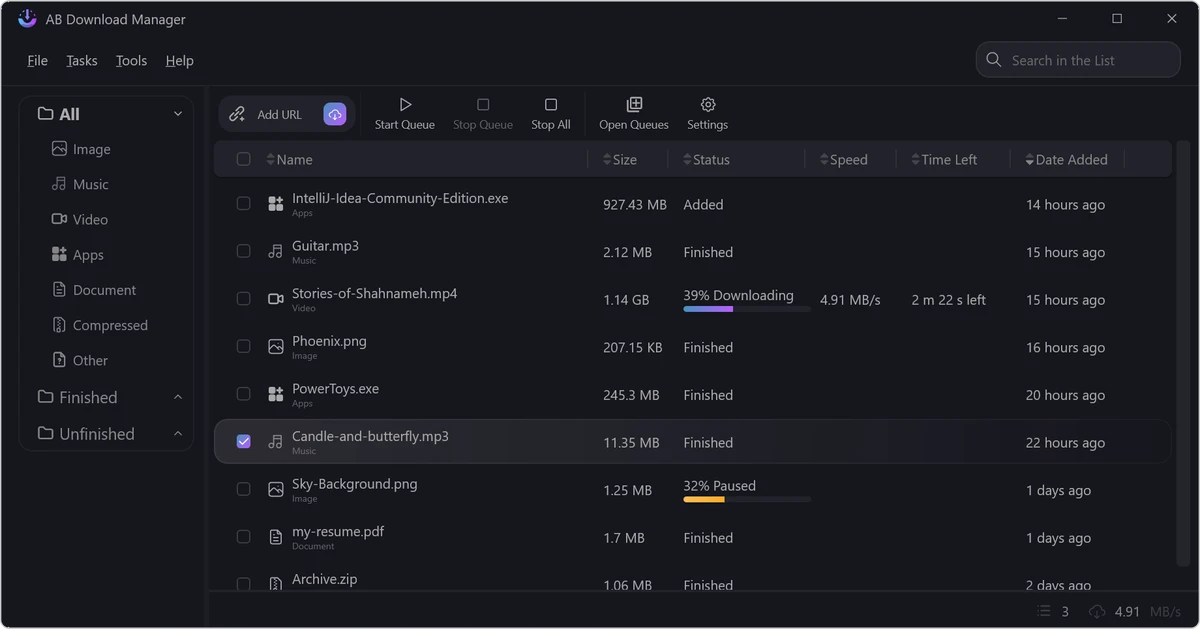
AB Download Manager focuses on making file downloads easier to control without adding unnecessary complexity. The interface is designed to be approachable, allowing users to quickly view active downloads, organize files, and manage download tasks from one location.

One of the most useful features is multi-connection downloading, which can improve download performance by splitting files into multiple connections. This is especially helpful when downloading larger files or multiple items at once. The queue management system is another practical addition. Instead of starting every download immediately, users can organize files into a sequence and let the application process them automatically. This makes handling large batches of downloads much more convenient.

The built-in scheduler adds another layer of flexibility. Users can choose when download queues should begin or stop, which can be useful when managing bandwidth usage or scheduling downloads at specific times. Bandwidth control is also well implemented. The ability to set download speed limits helps prevent downloads from using the entire internet connection, making it easier to share network resources with other users or applications.

Browser integration improves the overall workflow by allowing users to send links directly to AB Download Manager. Automatic link capturing and context menu options reduce the need to manually copy and paste download URLs. Overall, AB Download Manager provides a streamlined experience for users who want more control over their downloads than standard browser tools provide.

Conclusion

AB Download Manager provides a simple yet effective solution for improving and organizing file downloads. With features such as multi-connection downloading, download queues, scheduling, speed limits, and browser integration, it offers better control than standard browser-based downloads.

Pros & Cons

Pros

  • Simple and easy-to-use interface
  • Faster downloads through multiple connections
  • Download queue management
  • Scheduling features
  • Bandwidth control options
  • Browser context menu integration
  • Automatic download link detection
  • Useful for managing multiple files
  • Dark mode interface

Cons

  • Feature set is focused mainly on download management
  • Advanced users may require additional specialized tools for more complex workflows
  • No additional information about supported protocols is provided

Frequently Asked Questions

What is AB Download Manager?

AB Download Manager is a Windows application that helps users manage, organize, and optimize internet file downloads.

Can AB Download Manager increase download speed?

Yes. The application uses multiple connections to improve download performance compared with traditional downloading methods.

Does AB Download Manager support download queues?

Yes. Users can create and manage download queues to organize multiple files.

Can I schedule downloads?

Yes. AB Download Manager includes scheduling features that allow users to set when download queues start and stop.

Does AB Download Manager work with browsers?

Yes. It adds browser context menu options and can automatically capture download links for the application.

Can I limit download speed?

Yes. Users can set download speed limits to better manage network usage.

What types of files can AB Download Manager download?

The application can manage downloads such as documents, images, videos, software, and other files available online.

Recommended apps [Freeware]:
  • FastCopy 5.11.3 FastCopy logo a lightweight Windows tool for ultra-fast file copying, syncing, and error-resilient data transfer
  • OCCT 16.1.11.99 OCCT logo hardware monitoring and stress testing tool for CPU, GPU, memory, and power supply performance analysis.
  • PortKiller 3.3.3 PortKiller logo a network utility for monitoring TCP ports, managing processes, and handling tunnels on Windows.
  • Training Manager 2026 v4.10.4002 Training Manager logo Track employee training, compliance, certifications, and class schedules with centralized training management tools
  • Don't Sleep 10.22 Don't Sleep logo prevent sleep, restart, or hibernation with a lightweight Windows power control utility
  • Ultimaker Cura 5.13.0 Ultimaker Cura logo Prepare, slice, and manage 3D prints with Ultimaker Cura, an open-source software for beginners and professionals
Recommended apps [Shareware]:
  • VueScan 9.8.56 VueScan logo Enhance scanner functionality with advanced tools for scanning documents, photos, videos, and slides.
  • UPDF 2.5.5 UPDF logo AI-powered PDF editor for Windows that simplifies editing, annotating, converting, and managing PDFs
  • Paradox Converter 4.86 Paradox Converter logo transforms Paradox DB files into SQL, Excel, CSV, XML, DBF, HTML, and other formats
  • EF Duplicate Files Manager 26.05 EF Duplicate Files Manager logo finds and removes duplicate files by name, size, or content to reclaim storage space.
  • ON1 Photo RAW 2026.4 ON1 Photo RAW logo advanced AI masking, creative filters, and photo enlargement tools for photographers
  • SysTools MBOX Converter 9.0 SysTools MBOX Converter logo batch email migration tool that converts MBOX, MBS, and MBX files into multiple formats with attachment support