FileLegit Windows Utilities Backup & Recovery QILING Disk Master Technician
QILING Disk Master Technician logo

QILING Disk Master Technician 8.8 MB

  • User Rating:
    ★★★★★
    ★★★★★
    0.0 ★ 0Votes
  • Requirements:
    Windows
  • Version: 8.8 MB
  • Latest updated: 3 weeks ago
  • License: Free Trial  
  • Publisher: QILING Tech
  • Size: 31 MB
× app stores

QILING Disk Master Technician is a comprehensive backup, recovery, and disk management toolkit designed for IT administrators, technicians, and advanced users. It combines system imaging, file backup, disk partition management, and operating system migration into a single professional-grade solution. The software is clearly positioned as an all-in-one technical toolkit for managing data protection and system recovery across multiple environments. It supports full, incremental, and differential backups, along with advanced features such as hot cloning and unattended backup execution.

In addition to backup functionality, it also includes disk health checking, secure data wiping, and OS migration tools, making it suitable for maintenance, deployment, and disaster recovery scenarios.

Features of QILING Disk Master Technician

  • Full system backup and disk imaging for Windows systems.
  • File-level backup and recovery with selective targeting.
  • Incremental, differential, and full backup modes.
  • One-click system backup for fast deployment.
  • Unattended backup operation as a Windows service.
  • AES 256-bit encryption with compression and password protection.
  • File synchronization, including server-based support.
  • Disk and partition management tools.
  • OS migration to SSD or larger HDD.
  • Hot clone support for live system duplication.
  • Bare-metal system recovery for full system restoration.
  • Disk health checking and maintenance utilities.
  • Secure data wiping and file shredding.
  • Backup scheduling (daily, weekly, monthly).
  • Deduplication and storage optimization.
  • Email notifications for backup tasks.
  • GPT and UEFI boot support.
  • Support for large and diverse storage devices (HDD, SSD, RAID, NAS).

Interface and Usability

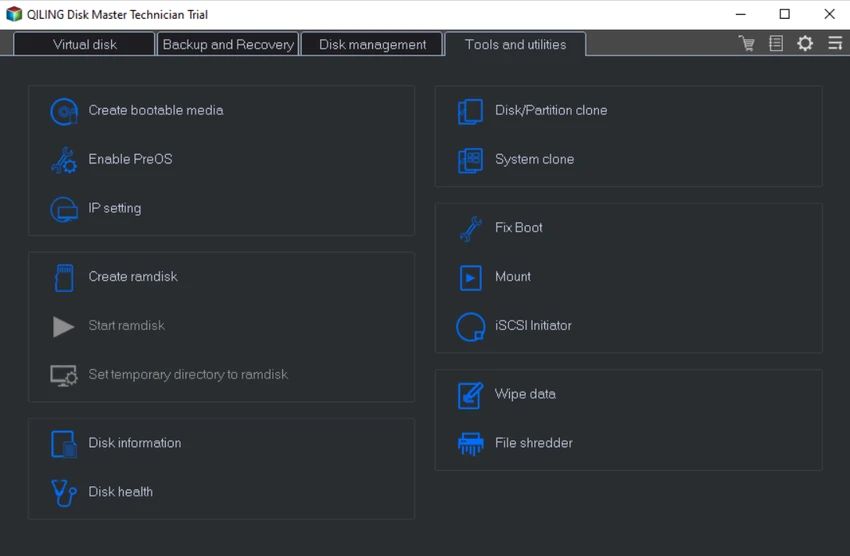
QILING Disk Master Technician provides a structured interface designed for IT professionals managing multiple systems or performing advanced maintenance tasks. From my perspective, the layout prioritizes operational efficiency, grouping tools into backup, recovery, and disk management categories.

While the software includes a wide range of advanced functions, the workflow remains relatively accessible thanks to guided backup wizards and one-click operations. However, its depth of functionality means it is best suited for users with some technical background or IT experience. The unattended backup feature is particularly useful in enterprise environments where automation and continuous protection are required.

Who Should Use QILING Disk Master Technician?

  • IT technicians and system administrators.
  • Enterprise IT departments managing multiple PCs.
  • Users performing OS deployment or migration tasks.
  • Professionals handling disaster recovery planning.
  • Users needing secure disk wiping and data protection.
  • Organizations managing backup automation at scale.

System Requirements

  • Windows XP / Vista / 7 / 8 / 8.1 / 10 / 11
  • CPU: 1 GHz or faster
  • RAM: 1 GB or higher
  • Storage: 1 GB free disk space
  • Supports HDD, SSD, RAID, NAS, USB, and memory cards

Conclusion

QILING Disk Master Technician is a highly capable and professional-grade toolkit designed for IT specialists who need complete control over backup, recovery, and disk management tasks. It combines powerful system imaging, secure backup automation, and advanced disk utilities in a single solution.

Pros & Cons

✓

Pros

  • All-in-one backup, recovery, and disk management suite
  • Supports full, incremental, and differential backups
  • Hot clone and OS migration tools included
  • AES 256-bit encryption for secure backups
  • Automated and unattended backup support
  • Disk wiping and secure deletion tools
  • Works with multiple storage types (HDD, SSD, NAS, RAID)
✕

Cons

  • Feature-rich interface may be complex for beginners
  • Primarily designed for technical and IT users
  • Requires some learning for advanced operations

Frequently Asked Questions

What is QILING Disk Master Technician used for?

It is used for system backup, disk imaging, OS migration, recovery, and advanced disk management tasks.

Does it support automated backups?

Yes. It supports scheduled and unattended backups running as a Windows service.

Can it migrate Windows to a new SSD?

Yes. It includes OS migration tools for transferring systems to SSD or larger drives.

Does it support secure data deletion?

Yes. It includes file shredding and disk wiping tools for secure data removal.

Is it suitable for IT professionals?

Yes. It is designed specifically for IT technicians, administrators, and enterprise environments.

What types of backups does it support?

It supports full, incremental, and differential backups, along with system imaging and file-level backups.

Recommended apps [Freeware]:
  • Simple IP Config 2.9.7 Simple IP Config logo a lightweight, portable tool for quickly changing Windows IP, DNS, and network settings
  • Stretchly 1.22.0 Stretchly logo reminds you to take breaks while working on your computer, promoting better health and productivity.
  • Daum PotPlayer 1.7.22979 Daum PotPlayer logo a free media player for Windows with broad format support, built-in codecs, subtitles, and customization
  • RapidRAW 1.5.9 RapidRAW logo a lightweight, GPU-accelerated RAW photo editor with advanced masking, non-destructive editing, and AI tools
  • AltAppSwitcher 0.95 AltAppSwitcher logo Switch between Windows applications with macOS-inspired shortcuts using a lightweight portable utility designed for faster multitasking.
  • HashMyFiles 2.51 HashMyFiles logo Calculate MD5 and SHA1 file hashes quickly with a lightweight utility for verifying file integrity and managing checksum data.
Recommended apps [Shareware]:
  • GiliSoft Exe Lock 12.0.0 GiliSoft Exe Lock logo Protect Windows applications with passwords and prevent unauthorized access using GiliSoft Exe Lock
  • Auslogics ChillMate 1.1.0.6 Auslogics ChillMate logo Monitor CPU and GPU temperature, optimize battery life, and reduce overheating with Auslogics ChillMate for Windows laptops
  • Actual Multiple Monitors 8.15.4 Actual Multiple Monitors logo multi-monitor setups with taskbars, window control, gaming tools, wallpapers, and desktop management features
  • Actual Window Menu 8.15.4 Actual Window Menu logo adds advanced commands like transparency, always-on-top, minimize to tray, and resize options to the Windows system menu
  • Chris-PC RAM Booster 7.26.0706 Chris-PC RAM Booster logo manages Windows memory usage, optimizes RAM performance, and helps improve application responsiveness
  • PerfectXL Explore 1.6.4 PerfectXL Explore logo analyze complex Excel models with visual maps, formula lists, and spreadsheet insights.