


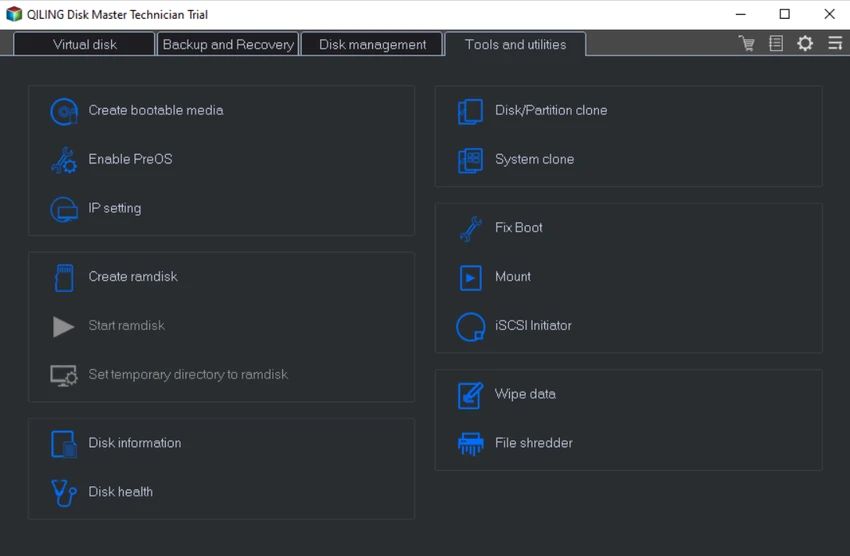

QILING Disk Master Technician is a comprehensive backup, recovery, and disk management toolkit designed for IT administrators, technicians, and advanced users. It combines system imaging, file backup, disk partition management, and operating system migration into a single professional-grade solution. The software is clearly positioned as an all-in-one technical toolkit for managing data protection and system recovery across multiple environments. It supports full, incremental, and differential backups, along with advanced features such as hot cloning and unattended backup execution.
In addition to backup functionality, it also includes disk health checking, secure data wiping, and OS migration tools, making it suitable for maintenance, deployment, and disaster recovery scenarios.
Features of QILING Disk Master Technician
- Full system backup and disk imaging for Windows systems.
- File-level backup and recovery with selective targeting.
- Incremental, differential, and full backup modes.
- One-click system backup for fast deployment.
- Unattended backup operation as a Windows service.
- AES 256-bit encryption with compression and password protection.
- File synchronization, including server-based support.
- Disk and partition management tools.
- OS migration to SSD or larger HDD.
- Hot clone support for live system duplication.
- Bare-metal system recovery for full system restoration.
- Disk health checking and maintenance utilities.
- Secure data wiping and file shredding.
- Backup scheduling (daily, weekly, monthly).
- Deduplication and storage optimization.
- Email notifications for backup tasks.
- GPT and UEFI boot support.
- Support for large and diverse storage devices (HDD, SSD, RAID, NAS).
Interface and Usability
QILING Disk Master Technician provides a structured interface designed for IT professionals managing multiple systems or performing advanced maintenance tasks. From my perspective, the layout prioritizes operational efficiency, grouping tools into backup, recovery, and disk management categories.
While the software includes a wide range of advanced functions, the workflow remains relatively accessible thanks to guided backup wizards and one-click operations. However, its depth of functionality means it is best suited for users with some technical background or IT experience. The unattended backup feature is particularly useful in enterprise environments where automation and continuous protection are required.
Who Should Use QILING Disk Master Technician?
- IT technicians and system administrators.
- Enterprise IT departments managing multiple PCs.
- Users performing OS deployment or migration tasks.
- Professionals handling disaster recovery planning.
- Users needing secure disk wiping and data protection.
- Organizations managing backup automation at scale.
System Requirements
- Windows XP / Vista / 7 / 8 / 8.1 / 10 / 11
- CPU: 1 GHz or faster
- RAM: 1 GB or higher
- Storage: 1 GB free disk space
- Supports HDD, SSD, RAID, NAS, USB, and memory cards
Conclusion
QILING Disk Master Technician is a highly capable and professional-grade toolkit designed for IT specialists who need complete control over backup, recovery, and disk management tasks. It combines powerful system imaging, secure backup automation, and advanced disk utilities in a single solution.


