Paradox Converter logo

Paradox Converter 4.86

  • User Rating:
    ★★★★★
    ★★★★★
    0.0 0Votes
  • Requirements:
    Windows
  • Version: 4.86
  • Latest updated: 1 week ago
  • License: Free Trial  
  • Publisher: HiBase Group
  • Size: 2.8 MB
× app stores

Paradox Converter is a specialized database conversion utility designed to transform legacy Paradox database files (DB) into a wide range of modern formats. The software supports exports to SQL databases, Excel spreadsheets, CSV files, XML documents, DBF databases, HTML pages, text files, and more. Built for users who need to migrate, archive, analyze, or integrate Paradox data into newer systems, Paradox Converter emphasizes automation, batch processing, and flexible conversion options without requiring external database drivers.

Features of Paradox Converter

Database Conversion

  • Convert Paradox DB files to DBF
  • Convert Paradox DB files to SQL
  • Convert Paradox DB files to XLS
  • Convert Paradox DB files to XLSX
  • Convert Paradox DB files to CSV
  • Convert Paradox DB files to XML
  • Convert Paradox DB files to TXT
  • Convert Paradox DB files to HTML
  • Export data for MySQL
  • Export data for SQL Server
  • Export data for Oracle databases

Batch Processing

  • Convert multiple databases simultaneously
  • Fully automated batch operations
  • Process dozens or hundreds of database files
  • Silent conversion workflow

Advanced Data Management

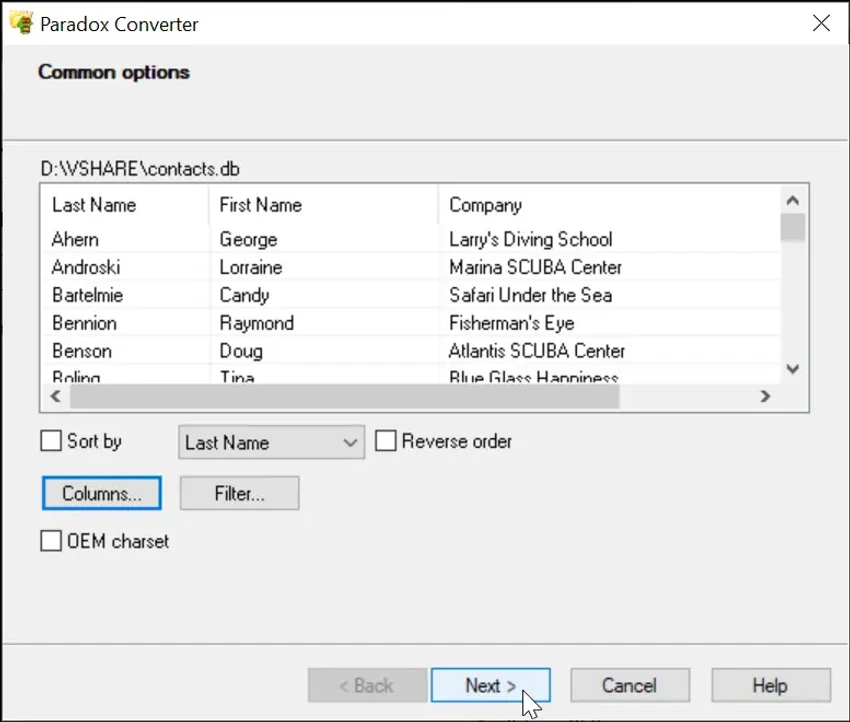
  • Flexible data sorting options
  • Custom presentation of converted data
  • Filtering capabilities for partial data exports
  • Selective data transfer during conversion

Automation & Integration

  • Full command-line support
  • Scheduled conversion tasks
  • Automated database migration workflows
  • Integration into existing administrative processes

Database Connectivity

  • No ODBC drivers required
  • No BDE (Borland Database Engine) required
  • Direct database conversion support

User Experience

Paradox Converter is designed for a specific audience: users who need to work with legacy Paradox databases and move their data into more modern formats. Its focused approach makes the conversion process straightforward and efficient.

The software's greatest strength is its automation capability. Instead of converting files one at a time, users can process large collections of Paradox databases in batch mode. This significantly reduces the effort required when handling archive migrations, database modernization projects, or large-scale data exports. The broad selection of output formats also increases flexibility. Whether users need spreadsheet-compatible formats such as XLS and XLSX, database-ready SQL exports, or universal formats like CSV and XML, the software covers most common migration requirements.

Command-line support is particularly valuable for IT administrators and database professionals who need recurring conversions or scheduled tasks. Combined with filtering and sorting options, the software can be adapted to more complex workflows than basic one-click conversion utilities. Another practical advantage is the lack of dependency on external drivers such as ODBC or BDE. This simplifies deployment and reduces compatibility concerns when working with older Paradox databases. Overall, Paradox Converter focuses on doing one task well: converting legacy database files quickly and reliably.

Conclusion

Paradox Converter provides a focused and efficient solution for converting legacy Paradox databases into modern formats. With support for SQL, Excel, CSV, XML, HTML, and DBF exports, along with batch processing and command-line automation, it simplifies database migration and archival projects.

Pros & Cons

Pros

  • Supports numerous export formats
  • Converts Paradox databases to modern formats
  • Batch processing capabilities
  • Full command-line support
  • Suitable for large-scale migrations
  • Flexible filtering and sorting options
  • No ODBC or BDE drivers required
  • Automated conversion workflows
  • Supports popular SQL database formats

Cons

  • Specialized tool primarily intended for Paradox databases
  • Limited usefulness for users without legacy database conversion needs
  • Advanced options may be unnecessary for simple conversions

Frequently Asked Questions

What is Paradox Converter?

Paradox Converter is a database conversion utility that transforms Paradox DB files into formats such as SQL, Excel, CSV, XML, DBF, TXT, and HTML.

Which output formats are supported?

The software supports DBF, SQL, XLS, XLSX, CSV, XML, TXT, and HTML formats.

Can Paradox Converter export data to SQL databases?

Yes. The software supports SQL exports for platforms including MySQL, SQL Server, and Oracle.

Does Paradox Converter support batch processing?

Yes. Multiple Paradox databases can be converted automatically in batch mode.

Is command-line automation available?

Yes. Full command-line support allows scheduled and automated database conversions.

Does the software require ODBC or BDE drivers?

No. Paradox Converter does not require external ODBC or BDE drivers to perform conversions.

Which Windows versions are supported?

The software supports Windows 7, Windows 8, Windows 10, and Windows 11.

Recommended apps [Freeware]:
  • FBackup 9.9.1044 FBackup logo a free Windows backup tool offering automatic backups, cloud support, encryption, and easy file recovery options
  • PC Timer 19.7 PC Timer logo a lightweight Windows tool to schedule shutdown, restart, logout, or lock actions with a simple timer or calendar-based scheduler
  • Windows 10 Debloater 3.0.3 Windows 10 Debloater logo customize Windows 10 by disabling unwanted features and generating PowerShell scripts
  • VSDC Free Video Editor 11.2.3.729 VSDC Free Video Editor logo a non-linear video editing tool for creating videos with effects, transitions, and multi-format support on Windows
  • Kali Linux 2026.2 Kali Linux logo a powerful penetration testing OS with tools for cybersecurity, digital forensics, and ethical hacking
  • Adobe Acrobat Reader DC 2026.001.21691 Adobe Acrobat Reader DC logo trusted PDF viewer for reading, printing, and annotating PDFs with strong security and cloud sync support
Recommended apps [Shareware]:
  • Kettler World Tours 3.0.4.20 Kettler World Tours logo Train indoors with real-world routes, GPS integration, and online racing using Kettler World Tours
  • Roboform 9.9.4.6 Roboform logo a secure password manager using AES-256 encryption, autofill, and cross-device sync for safer login management
  • ViewCompanion Pro 17.03.0.1203 ViewCompanion Pro logo View, convert, annotate, and compare PDF, DWF, CAD, and technical drawing files with powerful batch tools
  • Coolutils PDF Splitter 5.2.0.43 Coolutils PDF Splitter logo split PDF files into individual pages, custom page ranges, or chapters defined by bookmarks
  • ReclaiMe Build 6447 ReclaiMe logo easy-to-use Windows data recovery tool for hard drives, USB drives, RAID arrays, and memory cards
  • Karaosoft Karma 2026.6.26 Karaosoft Karma logo Manage karaoke shows using drag-and-drop rotation, triple display support, and smart search tools.