GSoft4U Music Collection logo

GSoft4U Music Collection 3.9.9.0

  • User Rating:
    ★★★★★
    ★★★★★
    0.0 ★ 0Votes
  • Requirements:
    Windows
  • Version: 3.9.9.0
  • Latest updated: 1 week ago
  • License: Freeware  
  • Publisher: GSoft4U
  • Size: 9 MB
× app stores

GSoft4U Music Collection is a free music cataloging application designed to help users organize large music libraries into searchable and well-structured databases. Instead of functioning as a music player, the software focuses on catalog management by allowing users to store detailed information about albums and tracks, making it easier to browse, search, and maintain growing music collections.

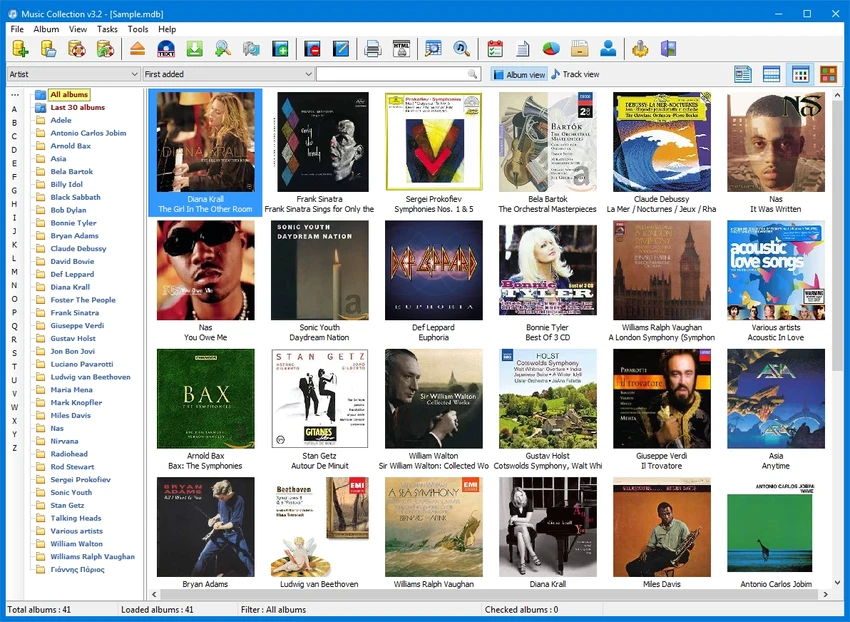
The application lets users create one or more music databases and organize albums using information such as artist, album title, genre, release date, record label, media format, and personal star ratings. Artists are automatically arranged alphabetically, making large collections easier to navigate. With an internet connection, users can retrieve additional album information to enrich their library, while audio folders can also be scanned to import album details from existing file tags.

GSoft4U Music Collection stores its databases in Microsoft Access format and includes several tools for managing collections efficiently. Users can search by artist, album title, barcode, catalog number, or even identify albums by inserting a CD into the computer. Additional features such as filtering, sorting, importing and exporting album data, printing collection information, and generating reports make it a practical solution for collectors who want to maintain an organized and searchable music archive.

Features of GSoft4U Music Collection

  • Organize music collections into searchable databases
  • Store album details including genre, format, release date, record label, and ratings
  • Manage multiple music collections
  • Alphabetically organize artists
  • Retrieve additional album information online
  • Scan folders for audio files and import metadata from file tags
  • Search by artist, album title, barcode, catalog number, or CD
  • Sort albums using multiple fields
  • Filter collections using various search criteria
  • Import and export album information
  • Print collection data
  • Generate collection reports
  • Database storage in Microsoft Access format

Interface and Usability

GSoft4U Music Collection provides a straightforward interface focused on organizing and browsing music libraries. Album information is presented in an easy-to-manage format, allowing users to quickly edit metadata, assign ratings, and categorize their collections. The alphabetical organization of artists helps simplify navigation, particularly for larger libraries.

Searching is flexible, with multiple methods available for locating albums, including artist names, album titles, barcode numbers, catalog numbers, and inserted CDs. Folder scanning and metadata importing also help reduce the amount of manual data entry required when adding existing music files. Combined with filtering and sorting tools, the application makes managing extensive music collections more efficient.

Who Should Use GSoft4U Music Collection?

  • Music collectors managing large libraries
  • Audiophiles organizing physical and digital albums
  • Users who want searchable music databases
  • Collectors maintaining detailed album records
  • Anyone looking to organize music by artist, genre, or release information
  • Users who need reporting and import/export capabilities

Conclusion

GSoft4U Music Collection is a practical solution for users who want to organize and maintain detailed music libraries instead of simply playing audio files. Its searchable database, flexible cataloging tools, metadata support, and reporting features make it well suited for collectors with growing digital or physical music collections. The ability to manage multiple databases and import information from file tags further improves its usefulness for organizing large archives.

Pros & Cons

✓

Pros

  • Free to use
  • Organizes music into searchable databases
  • Supports detailed album metadata
  • Multiple search and filtering options
  • Can retrieve album information online
  • Imports metadata from audio file tags
  • Supports printing, reporting, and data export
  • Allows multiple music collections
✕

Cons

  • Designed for catalog management rather than music playback
  • Requires an internet connection for online album information

Frequently Asked Questions

What is GSoft4U Music Collection used for?

GSoft4U Music Collection is designed to organize and catalog music collections by storing detailed album information in searchable databases.

Can GSoft4U Music Collection play music?

The software is primarily intended for managing and organizing music collections rather than serving as a dedicated media player.

How can I add albums to my collection?

Albums can be added manually, imported by scanning folders containing audio files, or identified using metadata from file tags. Additional album information can also be retrieved online when an internet connection is available.

Can I manage more than one music collection?

Yes. The software allows users to create and manage multiple music collection databases.

How can I search for albums?

You can search using artist names, album titles, barcode numbers, catalog numbers, or by inserting a CD into your computer. The software also provides sorting and filtering options to narrow search results.

Does GSoft4U Music Collection support exporting data?

Yes. The software supports importing and exporting album information, printing collection data, and generating reports for your music library.

Recommended apps [Freeware]:
  • All in One Runtimes 2.5.0 All in One Runtimes logo Package essential Windows runtime environment packages to improve software compatibility and system stability.
  • FastCopy 5.11.3 FastCopy logo a lightweight Windows tool for ultra-fast file copying, syncing, and error-resilient data transfer
  • Daum PotPlayer 1.7.22979 Daum PotPlayer logo a free media player for Windows with broad format support, built-in codecs, subtitles, and customization
  • QontrolPanel 1.18.2 QontrolPanel logo system tray audio tool for quickly switching output devices, managing inputs, and controlling app volume on Windows
  • Norton 360 Remover 26.6.11050.2580 Norton 360 Remover logo a utility that completely uninstalls Norton 360 security software, removing leftover files and settings
  • Foxit Reader 2026.1.2.36540 Foxit Reader logo Read, annotate, fill forms, and print PDF files with Foxit Reader, a lightweight and feature-rich PDF tool for Windows
Recommended apps [Shareware]:
  • Shield Antivirus 5.6.6 Shield Antivirus logo real-time protection against viruses, ransomware, spyware, and malware with scheduled scans and system tools
  • EventSentry Light 6.0.1.68 EventSentry Light logo Monitor servers, logs, and network devices, get real-time alerts and centralized system monitoring for IT environments.
  • Smart Game Booster 6.0.0.1164 Smart Game Booster logo Optimize Windows, monitor FPS and temperatures, and reduce lag with one click
  • FastKeys 6.07 FastKeys logo Windows automation tool for shortcuts, text expansion, mouse gestures, macros, and workflow automation
  • GiliSoft Movie DVD Creator 10.9 GiliSoft Movie DVD Creator logo Create DVD discs, ISO images, and VIDEO_TS folders on Windows with menus, chapters, subtitles, and basic editing tools
  • Perplexity 1.7.0 Perplexity logo Get AI-powered answers, summaries, and research help with source links using this modern search and productivity tool.