QILING Disk Master Technician logo

QILING Disk Master Technician 8.8 MB

  • Benutzerbewertung:
    ★★★★★
    ★★★★★
    0.0 0Votes
  • Anforderungen:
    Windows
  • Version: 8.8 MB
  • Zuletzt aktualisiert: vor 3 Wochen
  • Lizenz: Testversion  
  • Herausgeber: QILING Tech
  • Größe: 31 MB
× app stores

QILING Disk Master Technician is a comprehensive backup, recovery, and disk management toolkit designed for IT administrators, technicians, and advanced users. It combines system imaging, file backup, disk partition management, and operating system migration into a single professional-grade solution. The software is clearly positioned as an all-in-one technical toolkit for managing data protection and system recovery across multiple environments. It supports full, incremental, and differential backups, along with advanced features such as hot cloning and unattended backup execution.

In addition to backup functionality, it also includes disk health checking, secure data wiping, and OS migration tools, making it suitable for maintenance, deployment, and disaster recovery scenarios.

Features of QILING Disk Master Technician

  • Full system backup and disk imaging for Windows systems.
  • File-level backup and recovery with selective targeting.
  • Incremental, differential, and full backup modes.
  • One-click system backup for fast deployment.
  • Unattended backup operation as a Windows service.
  • AES 256-bit encryption with compression and password protection.
  • File synchronization, including server-based support.
  • Disk and partition management tools.
  • OS migration to SSD or larger HDD.
  • Hot clone support for live system duplication.
  • Bare-metal system recovery for full system restoration.
  • Disk health checking and maintenance utilities.
  • Secure data wiping and file shredding.
  • Backup scheduling (daily, weekly, monthly).
  • Deduplication and storage optimization.
  • Email notifications for backup tasks.
  • GPT and UEFI boot support.
  • Support for large and diverse storage devices (HDD, SSD, RAID, NAS).

Interface and Usability

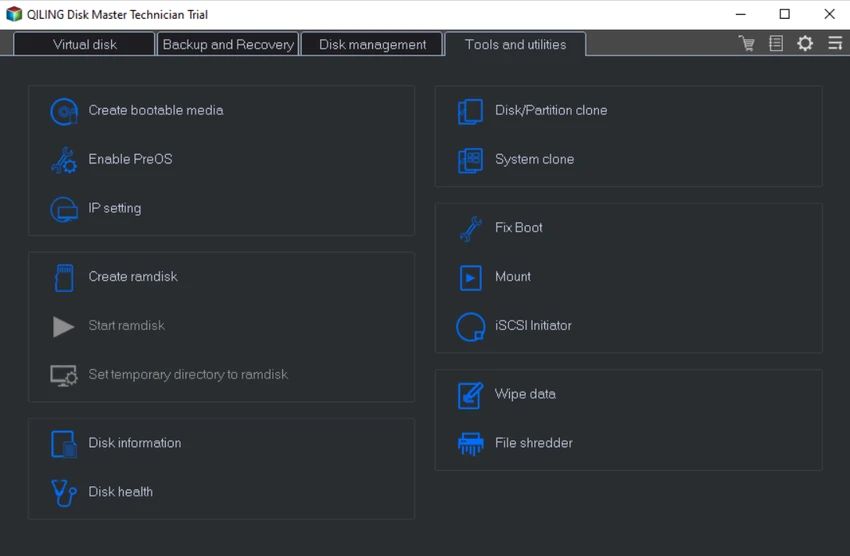
QILING Disk Master Technician provides a structured interface designed for IT professionals managing multiple systems or performing advanced maintenance tasks. From my perspective, the layout prioritizes operational efficiency, grouping tools into backup, recovery, and disk management categories.

While the software includes a wide range of advanced functions, the workflow remains relatively accessible thanks to guided backup wizards and one-click operations. However, its depth of functionality means it is best suited for users with some technical background or IT experience. The unattended backup feature is particularly useful in enterprise environments where automation and continuous protection are required.

Who Should Use QILING Disk Master Technician?

  • IT technicians and system administrators.
  • Enterprise IT departments managing multiple PCs.
  • Users performing OS deployment or migration tasks.
  • Professionals handling disaster recovery planning.
  • Users needing secure disk wiping and data protection.
  • Organizations managing backup automation at scale.

System Requirements

  • Windows XP / Vista / 7 / 8 / 8.1 / 10 / 11
  • CPU: 1 GHz or faster
  • RAM: 1 GB or higher
  • Storage: 1 GB free disk space
  • Supports HDD, SSD, RAID, NAS, USB, and memory cards

Conclusion

QILING Disk Master Technician is a highly capable and professional-grade toolkit designed for IT specialists who need complete control over backup, recovery, and disk management tasks. It combines powerful system imaging, secure backup automation, and advanced disk utilities in a single solution.

Vorteile & Nachteile

Vorteile

  • All-in-one backup, recovery, and disk management suite
  • Supports full, incremental, and differential backups
  • Hot clone and OS migration tools included
  • AES 256-bit encryption for secure backups
  • Automated and unattended backup support
  • Disk wiping and secure deletion tools
  • Works with multiple storage types (HDD, SSD, NAS, RAID)

Nachteile

  • Feature-rich interface may be complex for beginners
  • Primarily designed for technical and IT users
  • Requires some learning for advanced operations

Häufig gestellte Fragen

What is QILING Disk Master Technician used for?

It is used for system backup, disk imaging, OS migration, recovery, and advanced disk management tasks.

Does it support automated backups?

Yes. It supports scheduled and unattended backups running as a Windows service.

Can it migrate Windows to a new SSD?

Yes. It includes OS migration tools for transferring systems to SSD or larger drives.

Does it support secure data deletion?

Yes. It includes file shredding and disk wiping tools for secure data removal.

Is it suitable for IT professionals?

Yes. It is designed specifically for IT technicians, administrators, and enterprise environments.

What types of backups does it support?

It supports full, incremental, and differential backups, along with system imaging and file-level backups.

Empfohlene Apps [Freeware]:
  • Simple IP Config 2.9.7 Simple IP Config logo Ein leichtes, portables Tool zum schnellen Ändern von Windows-IP-, DNS- und Netzwerkeinstellungen
  • Stretchly 1.22.0 Stretchly logo Erinnert Sie daran, während der Arbeit am Computer Pausen einzulegen, was Ihre Gesundheit und Produktivität fördert.
  • Daum PotPlayer 1.7.22979 Daum PotPlayer logo Ein kostenloser Media-Player für Windows mit umfassender Formatunterstützung, integrierten Codecs, Untertiteln und Anpassungsmöglichkeiten.
  • RapidRAW 1.5.9 RapidRAW logo Ein leichtgewichtiger, GPU-beschleunigter RAW-Fotoeditor mit fortschrittlichen Maskierungs-, nicht-destruktiven Bearbeitungs- und KI-Werkzeugen
  • AltAppSwitcher 0.95 AltAppSwitcher logo Wechseln Sie mithilfe von macOS-inspirierten Tastenkombinationen zwischen Windows-Anwendungen – mit einem leichten, portablen Hilfsprogramm, das für schnelleres Multitasking entwickelt wurde.
  • HashMyFiles 2.51 HashMyFiles logo Berechnen Sie schnell MD5- und SHA1-Dateihashes mit einem leichtgewichtigen Hilfsprogramm zur Überprüfung der Dateiintegrität und zur Verwaltung von Prüfsummendaten.
Empfohlene Apps [Shareware]:
  • GiliSoft Exe Lock 12.0.0 GiliSoft Exe Lock logo Schützen Sie Windows-Anwendungen mit Passwörtern und verhindern Sie unbefugten Zugriff mit GiliSoft Exe Lock.
  • Auslogics ChillMate 1.1.0.6 Auslogics ChillMate logo Überwachen Sie die CPU- und GPU-Temperatur, optimieren Sie die Akkulaufzeit und reduzieren Sie Überhitzung mit Auslogics ChillMate für Windows-Laptops.
  • Actual Multiple Monitors 8.15.4 Actual Multiple Monitors logo multi-monitor setups with taskbars, window control, gaming tools, wallpapers, and desktop management features
  • Actual Window Menu 8.15.4 Actual Window Menu logo Fügt dem Windows-Systemmenü erweiterte Befehle wie Transparenz, Immer im Vordergrund, Minimieren in die Taskleiste und Größenänderungsoptionen hinzu.
  • Chris-PC RAM Booster 7.26.0706 Chris-PC RAM Booster logo Verwaltet die Windows-Speichernutzung, optimiert die RAM-Leistung und trägt zur Verbesserung der Anwendungsreaktionsfähigkeit bei.
  • PerfectXL Explore 1.6.4 PerfectXL Explore logo Analysieren Sie komplexe Excel-Modelle mit visuellen Darstellungen, Formellisten und Tabellenkalkulationsanalysen.