Sysinternals Suite logo

Sysinternals Suite 2026.6.17

  • User Rating:
    ★★★★★
    ★★★★★
    0.0 0Votes
  • Requirements:
    Windows
  • Version: 2026.6.17
  • Latest updated: 1 week ago
  • License: Freeware  
  • Publisher: Microsoft
  • Size: 184 MB
× app stores

Sysinternals Suite is a comprehensive toolkit designed for advanced Windows diagnostics, system monitoring, and troubleshooting. It includes dozens of specialized utilities that help users analyze processes, manage startup behavior, monitor file system activity, and investigate system performance issues.

Overview

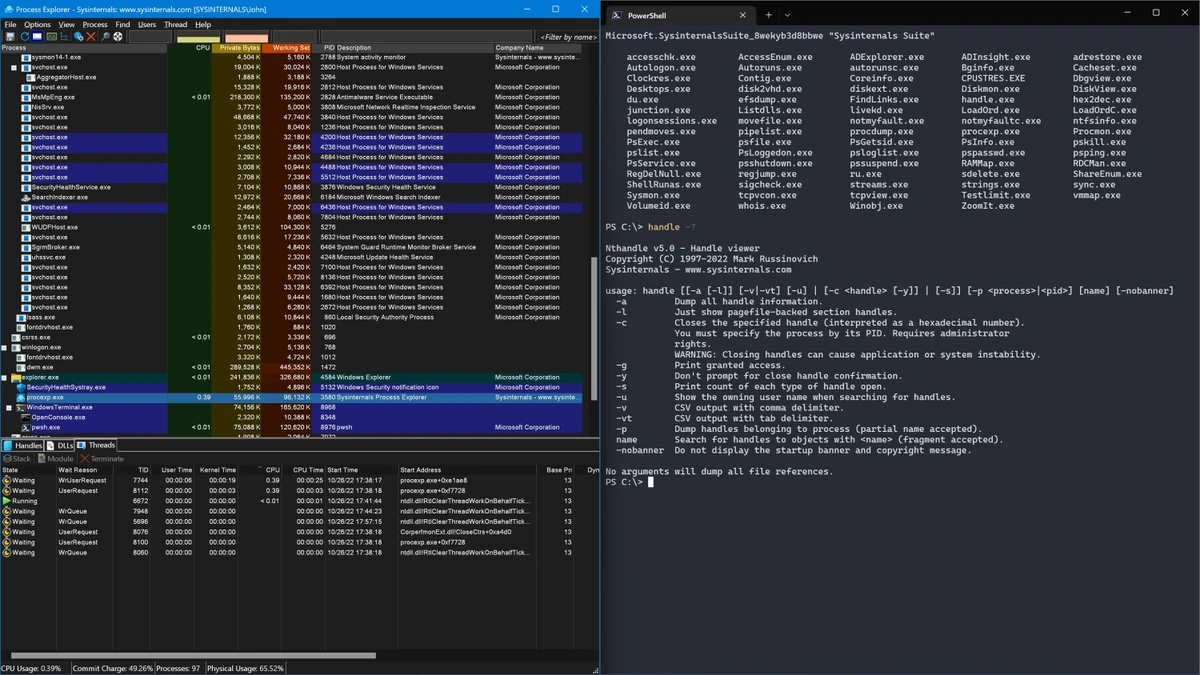
Sysinternals Suite is developed by Microsoft and is widely used by IT professionals, system administrators, and security analysts to gain deep visibility into Windows operating systems. Instead of being a single application, the suite is a collection of specialized utilities, each focused on a specific aspect of system behavior. Tools like Process Explorer and Process Monitor provide real-time insight into running processes and system activity, while Autoruns helps control startup programs. Other utilities focus on disk usage, network activity, registry analysis, and system internals.

The strength of the suite lies in its depth and precision, offering capabilities far beyond standard Windows administrative tools.

Features of Sysinternals Suite

  • Comprehensive system diagnostics and troubleshooting tools
  • Process monitoring and analysis (Process Explorer, Process Monitor)
  • Startup management and autorun control (Autoruns)
  • File system and disk activity monitoring
  • Network connection tracking (TCPView)
  • Registry and system configuration utilities
  • Security analysis tools for detecting suspicious activity
  • Remote system execution and administration tools (PsExec, PsTools suite)
  • Disk and storage utilities for performance and usage analysis
  • System information and hardware inspection tools
  • Lightweight, portable utilities (no installation required for most tools)
  • Wide coverage of Windows internals for deep system inspection

User Experience

Sysinternals Suite is not designed for casual users. Instead, it serves as a professional-grade toolkit for diagnosing and understanding Windows behavior at a deep level. Each utility has its own interface and purpose, which means users must learn how individual tools work. However, once familiar, the suite becomes extremely powerful for troubleshooting performance issues, identifying malware behavior, or managing complex system environments.

Conclusion

Sysinternals Suite is one of the most powerful Windows diagnostic toolkits available. Its collection of specialized utilities provides unmatched insight into system processes, performance, and security. If you work with Windows systems professionally or need advanced troubleshooting capabilities beyond built-in tools, Sysinternals Suite is an essential toolkit worth using.

Pros & Cons

Pros

  • Extremely powerful system diagnostics tools
  • Wide range of specialized utilities
  • Excellent for troubleshooting and security analysis
  • Portable and lightweight tools
  • Industry-standard toolkit for Windows professionals

Cons

  • Steep learning curve for beginners
  • Not a single unified interface
  • Highly technical and not user-friendly for casual users

Frequently Asked Questions

What is Sysinternals Suite used for?

It is used for advanced Windows system monitoring, troubleshooting, and performance analysis.

Is Sysinternals Suite beginner-friendly?

No, it is designed for advanced users and IT professionals.

Does Sysinternals Suite require installation?

Most tools are portable and can be run without installation.

Who develops Sysinternals Suite?

It is developed and maintained by Microsoft.

Recommended apps [Freeware]:
  • PortKiller 3.3.3 PortKiller logo a network utility for monitoring TCP ports, managing processes, and handling tunnels on Windows.
  • CheckMail 5.23.6 CheckMail logo a POP3 email checker that lets users preview, manage, and delete emails before downloading them
  • PDFgear 2.1.16 PDFgear logo a free PDF editor for Windows that supports editing, conversion, OCR, merging, signing, and AI-assisted PDF workflows
  • WifiInfoView 3.00 WifiInfoView logo scans nearby Wi-Fi networks and displays detailed technical information in real time
  • ToDoList 9.2.0 ToDoList logo customizable task manager for Windows with subtasks, reminders, notes, tracking, and project tools
  • Donemax Video Downloader 3.0 Donemax Video Downloader logo download videos and audio from 1,200+ websites for offline viewing and playback
Recommended apps [Shareware]:
  • Internet Download Manager (IDM) 6.43 Build 2 Internet Download Manager (IDM) logo boosts download speeds up to 5x, schedules downloads, and supports all major browsers and protocols
  • Adobe Premiere Pro 2026 Adobe Premiere Pro logo professional 4K video editor with advanced audio, color, and motion graphics tools.
  • Net Monitor for Employees Professional 6.6.6 Net Monitor for Employees Professional logo track screen activity, usage, and productivity in business environments.
  • ON1 Resize AI 2026.4 ON1 Resize AI logo advanced AI upscaling technology to enlarge photos up to 10x while preserving detail, sharpness, and print quality
  • Coolutils PDF Splitter Pro 6.1.0.85/57 Coolutils PDF Splitter Pro logo Split large PDF files by keywords, page breaks, or document patterns with Coolutils PDF Splitter Pro for Windows.
  • Start11 2.72 Start11 logo Windows customization tool that restores classic Start Menu styles and enhances taskbar functionality on Windows 10 and 11