HWMonitor logo

HWMonitor 1.64

  • User Rating:
    ★★★★★
    ★★★★★
    0.0 0Votes
  • Requirements:
    Windows
  • Version: 1.64
  • Latest updated: 2 days ago
  • License: Freeware  
  • Publisher: CPUID
  • Size: 3 MB
×

HWMonitor is a lightweight hardware monitoring utility developed by CPUID. It is designed to give users real-time visibility into key PC health metrics such as temperatures, voltages, and fan speeds. Whether you are troubleshooting performance issues or simply keeping an eye on system stability, HWMonitor provides a straightforward way to access critical sensor data.

Overview

HWMonitor focuses on reading data directly from the most common hardware sensor chips found in modern PCs. It supports CPU on-die thermal sensors, GPU temperature readings, hard drive temperatures via S.M.A.R.T., and system fan speeds. The software is designed for Windows systems and presents hardware statistics in a simple, readable interface. It is especially useful for users who want a quick snapshot of system health without complex configuration.

Features of HWMonitor

  • Real-time monitoring of CPU, GPU, memory, and system temperatures
  • Reads voltages, power usage, and fan speeds
  • Supports a wide range of hardware sensor chips (ITE, Winbond, etc.)
  • Hard drive temperature monitoring via S.M.A.R.T.
  • GPU temperature tracking for modern graphics cards
  • Logging capability for later performance analysis
  • Optional alerts when values exceed defined thresholds
  • Clean interface with easy-to-read sensor layout
  • Multi-language support
  • Compatibility with various motherboard and hardware manufacturers

User Experience

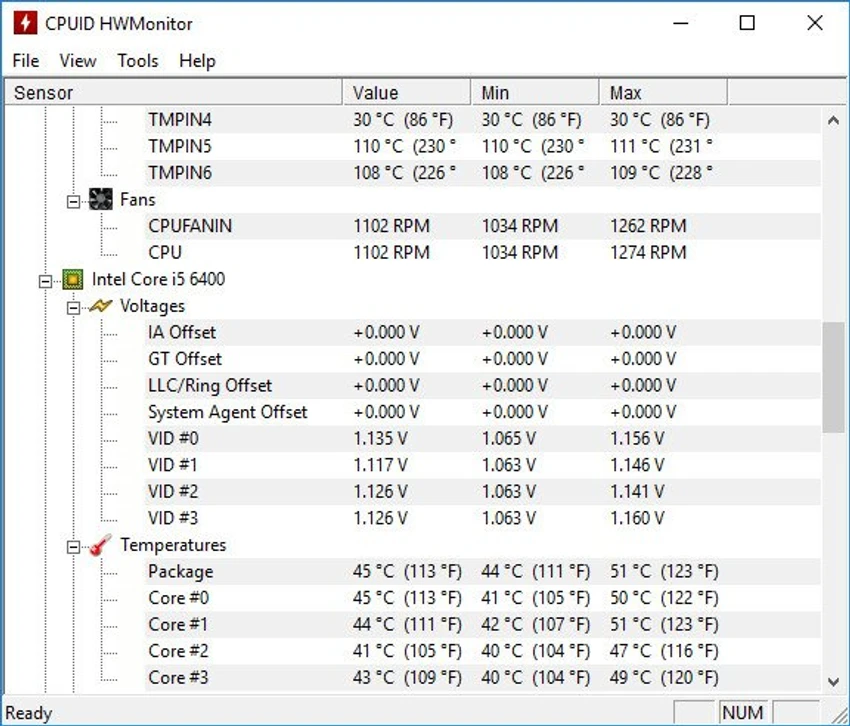
Using HWMonitor feels straightforward from the moment it launches. The interface is minimal and data-focused, making it easy to scan system readings without navigating complex menus. All sensor information is displayed in a structured list, which is helpful for both casual users and more technical audiences. Because it updates readings in real time, it works well for monitoring system behavior during gaming, rendering, or troubleshooting overheating issues. However, the simplicity also means there are limited customization and advanced analytics features compared to more complex monitoring tools.

Who Should Use HWMonitor?

HWMonitor is ideal for:

  • PC users who want to monitor system temperatures and fan speeds
  • Gamers checking hardware performance under load
  • Technicians diagnosing hardware-related issues
  • Anyone who wants a simple system health overview without advanced setup

Conclusion

HWMonitor is a reliable and easy-to-use hardware monitoring tool that focuses on essential system metrics. It avoids unnecessary complexity and delivers clear, real-time information about your PC’s health. If you need a simple yet effective way to track temperatures, voltages, and fan activity, HWMonitor is a solid choice worth installing.

Pros & Cons

Pros

    • Real-time hardware monitoring
    • Supports a wide range of sensors and devices
    • Simple and easy-to-read interface
    • Includes logging and alert features

Cons

    • Limited advanced analysis tools
    • No detailed customization options mentioned in the data
    • Focuses mainly on monitoring, not optimization

Frequently Asked Questions

What is HWMonitor used for?

HWMonitor is used to monitor hardware sensors such as CPU temperature, GPU temperature, voltages, and fan speeds in real time.

Is HWMonitor free to use?

Yes, HWMonitor is available as a free system monitoring tool.

Can HWMonitor monitor GPU temperature?

Yes, it supports GPU temperature monitoring for most modern graphics cards.

Does HWMonitor require installation?

The provided data does not specify installation requirements in detail, but it is distributed as a Windows-compatible application.

Can HWMonitor help with overheating issues?

Yes, it helps users identify overheating components by displaying real-time temperature readings from system hardware.

Recommended apps [Freeware]:
  • Trillian 6.6 Build 15 Trillian logo all-in-one chat software designed to simplify online communication
  • Simple IP Config 2.9.7 Simple IP Config logo a lightweight, portable tool for quickly changing Windows IP, DNS, and network settings
  • IObit Driver Booster 13.4.0.234 IObit Driver Booster logo updates outdated drivers automatically to boost system stability and gaming performance.
  • DirPrintOK 7.61 DirPrintOK logo fast and portable tool to print or export directory contents in XLS, HTML, CSV, or TXT formats.
  • StaxRip 2.52.4 StaxRip logo powerful Windows GUI for video/audio encoding using FFmpeg, x265, AviSynth+, VapourSynth, and more.
  • Stretchly 1.21.0 Stretchly logo reminds you to take breaks while working on your computer, promoting better health and productivity.
Recommended apps [Shareware]:
  • Audio Transcoder 2.12.24 Audio Transcoder logo all-in-one audio converter and CD ripper supporting MP3, FLAC, AAC, WMA, and more
  • Adobe After Effects 2026 Adobe After Effects logo advanced motion graphics, visual effects, compositing, and animation tools for creators.
  • Screenpresso 2.2.13 Screenpresso logo a versatile screen capture and video recording tool with editing and annotation features.
  • Wondershare PDFelement Professional 12.1.23 Wondershare PDFelement Professional logo a PDF editor for editing, converting, signing, and managing documents easily.
  • DBConvert Studio 4.3.1 DBConvert Studio logo simplifies database migration and synchronization across multiple database platforms.
  • COAA PlanePlotter 6.7.5.9 COAA PlanePlotter logo a Windows tool that decodes live aircraft data like ADS-B and ACARS and displays real-time radar-style tracking