VirtualBox logo

VirtualBox 7.2.12

  • User Rating:
    ★★★★★
    ★★★★★
    0.0 ★ 0Votes
  • Requirements:
    Windows
  • Version: 7.2.12
  • Latest updated: 3 weeks ago
  • License: Freeware  
  • Publisher: Oracle
  • Size: 170 MB
× app stores

VirtualBox is a free, open-source virtualization platform that allows you to run multiple operating systems simultaneously on a single computer. Whether you're testing software, experimenting with a different operating system, or creating isolated development environments, VirtualBox provides a powerful yet accessible solution for creating and managing virtual machines (VMs).

Designed for desktop, server, and embedded use, VirtualBox supports a wide variety of guest operating systems while offering features commonly found in enterprise virtualization software. Its modular architecture, cross-platform compatibility, and extensive customization options make it a popular choice among developers, IT professionals, students, and technology enthusiasts.

The software also supports the VirtualBox Extension Pack, which adds additional functionality such as enhanced USB device support and other advanced capabilities.

Key Features of VirtualBox

  • Free and open-source virtualization platform
  • Run multiple operating systems simultaneously
  • Cross-platform virtualization
  • Modular architecture
  • Client/server design
  • Multiple management interfaces
  • Command-line management
  • Software Development Kit (SDK)
  • Virtual machine configuration stored in XML
  • Portable virtual machine definitions
  • Guest Additions for Windows and Linux
  • Improved guest performance
  • Seamless mouse pointer integration
  • Dynamic screen resolution support
  • Shared folders between host and guest
  • Virtual USB controllers
  • USB device support for virtual machines
  • Remote Desktop Protocol (RDP) support
  • Virtual machines can function as RDP servers
  • USB over RDP support
  • Compatible with desktop, server, and embedded environments
  • Extension Pack available for additional features

Interface and Usability

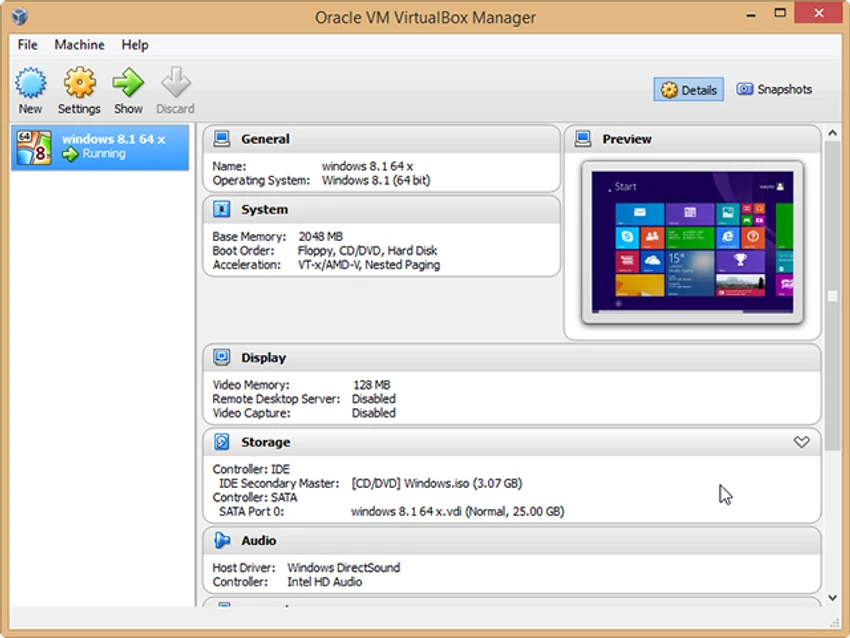
VirtualBox offers a clean management interface that makes creating and organizing virtual machines relatively straightforward. New virtual machines can be configured through step-by-step setup dialogs, while experienced users can fine-tune hardware allocation, storage, networking, and system settings in greater detail. Once Guest Additions are installed inside supported guest operating systems, the overall experience improves noticeably. Mouse integration becomes seamless, screen resolution adjusts dynamically, and shared folders simplify file transfers between the host and guest systems.

For advanced users, VirtualBox also supports command-line management and automation, making it suitable for development environments, testing workflows, and scripted deployments.

Performance

VirtualBox delivers solid virtualization performance for a wide range of workloads, particularly on systems equipped with modern multi-core processors and hardware virtualization support.

Guest operating systems generally run smoothly when allocated sufficient CPU cores and memory. Features such as Guest Additions help improve responsiveness, graphics integration, and usability inside virtual machines. As with any virtualization platform, overall performance depends on the host computer's hardware resources and the number of virtual machines running simultaneously.

Who Should Use VirtualBox?

  • Software developers
  • IT administrators
  • System engineers
  • Students learning operating systems
  • Cybersecurity professionals
  • QA and software testers
  • Linux enthusiasts
  • Users testing new operating systems
  • Anyone needing isolated virtual environments

Conclusion

VirtualBox continues to be one of the most capable free virtualization solutions available today. It combines enterprise-grade functionality with an approachable interface, allowing users to create and manage virtual machines for development, testing, education, and everyday computing tasks. Features such as Guest Additions, shared folders, XML-based virtual machine configurations, USB virtualization, and Remote Desktop support make it suitable for both personal and professional use. The optional Extension Pack further expands its capabilities for users with more advanced requirements.

Pros & Cons

✓

Pros

  • Completely free and open source
  • Supports multiple operating systems
  • Cross-platform compatibility
  • Easy virtual machine management
  • Guest Additions improve usability
  • Shared folders for file exchange
  • XML-based virtual machine configuration
  • Command-line and SDK support
  • Remote Desktop support
  • USB device virtualization
  • Large user community and extensive documentation
✕

Cons

  • Some advanced functionality requires the Extension Pack
  • Performance depends on available system resources
  • Initial virtualization setup may be challenging for beginners
  • Advanced networking options require some technical knowledge

Frequently Asked Questions

What is VirtualBox used for?

VirtualBox is virtualization software that allows you to run multiple operating systems simultaneously on a single physical computer by creating virtual machines.

Is VirtualBox free?

Yes. VirtualBox is free and open-source virtualization software. An optional VirtualBox Extension Pack is available to provide additional functionality beyond the core installation.

Which operating systems can VirtualBox run?

VirtualBox supports a wide range of guest operating systems, including various versions of Windows, Linux, and other supported operating systems, provided your host hardware meets the necessary requirements.

What are Guest Additions in VirtualBox?

Guest Additions are optional software components installed inside supported guest operating systems. They improve integration by enabling features such as seamless mouse movement, dynamic screen resizing, and shared folders.

Can VirtualBox share files between the host and guest operating systems?

Yes. VirtualBox supports shared folders, allowing selected directories on the host computer to be accessed from within supported virtual machines.

Does VirtualBox support Remote Desktop access?

Yes. VirtualBox supports the Remote Desktop Protocol (RDP), allowing virtual machines to function as remote desktop servers. It also supports USB over RDP, enabling compatible USB devices connected to an RDP client to be accessed from within the virtual machine.

Recommended apps [Freeware]:
  • Garmin Express 7.29.0.0 Garmin Express logo manage Garmin GPS devices with map updates, backups, software updates, and device registration
  • Far Manager 3.0 Build 6699 Far Manager logo Manage files efficiently with Far Manager's fast text-based interface, plugins, and archive support
  • VidCoder 12.23 VidCoder logo Convert, encode, and rip DVDs and Blu-rays with VidCoder, a powerful open-source video transcoding tool for Windows
  • Mp3tag 3.35.1 Mp3tag logo Edit, organize, and manage audio tags easily with Mp3tag. Supports MP3, FLAC, M4A, WMA, and online tag lookup
  • Wappalyzer 6.12.4 Wappalyzer logo Identify website technologies, CMS platforms, frameworks, analytics tools, and services with a powerful browser-based technology detector.
  • DNSCrypt-Proxy 2.1.17 DNSCrypt-Proxy logo Encrypt DNS traffic, monitor queries, filter unwanted domains, and improve online privacy with this powerful command-line security utility.
Recommended apps [Shareware]:
  • DBConvert Studio 4.3.1 DBConvert Studio logo simplifies database migration and synchronization across multiple database platforms.
  • Bulk Image Downloader 6.64 Bulk Image Downloader logo Download full-size images and videos from galleries, forums, and image hosts with Bulk Image Downloader
  • XYplorer 28.30.1400 XYplorer logo a fast, portable Windows file manager with tabbed browsing, dual-pane support, scripting, and advanced file management tools
  • Axialis IconVectors 1.70 Axialis IconVectors logo a lightweight SVG icon editor for developers, featuring live code previews, vector editing tools, and workflow integration
  • PrintFab 3.0.7 PrintFab logo advanced printer drivers, RIP functionality, color management, and ink optimization for high-quality printing
  • PanoramaStudio 4.2.0 PanoramaStudio logo Create seamless panoramic images with automatic photo stitching, editing tools, and export options for web, print, and presentations.